

Create: Ballast Mod pour Minecraft 1.21.1
Ajoute un nouveau bloc superposable qui a plus de masse à chaque couche ajoutée. Utile pour équilibrer vos constructions aéronautiques !
- téléchargements
- 3 téléchargements
- vues
- 19 vues
- Mis à jour
- Mis à jour 03.10.2026
- 1.21.1
 NeoForge
- Client et serveur
À propos du mod Create: Ballast
This is an addon for Create: Aeronautics, you won't find much use for it without that mod.
Adds Ballast Stones, a dense, layerable block that has more mass with each added layer. Useful for ballancing your aeronautics builds!
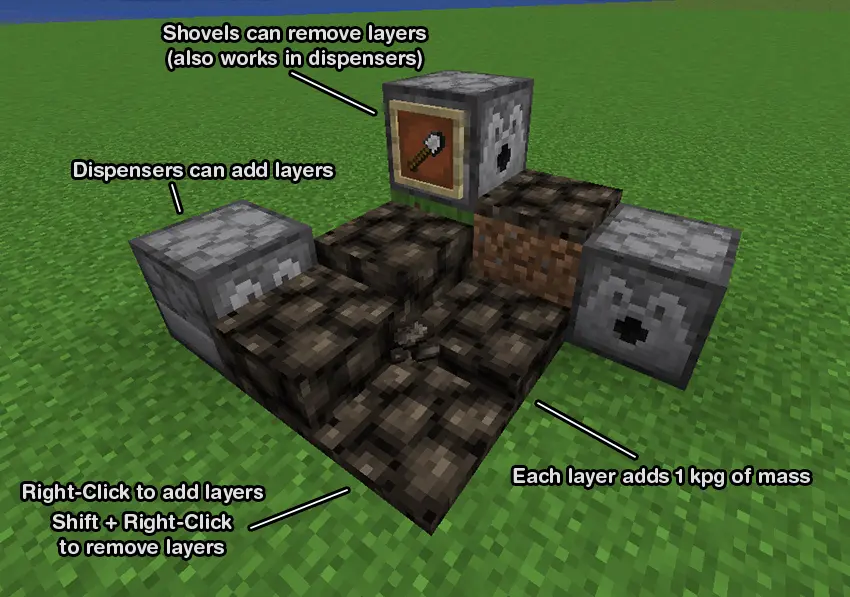
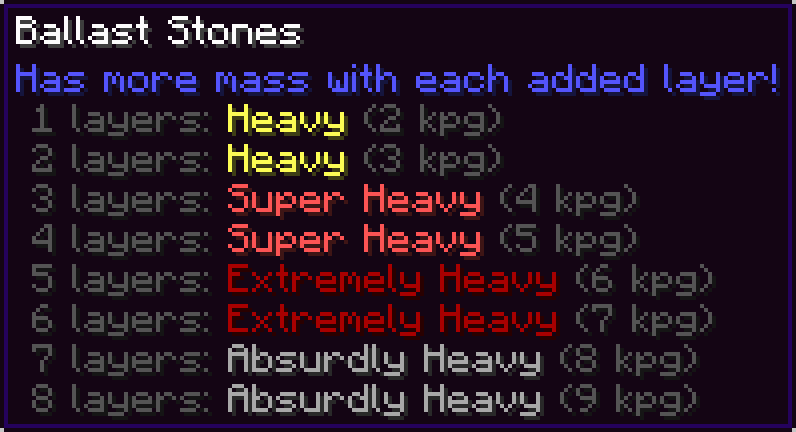
Right-click to add a new layer. Shift + Right-Click with ballast or an empty hand to remove a layer. Right-Clicking with a shovel can also remove a layer.
Dispensers can add layers, and remove layers with a shovel.
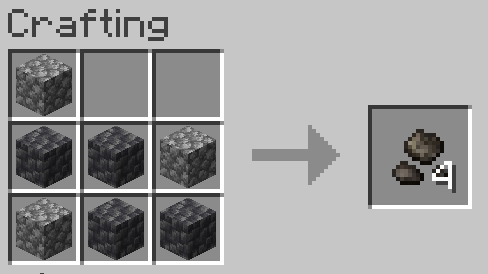
Crafted with 7 of any type of cobblestones (shapeless)
Q: What is ballast?
A: Ballast is dense material used as a weight to provide stability to a ship or hot air balloon. Ships today use water as ballast, but historically large stones known as ballast stones were used.
Q: Why would I want this mod?
A: Ships and airships in Create: Aeronautics can be tricky to ballance, especially since the heaviest blocks in the mod are only 4 kpg. This mod allows you to easily ballance the weight distribution on your ship without needing to place dozens of metal blocks all over your ship and ruining its aesthetic.
Q: Can you add water tank ballast?
A: Create: Aeronautics already plans to add weight for filled water tanks in an upcoming update. To maintain compatability when that update is released, I won't be adding it to this mod.
Q: When removing a layer of ballast stones using a dispenser, the ballast stones item is placed into the dispenser's inventory which can cause it to be placed again. How can I make sure layers are removed consistently?
A: You can have a hopper or pipe with a filtering setup remove the ballast stones from the dispenser but not the shovel. Or you can fill every slot in the hopper with shovels and the ballast stones will just drop on the ground instead of being placed into the dispenser, and you can use a hopper beneath the ballast stones to collect it.

Attribution
Textures were modified from https://github.com/malcolmriley/unused-textures

Comment installer Create: Ballast
With Millida Launcher
Install Millida Launcher
The launcher is free: download it at millida.net/launcher and sign in with any nickname.
Click “Install” on this page
The launcher opens and installs the mod for Minecraft 1.21.1 on NeoForge automatically.
Launch the game
A profile with it appears in the launcher: click “Play”.
Manually
Install NeoForge
The loader must match the game version of the mod file, for example Minecraft 1.21.1. After installing it, a separate profile appears in your launcher.
Download the file for your version
In the version list above, pick the file ballastmod-0.1.1.jar (30 KB) for your game version.
Put it in the mods folder
The folder is inside .minecraft (Windows: %appdata%\.minecraft\mods). If it does not exist, create it.
Launch the loader profile
Open “Mods” in the main menu: Create: Ballast should be in the list.
On a server
A server on NeoForge
The mod only works on a server with the same loader and game version, for example 1.21.1.
File goes into the server’s mods folder
Stop the server, put the mod file into the mods folder and start the server again.
Use the “To server” button
On Millida Hosting, the button at the top of the page uploads the file to your server and restarts it for you.
Minecraft 1.21.1 runs on Java 21: with a different Java version the game may close right after launch.
Versions
Avec dépendances
| Minecraft | Loader | Fichier | Date | Actions |
|---|---|---|---|---|
| 1.21.1 | NeoForge | 1.21.129.7 Ko 3 | ||
| 1.21.1 | NeoForge | 1.21.129.5 Ko | ||
| 1.21.1 | NeoForge | 1.21.129.1 Ko |
FAQ
Which Minecraft versions does Create: Ballast work on?
Only Minecraft 1.21.1: there are no files for other versions.
Is Create: Ballast for Forge or Fabric?
Only for NeoForge: 1.21.1. There are no files for Forge or Fabric: a mod for another loader will not start.
Does Create: Ballast need other mods?
The author lists no required dependencies: the NeoForge loader is enough.
Does Create: Ballast work on a server?
Yes. Create: Ballast works both in singleplayer and on a server.
Which Java does Create: Ballast need?
Minecraft 1.21.1 runs on Java 21. If the game closes right after launch, the usual cause is the wrong Java version in the profile settings.
Where can I download Create: Ballast safely?
On this page: the file ballastmod-0.1.1.jar (30 KB) is stored on Millida’s server, with no link shorteners. SHA-1 checksum: dc7a83667104c1307e40de01468f0deb6702b400.
Avis
Soyez le premier à noter Create: Ballast


