
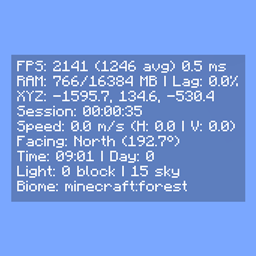
Compact F3 Plus Mod pour Minecraft 1.20.1, 1.21.1
un mod qui remplace le F3 vanilla par une superposition de HUD propre et minimaliste.
 Fabric
 Quilt
Quilt NeoForge
 Forge
ForgeCompact F3 Plus
A minimal, fully customizable HUD overlay for NeoForge, Forge and Fabric that replaces the vanilla F3 debug screen with a clean, readable interface.
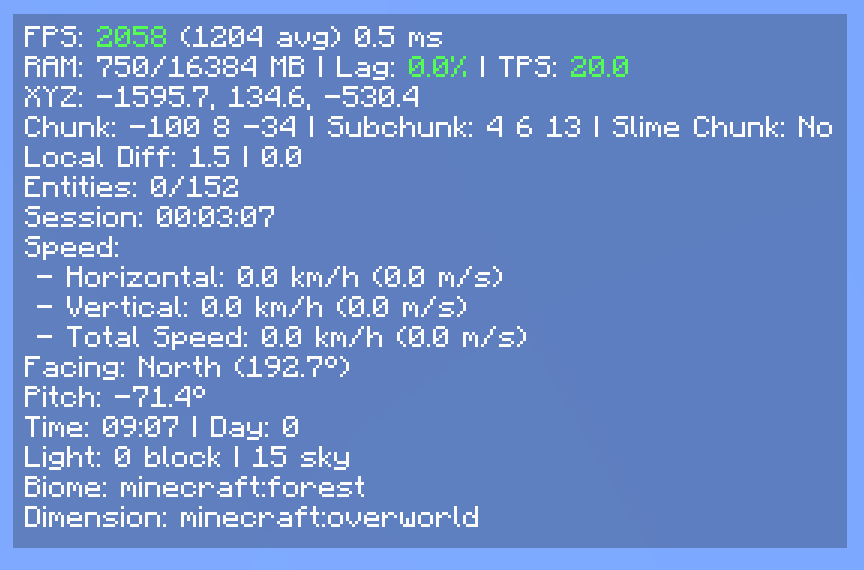
Modes
- Replace F3 (default): F3 opens the compact HUD instead of the vanilla debug screen.
- Standalone: Keep vanilla F3 intact and toggle the HUD separately via F8 (rebindable in Controls).
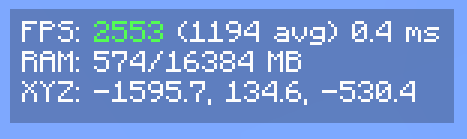
HUD Elements
- FPS - current, average and 1% low, with dynamic color indicators based on thresholds
- RAM usage
- Lag meter - stutter rate monitor for diagnosing frame drops
- Server TPS
- GPU and CPU in use
- XYZ coordinates
- Matching Nether / Overworld coordinates
- Network ping
- Facing direction: cardinal + axis + pitch
- Biome and dimension
- Block and sky light levels
- Local difficulty
- Session timer
- In-game time and day counter
- Slime chunk indicator
- Horizontal and vertical movement speed
- Item durability
- Currently playing music track
- Rendered entity count
- Dropped items in sight
- Crop growth progress
- Targeted block, fluid, and entity
- Blockstate properties of the targeted block
Configuration
Every element can be individually toggled. The HUD can be anchored to any screen corner with adjustable X and Y offsets.
Settings are saved to
config/compactf3plus-client.toml (NeoForge, Forge)
config/compactf3plus.json (Fabric)
and accessible via Mod Menu (Fabric) or the NeoForge / Forge mod list.
Credits
- username65735 - original Compact F3 and open-source release
Comment installer Compact F3 Plus
With Millida Launcher
Install Millida Launcher
The launcher is free: download it at millida.net/launcher and sign in with any nickname.
Click “Install” on this page
The launcher opens and installs the mod for Minecraft 1.20.1–1.21.1 on Fabric, Forge, NeoForge or Quilt automatically.
Launch the game
A profile with it appears in the launcher: click “Play”.
Manually
Install Fabric, Forge, NeoForge or Quilt
The loader must match the game version of the mod file, for example Minecraft 1.21.1. After installing it, a separate profile appears in your launcher.
Download the file for your version
In the version list above, pick the file compactf3plus-1.1.6.1-fabric-1.21.1.jar (37 KB) for your game version and loader.
Put it in the mods folder
The folder is inside .minecraft (Windows: %appdata%\.minecraft\mods). If it does not exist, create it.
Launch the loader profile
Open “Mods” in the main menu: Compact F3 Plus should be in the list.
Minecraft 1.21.1 runs on Java 21: with a different Java version the game may close right after launch.
Versions
Avec dépendances
| Minecraft | Loader | Fichier | Date | Actions |
|---|---|---|---|---|
| 1.21.1 | Fabric, Quilt | 1.1.6.1 for Fabric 1.21.137.3 Ko 1 | ||
| 1.21.1 | NeoForge | 1.1.6.1 for NeoForge 1.21.142.4 Ko 1 | ||
| 1.20.1 | Forge | 1.1.6 for Forge 1.20.141.7 Ko |
Avis
Soyez le premier à noter Compact F3 Plus


