
Classic Bars Mod pour Minecraft 1.20.1, 1.12.2
Remplace les icônes de statut par des barres de statut
- téléchargements
- 3 téléchargements
- vues
- 30 vues
- Mis à jour
- Mis à jour 18.10.2026
- 1.12.2 — 1.20.1
 Forge
Forge
À propos du mod Classic Bars
Classic Bar
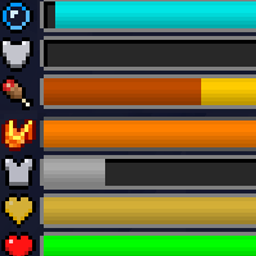
Classic Bar is a mod that replaces the traditional icon rows in the HUD with icon bars. With this comes some new benefits.
Features
Instead of adding additional rows when health/absorption is over 20, the bars always stay the same length whether you have 20 health or 200 health.
This mod is capable of showing armor over 20 where the vanilla caps the display, but it will cap out at 30 unless the Armor Attribute cap is removed with another mod.
This makes mods such as Overloaded Armor bar, Colorful Health bar, and Armor Toughness Bar irrelevant as this mod already has those improvements baked in.
In addition, this mod also shows the saturation and exhaustion levels of the player, which are normally not seen
Note: this feature does NOT need Appleskin/Core, this mod has 0 dependencies
(running around)
And when holding a food item, it's potential saturation/hunger will be overlaid on top of the hunger bar
Armor toughness is shown above the hunger bar (only vanilla diamond armor by default has it but other mods may add stronger armor.)
Mod Compat
Random Things (Lava Waders/Fire Charm)
Lava Waders Bauble (The name)
Tough as Nails (Thirst Bar)
Botania (Tiara)
Iblis (Hunger amounts)
Clientside only.
Need a custom mod for a reasonable fee? Just want to chat? Have a complex issue needing additional discussion? Join the Discord:
Want to help support this mod and others? donate to my Patreon in the link below
Comment installer Classic Bars
With Millida Launcher
Install Millida Launcher
The launcher is free: download it at millida.net/launcher and sign in with any nickname.
Click “Install” on this page
The launcher opens and installs the mod for Minecraft 1.12.2–1.20.1 on Forge automatically.
Launch the game
A profile with it appears in the launcher: click “Play”.
Manually
Install Forge
The loader must match the game version of the mod file, for example Minecraft 1.20.1. After installing it, a separate profile appears in your launcher.
Download the file for your version
In the version list above, pick the file classicbar-1.20.1-6.jar (121 KB) for your game version.
Put it in the mods folder
The folder is inside .minecraft (Windows: %appdata%\.minecraft\mods). If it does not exist, create it.
Launch the loader profile
Open “Mods” in the main menu: Classic Bars should be in the list.
Minecraft 1.20.1 runs on Java 17: with a different Java version the game may close right after launch.
Versions
Avec dépendances
| Minecraft | Loader | Fichier | Date | Actions |
|---|---|---|---|---|
| 1.20.1 | Forge | classicbar-1.20.1-6.jar121 Ko 3 | ||
| 1.16.5 | — | classicbar-4.1.0-1.16.5.jar62.6 Ko | ||
| 1.12.2 | — | classicbar-0.3.0.jar75.4 Ko |
FAQ
Which Minecraft versions does Classic Bars work on?
There are files for 1.20.1, 1.16.5, 1.12.2. The newest is 1.20.1.
Is Classic Bars for Forge or Fabric?
Only for Forge: 1.20.1. There are no files for Fabric or NeoForge: a mod for another loader will not start.
Does Classic Bars need other mods?
The author lists no required dependencies: the Forge loader is enough.
Which Java does Classic Bars need?
Minecraft 1.20.1 runs on Java 17. If the game closes right after launch, the usual cause is the wrong Java version in the profile settings.
Where can I download Classic Bars safely?
On this page: the file classicbar-1.20.1-6.jar (121 KB) is stored on Millida’s server, with no link shorteners. SHA-1 checksum: dbf7de079dfdaaefae2fe4c52d14542b0bdee142.
Avis
Soyez le premier à noter Classic Bars


