

BetterNether Mod pour Minecraft 1.20.1, 1.21.1
Plus de biomes, plus de créatures, plus d'outils pour la dimension enflammée
- téléchargements
- 70 téléchargements
- vues
- 337 vues
- Mis à jour
- Mis à jour 26.10.2026
- 1.19 — 26.3
 Fabric
- Client et serveur
À propos du mod BetterNether
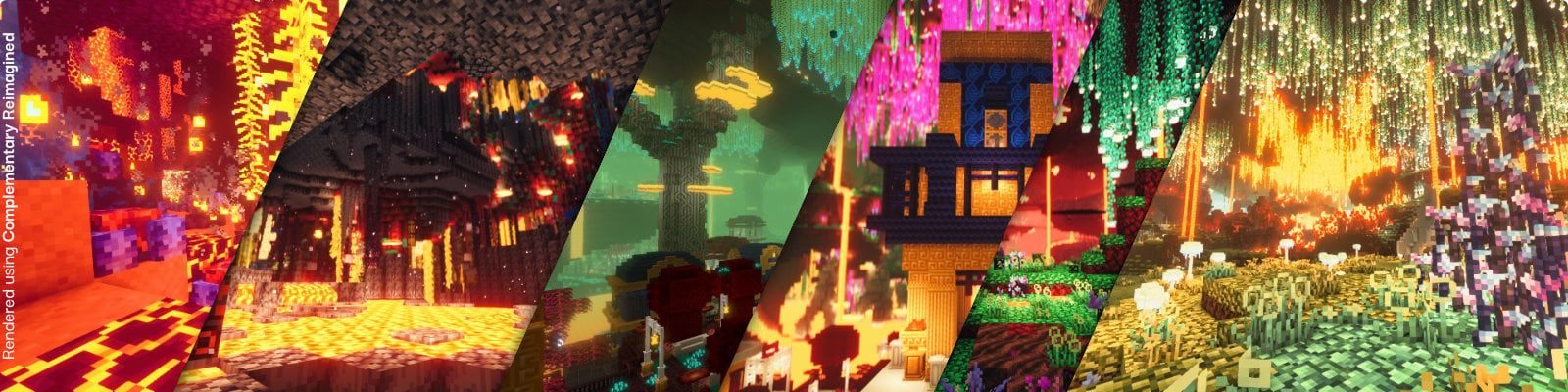
With BetterNether your adventures in the fiery dimension will be even more exciting. The mod adds new biomes, plants and materials to the Nether. Among them there are new challenging monsters like the Naga, or dark dungeons where the creatures of Nether have taken over. Your new tools will bring unique improvements that will help you to survive. There are a lot of unique new blocks for builders together with variants of old familiar vanilla blocks.

Main Features
- Dozens of new plants for the Nether
- New Nether-mobs
- New unique biomes
- Vertical and volumetric biome system (supporting other mods and datapacks)
- Many new materials, recipes, food, tools and items
- Ability to farm some materials using plant farms and mob farms
- Many Nether structures, including big and rare Nether Cities
- Integrations with other popular mods.

What others are saying
You might also like
BetterEnd New Biomes, mysterious rituals and Mobs for your End

Wunderreich Advanced Vanilla-Like Mechanics and Tools
Comment installer BetterNether
With Millida Launcher
Install Millida Launcher
The launcher is free: download it at millida.net/launcher and sign in with any nickname.
Click “Install” on this page
The launcher opens and installs the mod for Minecraft 1.19–26.3 on Fabric automatically, together with its dependencies: Dependency, Fabric API, World Weaver.
Launch the game
A profile with it appears in the launcher: click “Play”.
Manually
Install Fabric
The loader must match the game version of the mod file, for example Minecraft 26.3. After installing it, a separate profile appears in your launcher.
Download the file for your version
In the version list above, pick the file better-nether-26.302.0.jar (24 MB) for your game version.
Put it in the mods folder
The folder is inside .minecraft (Windows: %appdata%\.minecraft\mods). If it does not exist, create it. Required dependencies go there too: Dependency, Fabric API, World Weaver.
Launch the loader profile
Open “Mods” in the main menu: BetterNether should be in the list.
On a server
A server on Fabric
The mod only works on a server with the same loader and game version, for example 26.3.
File goes into the server’s mods folder
Stop the server, put the mod file into the mods folder and start the server again.
Use the “To server” button
On Millida Hosting, the button at the top of the page uploads the file to your server and restarts it for you.
Versions
Avec dépendances
| Minecraft | Loader | Fichier | Date | Actions |
|---|---|---|---|---|
| 26.3 | Fabric | 26.323.7 Mo 1 | ||
| 1.21.8 | Fabric | 1.21.822.5 Mo 3 | ||
| 26.1.2 | Fabric | 26.1.226.6 Mo 4 | ||
| 26.2 | Fabric | 26.226.7 Mo 4 | ||
| 1.20.1 | Fabric | 1.20.121.9 Mo 4 | ||
| 26.3 | Fabric | 26.326.7 Mo 22 | ||
| 26.3 | Fabric | 26.326.7 Mo 10 | ||
| 26.2 | Fabric | 26.226.7 Mo 4 |
Ce qu'il faut pour l'exécuter
- WTHITfacultatif
- Dependencyobligatoire
- Fabric APIobligatoire
- World Weaverobligatoire
- EMIfacultatif
- Mod Menufacultatif
- Roughly Enough Items (REI)facultatif
- Just Enough Items (JEI)facultatif
FAQ
Which Minecraft versions does BetterNether work on?
There are files for 1.19–26.3, 15 versions in total. The newest is 26.3.
Is BetterNether for Forge or Fabric?
Only for Fabric: 1.19–26.3. There are no files for Forge or NeoForge: a mod for another loader will not start.
What does BetterNether need to work?
Required: Dependency, Fabric API, World Weaver. Without them the mod will not start: dependencies go into the same mods folder. Optional: WTHIT, EMI, Mod Menu, Roughly Enough Items (REI) and 1 more.
Does BetterNether work on a server?
Yes. BetterNether works both in singleplayer and on a server.
Where can I download BetterNether safely?
On this page: the file better-nether-26.302.0.jar (24 MB) is stored on Millida’s server, with no link shorteners. SHA-1 checksum: 9b8c3b0f9b1885c6ac1ca3aac0b36ddb469f08b4.
Avis
Soyez le premier à noter BetterNether


