

AutoMessage Mod pour Minecraft 1.20.1, 1.21.1
En gros, AutoMessage permet d'ajouter une option pour créer et envoyer des messages automatiquement de manière rapide et efficace.
 Fabric
 NeoForge
 Forge
ForgeÀ propos du mod AutoMessage

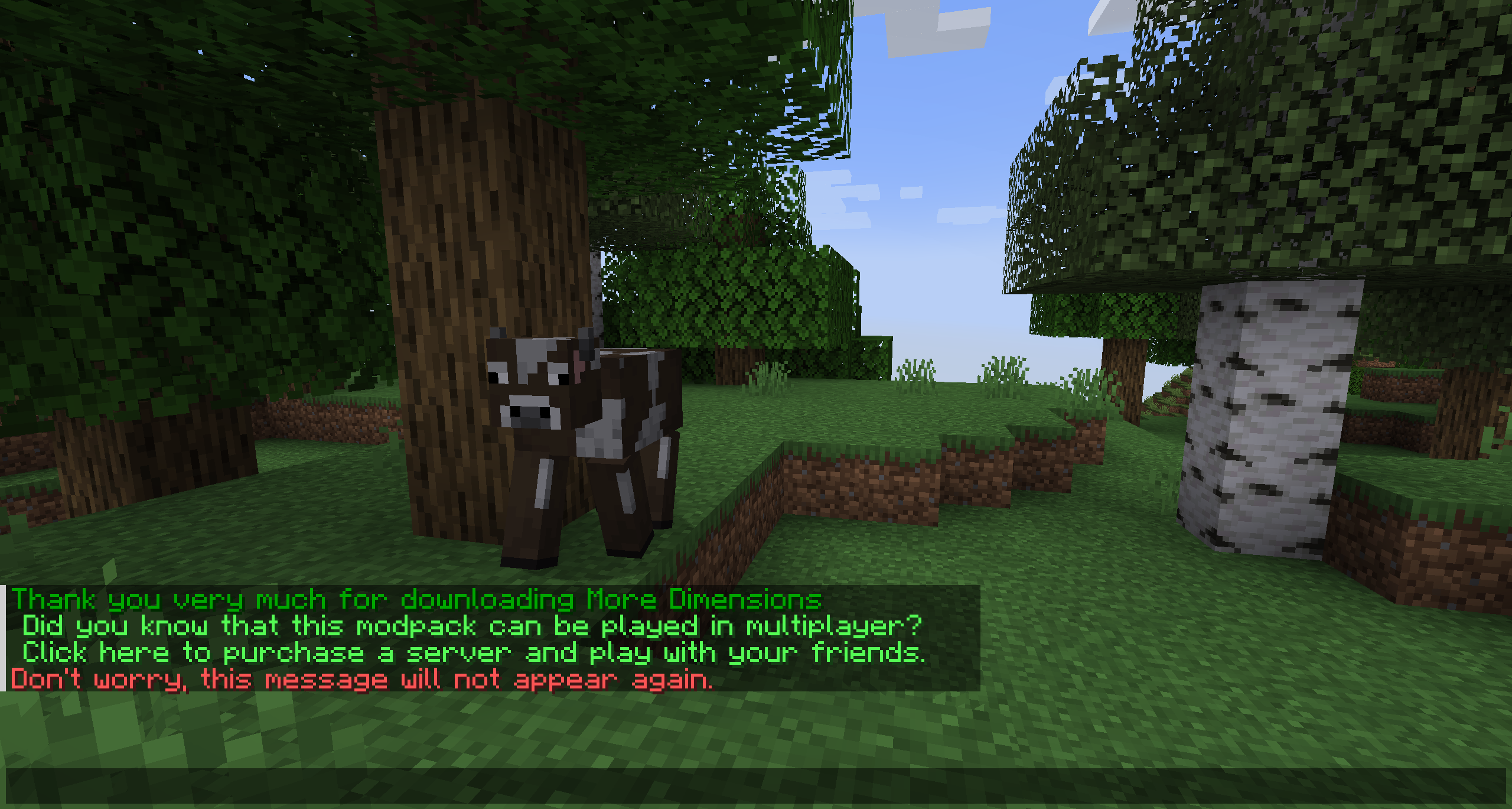
Basically, AutoMessage is responsible for adding an option to create and send messages automatically in a fast and effective way. To do this, it adds a configuration file that can be modified from start to finish by the player, and that, for example, will allow them to promote their social networks when starting a game, or simply thank them for downloading.

Do you need a server to play with your friends?
For exceptional server hosting services, look no further than BisectHosting. Of course, you can install all the mods or modpacks you want, and their support team is always available to help you.
With the code "Lupin" you will get a 25% discount! Click here!

This mod is intended for two types of people, either the creators of mod packs, or on the other hand, the creators of multiplayer servers, since it is in charge of facilitating the sending of automatic messages.
These messages are easily customizable, through the new file that will be generated when running the mod for the first time. Among other things, you can choose the text, the color or even the links.

How do you configure this mod?
An example would be the following:
["AutoMessage Configuration"]
- MESSAGES = ["§2Thank you very much for downloading AutoMessage§f", "§cDon't worry, this message will not appear again.§f"]
- INTERVALS = [5, 5]
- LIMITS = [1, 1]
- LINKS = ["https://www.curseforge.com/members/lupiiin_/projects", "https://www.curseforge.com/members/lupiiin_/projects"]
- HARD LIMITS = [1, 1]

A more detailed explanation...
- The message is obviously the text that will appear on the screen, several texts can be put on different lines, separated by commas, and opening and closing with quotation marks. Color codes and guide: https://www.codewizardshq.com/minecraft-color-codes/
- The interval is the time that will pass until the message is displayed on the screen.
- The soft limit is the number of times the message will be sent in a single session.
- The hard limit is the number of times the message will be sent for the lifetime of the player.
- In links, a link should be placed if necessary.
An Important Note...
The values you place in your Soft Limit and Hard Limit configuration are tracked individually for separate worlds. For Modpack Developers, this means your message will be repeated if the player creates a new world. For Server Owners, this means that resetting your world will cause the messages to be repeated as well.
Does it work on servers?
### Sure! Remember that the best way to play with mods and friends is with BisectHosting, and by clicking on this link you can get a 25% discount.
Can this mod be used in modpacks?
### Of course! As long as it is published only on Modrinth or CurseForge. Uploading it to any other platform would be violating our rights and is not allowed at all.
However, we are really grateful if you consider adding it to your Modrinth or CurseForge modpack. If you need any small changes or have any questions, contact us!

Comment installer AutoMessage
With Millida Launcher
Install Millida Launcher
The launcher is free: download it at millida.net/launcher and sign in with any nickname.
Click “Install” on this page
The launcher opens and installs the mod for Minecraft 1.20.1–26.1.2 on Fabric, Forge or NeoForge automatically, together with its dependencies: MonoLib.
Launch the game
A profile with it appears in the launcher: click “Play”.
Manually
Install Fabric, Forge or NeoForge
The loader must match the game version of the mod file, for example Minecraft 26.1.2. After installing it, a separate profile appears in your launcher.
Download the file for your version
In the version list above, pick the file automessage-merged-26.1.2-3.0.0.jar (310 KB) for your game version and loader.
Put it in the mods folder
The folder is inside .minecraft (Windows: %appdata%\.minecraft\mods). If it does not exist, create it. Required dependencies go there too: MonoLib.
Launch the loader profile
Open “Mods” in the main menu: AutoMessage should be in the list.
On a server
A server on Fabric, Forge or NeoForge
The mod only works on a server with the same loader and game version, for example 26.1.2.
File goes into the server’s mods folder
Stop the server, put the mod file into the mods folder and start the server again.
Use the “To server” button
On Millida Hosting, the button at the top of the page uploads the file to your server and restarts it for you.
Versions
Avec dépendances
| Minecraft | Loader | Fichier | Date | Actions |
|---|---|---|---|---|
| 26.1.2 | Fabric, NeoForge | 26.1.2310 Ko | ||
| 1.21.10 | Fabric, NeoForge | 1.21.10139 Ko | ||
| 1.21.8 | Fabric, NeoForge | 1.21.8139 Ko | ||
| 1.21.8 | Forge | 1.21.858.8 Ko | ||
| 1.21.1 | Fabric, NeoForge | 1.21.1137 Ko | ||
| 1.21.1 | Forge | 1.21.158.2 Ko | ||
| 1.20.1 | Fabric, Forge | 1.20.1137 Ko | ||
| 1.21.1 | Fabric, NeoForge | 1.21.170.9 Ko |
Ce qu'il faut pour l'exécuter
- MonoLibobligatoire
FAQ
Is AutoMessage for Forge or Fabric?
There are files for Fabric: 1.20.1–26.1.2, for Forge: 1.20.1–1.21.8 and for NeoForge: 1.21–26.1.2.
Where can I download AutoMessage safely?
On this page: the file automessage-merged-26.1.2-3.0.0.jar (310 KB) is stored on Millida’s server, with no link shorteners. SHA-1 checksum: e6a60eced5346c17a2f44c168576870f3f26a287.
Avis
Soyez le premier à noter AutoMessage


