
 Fabric
À propos du mod Auto Workstations (Fabric)
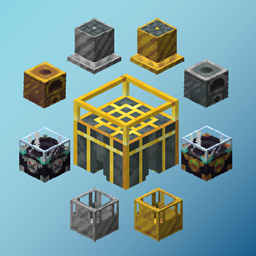
Auto Workstations adds automated versions for many of the vanilla workstations, including:
- Crafting Table
- Furnace
- Enchanting Table
- Brewing Stand
- Grindstone
Although some of these may already seem automatable, such as the furnace, this mod allows the automation of XP collection from them. Each auto workstation in the mod has an iron and gold version, with the gold version being faster.
Currently looking for developers to help out with the mod! Please join the Discord and drop a message if interested.
Auto Furnaces allows the automated extraction of XP. Empty glass bottles can be inserted, and they will be filled with XP to product bottles o' enchanting.
Auto Enchanting Tables can store XP, this works like a player's XP bar where each level takes longer to fill then the last. Bottles o' enchanting can be inserted and emptied into these and will output empty glass bottles.
This block can suck up nearby XP orbs and bottle them up like the Auto Furnace. The gold version has a larger range than the iron one.
Auto Anvils can store XP, this works like a player's XP bar where each level takes longer to fill then the last. Bottles o' enchanting can be inserted and emptied into these and will output empty glass bottles.
Hoppers can be attached to these to allow complete automation.
An auto grindstone has also been added! The grindstone can be used to repair tools using other tools, or remove enchantments for bottled XP.
Other automated workstations are also planned:
- Smiting table
This mod is in beta, if you find an issue please contact me on discord via my Discord server or by emailing billyg270@gmail.com
The conveyor belts shown in some GIFs are from: here
Sponsor:
https://bisecthosting.com/BillBodkin
Comment installer Auto Workstations (Fabric)
With Millida Launcher
Install Millida Launcher
The launcher is free: download it at millida.net/launcher and sign in with any nickname.
Click “Install” on this page
The launcher opens and installs the mod for Minecraft 1.21.4 on Fabric automatically.
Launch the game
A profile with it appears in the launcher: click “Play”.
Manually
Install Fabric
The loader must match the game version of the mod file, for example Minecraft 1.21.4. After installing it, a separate profile appears in your launcher.
Download the file for your version
In the version list above, pick the file auto-workstations-[MC1.21.4]-1.0-rc.28.jar (459 KB) for your game version.
Put it in the mods folder
The folder is inside .minecraft (Windows: %appdata%\.minecraft\mods). If it does not exist, create it.
Launch the loader profile
Open “Mods” in the main menu: Auto Workstations (Fabric) should be in the list.
Minecraft 1.21.4 runs on Java 21: with a different Java version the game may close right after launch.
Versions
Avec dépendances
| Minecraft | Loader | Fichier | Date | Actions |
|---|---|---|---|---|
| 1.21.4 | Fabric | auto-workstations-[MC1.21.4]-1.0-rc.28.jar459 Ko |
FAQ
Which Minecraft versions does Auto Workstations (Fabric) work on?
Only Minecraft 1.21.4: there are no files for other versions.
Is Auto Workstations (Fabric) for Forge or Fabric?
Only for Fabric: 1.21.4. There are no files for Forge or NeoForge: a mod for another loader will not start.
Does Auto Workstations (Fabric) need other mods?
The author lists no required dependencies: the Fabric loader is enough.
Which Java does Auto Workstations (Fabric) need?
Minecraft 1.21.4 runs on Java 21. If the game closes right after launch, the usual cause is the wrong Java version in the profile settings.
Where can I download Auto Workstations (Fabric) safely?
On this page: the file auto-workstations-[MC1.21.4]-1.0-rc.28.jar (459 KB) is stored on Millida’s server, with no link shorteners. SHA-1 checksum: dc3903f541cd5b10052070ed24ca0513df6196d1.
Avis
Soyez le premier à noter Auto Workstations (Fabric)


