
 NeoForge
 Forge
AE2 MEGA Things
This mod is an add-on for AE2 Things and MEGA Cells, introducing a variety of DISK Cells without type restrictions.
Features
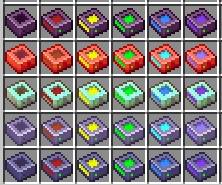
DISK Cells
Item DISKs
Storage capacities range from 1M to 256M, consuming 1 byte per item.
Fluid DISKs
Capacities range from 1k to 256M, consuming 1 byte per 1000mB.
Chemical DISKs (Integration with Applied Mekanistics)
Adds DISKs for chemicals with capacities from 1k to 256M, consuming 1 byte per 1000mB.
Common Characteristics
All DISKs incur a storage loss of 24 bytes per 1kiB, similar to AE2 Things.
Command Enhancements
This mod modifies the AE2 Things /ae2things recover command, introducing the following new feature:
- You can specify the third argument to explicitly select the DISK used for recovery.
License
This mod is licensed under the GNU Lesser General Public License v3.0 (LGPL-3.0). The source code, as well as detailed license information for dependencies and assets, is available in the GitHub Repository.
Dependencies and Assets
This mod relies on various projects such as Applied-Energistics-2, MEGACells, Applied-Mekanistics, and AE2Things-Forge, all of which have their own licenses. Textures in this mod are derived from these projects and are licensed under CC BY-NC-SA 3.0 or compatible terms. For a complete list of dependencies, assets, and their licenses, please refer to the repository.
Comment installer AE2 MEGA Things
With Millida Launcher
Install Millida Launcher
The launcher is free: download it at millida.net/launcher and sign in with any nickname.
Click “Install” on this page
The launcher opens and installs the mod for Minecraft 1.18.2–1.21.1 on Forge or NeoForge automatically.
Launch the game
A profile with it appears in the launcher: click “Play”.
Manually
Install Forge or NeoForge
The loader must match the game version of the mod file, for example Minecraft 1.21.1. After installing it, a separate profile appears in your launcher.
Download the file for your version
In the version list above, pick the file AE2MEGAThings-1.21.1-2.0.4.jar (180 KB) for your game version and loader.
Put it in the mods folder
The folder is inside .minecraft (Windows: %appdata%\.minecraft\mods). If it does not exist, create it.
Launch the loader profile
Open “Mods” in the main menu: AE2 MEGA Things should be in the list.
Minecraft 1.21.1 runs on Java 21: with a different Java version the game may close right after launch.
Versions
Avec dépendances
| Minecraft | Loader | Fichier | Date | Actions |
|---|---|---|---|---|
| 1.18.2 | Forge | [1.18.2] v0.8.4378 Ko | ||
| 1.21.1 | NeoForge | [1.21.1] v2.0.4180 Ko 2 |
Avis
Soyez le premier à noter AE2 MEGA Things


