

Additional Banners Mod pour Minecraft 1.12.2, 26.3
Toute une nouvelle gamme de motifs de bannières, pour embellir votre monde !
 NeoForge
 Fabric
 Forge
ForgeÀ propos du mod Additional Banners
This mod adds a variety of banner patterns to the game. These patterns draw inspiration from various game mechanics and provide a great way for players to spice up their builds.
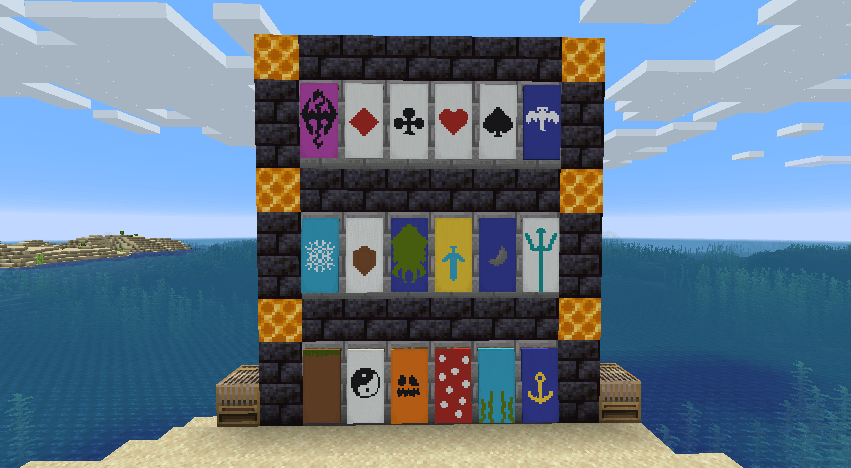
Usage Guide
All banner patterns in this mod are applied using the new Loom block. To select the pattern you must have the pattern item for the specific design you want to use. Most of the patterns in this mod can be crafted however some are exclusive trades from the wandering merchant.
Craftable Patterns
The craftable patterns from this mod are crafted with paper, shears, and a stencil item in a shapeless recipe. The shears will not be consumed by the recipe however they will take some durability damage.
- Grass - Grass Block
- Pumpkin - Jack o' Lantern
- Mushroom - Red Mushroom
- Kelp - Kelp
- Anchor - Any boat.
- Snowflake - Snowball
- Shield - Shield
- Squid - Ink Sac
- Sword - Golden Sword
- Trident - Trident
- Dragon - Dragon Breath
- Phantom - Phantom Membrane
Wandering Villager Trades
Some patterns can only be obtained from the wandering trader.
- Diamonds
- Clubs
- Hearts
- Spades
- Moon
- Balance
Like the mod and want to support me?
- Follow me on Twitter
- Join my Discord
- Pledge on Patreon
- Check out my website
This project is sponsored by Nodecraft. Use code DARKHAX for 30% off your first month of service!
Comment installer Additional Banners
With Millida Launcher
Install Millida Launcher
The launcher is free: download it at millida.net/launcher and sign in with any nickname.
Click “Install” on this page
The launcher opens and installs the mod for Minecraft 1.12.2–26.3 on Fabric, Forge or NeoForge automatically, together with its dependencies: Fabric API, Bookshelf.
Launch the game
A profile with it appears in the launcher: click “Play”.
Manually
Install Fabric, Forge or NeoForge
The loader must match the game version of the mod file, for example Minecraft 26.3. After installing it, a separate profile appears in your launcher.
Download the file for your version
In the version list above, pick the file AdditionalBanners-neoforge-MC26.3-26.3.0.1.jar (103 KB) for your game version and loader.
Put it in the mods folder
The folder is inside .minecraft (Windows: %appdata%\.minecraft\mods). If it does not exist, create it. Required dependencies go there too: Fabric API, Bookshelf.
Launch the loader profile
Open “Mods” in the main menu: Additional Banners should be in the list.
On a server
A server on Fabric, Forge or NeoForge
The mod only works on a server with the same loader and game version, for example 26.3.
File goes into the server’s mods folder
Stop the server, put the mod file into the mods folder and start the server again.
Use the “To server” button
On Millida Hosting, the button at the top of the page uploads the file to your server and restarts it for you.
Versions
Avec dépendances
| Minecraft | Loader | Fichier | Date | Actions |
|---|---|---|---|---|
| 26.3 | NeoForge | 26.3103 Ko | ||
| 26.3 | Fabric | 26.3108 Ko 1 | ||
| 1.12.2 | Forge | 1.12.287.1 Ko | — |
Ce qu'il faut pour l'exécuter
- Fabric APIobligatoire
- Bookshelfobligatoire
FAQ
Which Minecraft versions does Additional Banners work on?
There are files for 26.3, 1.12.2. The newest is 26.3.
Is Additional Banners for Forge or Fabric?
There are files for Fabric: 26.3, for Forge: 1.12.2 and for NeoForge: 26.3.
What does Additional Banners need to work?
Required: Fabric API, Bookshelf. Without them the mod will not start: dependencies go into the same mods folder.
Does Additional Banners work on a server?
Yes. Additional Banners works both in singleplayer and on a server.
Where can I download Additional Banners safely?
On this page: the file AdditionalBanners-neoforge-MC26.3-26.3.0.1.jar (103 KB) is stored on Millida’s server, with no link shorteners. SHA-1 checksum: 96d76fcb7db9e25079f56706110c299fb66f20f5.
Avis
Soyez le premier à noter Additional Banners


