

Optimus Build pour Minecraft 26.2
Un modpack de performances avec la parité Optifine et quelques améliorations visuelles. 26.2
- vues
- 29 vues
- Mis à jour
- Mis à jour 04.09.2026
- 26.2
 Fabric
- Client
À propos du modpack Optimus

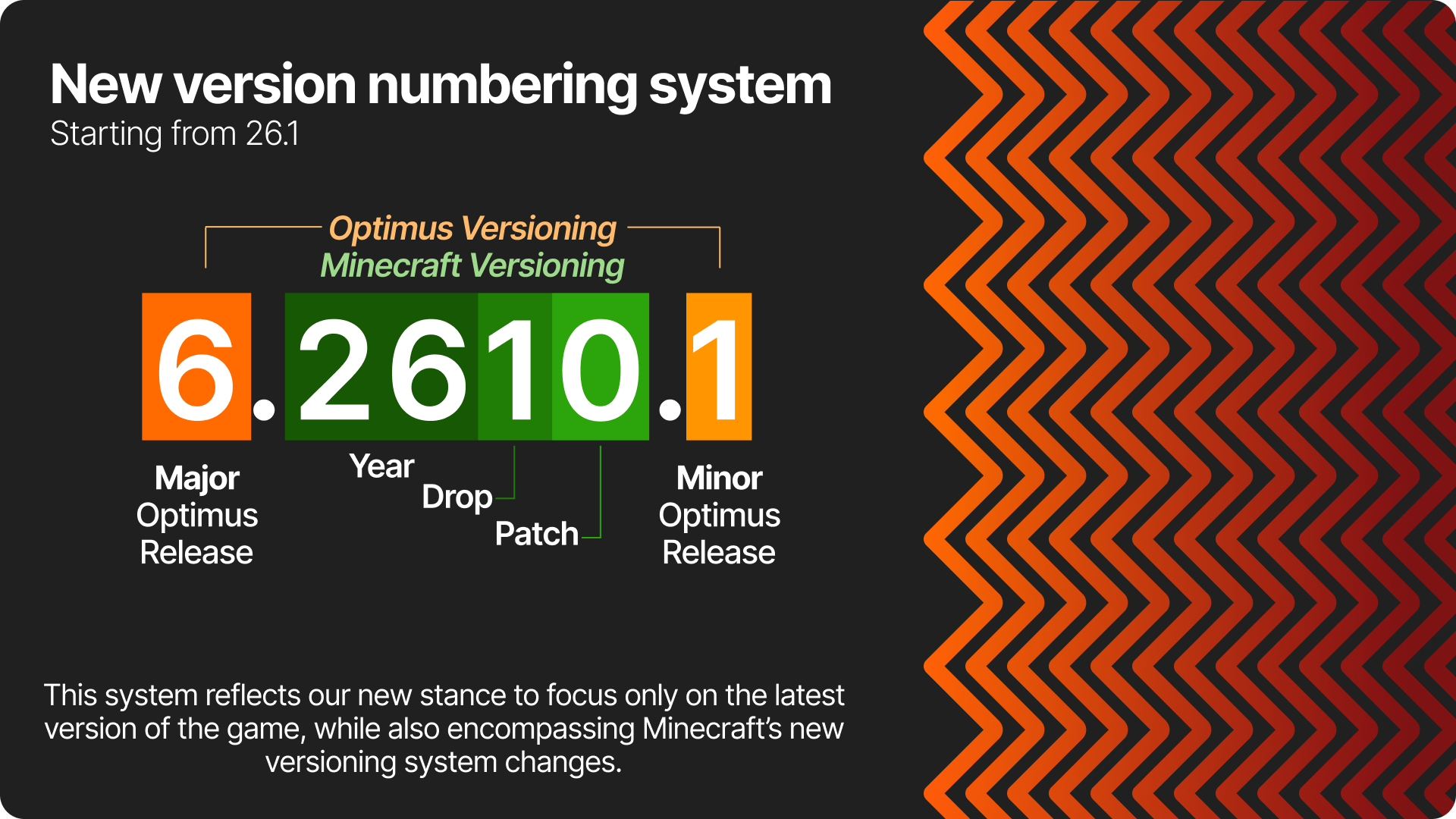
🛈 New version numbering system starting with 26.1
Starting with 26.1, our version numbering system will change:
⁉️ Why Optimus?
🔥 Blazing fast performance
Optimus is based on Adrenaline, onme of the greatest performance packs available. It greatlty improves minecraft's performance by default, and Optimus goes further to add a few mods not bundled by default
📦 Everything you need is already prepackaged
Just install and go! Optimus provides a great lenght of QoL client-side tweaks, whilst keeping maximum performance.
🧡 Made with love.
Optimus is a passion project, born long before the first public release. I've been building performance modpacks for 7 years (due to tremendous need lol), and Optimus itself was born 3 years ago.
✒️ Good design.
Come on, don't you love the orange arrows?!
❔ Why not just use OptiFine?
OptiFine's methods are and have always been extremaly invasive. This leads to a lot of issues with other mods, and also slows down updates. Also, it doesn't offer the same boost in performance today as it did on older versions, when it was at it's peak.
Parity status for version 5.x:
Click to expand
Feature - 1.21.5
Shaders - ✅ Dynamic Lights - ✅ Zoom - ✅ Better Grass - ✅ Connected Textures - ✅ Custom Item Textures - ⛔ Custom Entity Models - ✅ Capes - ✅ Animated Textures - ⛔ Particle Control - ✅ Detail Control - ✅ Animation Control - ✅ Miscellaneous Toggles - ✅ Custom Colors - ✅ Custom GUI - ✅ Custom Sky - ⛔ Emissive Blocks - ✅ Emissive Entities - ✅ Random Entities - ✅ Resource pack splash screen - ✅
➕ What are the QoL features added?
- Hunger-related improvements, allowing you to preview hunger and saturation from foods and actually seing your current saturation;
- Overall UI and UX improvements (animations, toggleable dark mode, numbered hotbar texture, etc)
- Better keybind management
- Larger screenshots by pressing F9
- Access worlds from .minecraft everywhere
- Keeping chats across worlds and servers
- Ability to revert controversial game changes
- The basics:
- WAILA/HWYLA/WTHIT
- NEI/JEI/REI
- Minimap and World map
The list goes on; play to check everything out!
ℹ️ Still unsure?
Check the wiki (coming soon!)
👤 Credits
Resource Packs
Optimus Core features VanillaTweaks;
Comment installer Optimus
With Millida Launcher
Install Millida Launcher
The launcher is free: download it at millida.net/launcher and sign in with any nickname.
Click “Install” on this page
The launcher opens and installs the modpack for Minecraft 26.2 on Fabric automatically.
Launch the game
A profile with it appears in the launcher: click “Play”.
Manually
Download the modpack archive
In the version list above, pick the file Optimus.mrpack (906 KB).
Import it into a launcher
A launcher that supports modpacks (Millida Launcher, Prism) takes the archive via “Add modpack”, then “From file”. No need to unpack it yourself.
Allocate memory
Modpacks need more memory than the plain game: set 4–6 GB in the profile settings.
Versions
Avec dépendances
| Minecraft | Loader | Fichier | Actions |
|---|---|---|---|
| 26.2 | Fabric | 26.2906 Ko |
Ce qu'il faut pour l'exécuter
- Continuitydéjà inclus
- Fabrishotdéjà inclus
- More Chat Historydéjà inclus
- Reese's Sodium Optionsdéjà inclus
- CraftPresencedéjà inclus
- AppleSkindéjà inclus
- Dependencydéjà inclus
- Dynamic FPSdéjà inclus
- Text Placeholder APIdéjà inclus
- BadOptimizationsdéjà inclus
- UniLibdéjà inclus
- Dependencydéjà inclus
Avis
Soyez le premier à noter Optimus


