

Minecraft VHS Build pour Minecraft 1.19.2
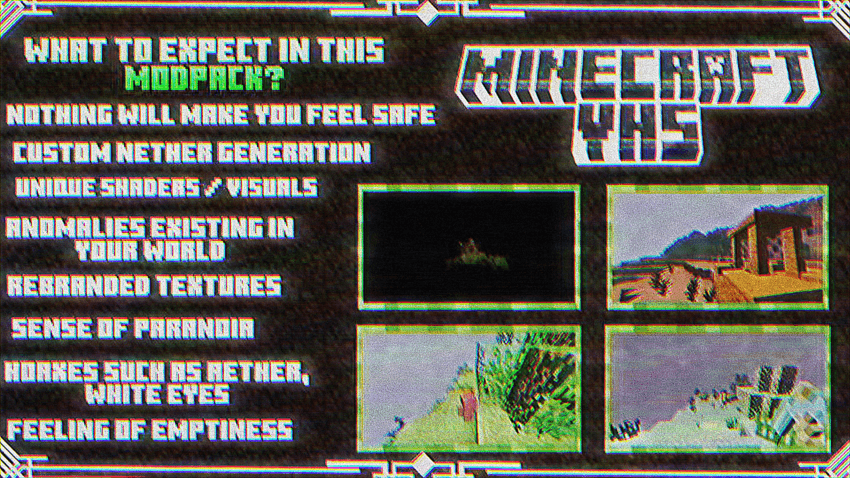
Minecraft VHS est une version de Minecraft basée sur le côté liminal et cru du vieux MC
- téléchargements
- 4 téléchargements
- vues
- 26 vues
- Mis à jour
- Mis à jour 31.10.2026
- 1.19.2
 Forge
Forge
À propos du modpack Minecraft VHS

HELP
Made by Stodiee
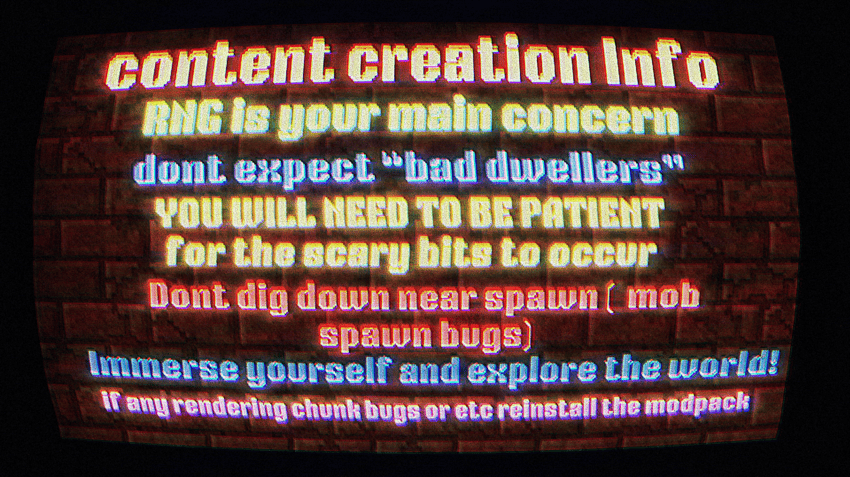
To those who installed this pack and are slightly dissatisfied with the visual settings at night time as well as the lack of render distance and customization, here might be some recommendations. to allow customization of the modpack, go into the mods profile settings and tick "allow content management for this profile". MENU: Turn off FANCYMENU mod to access the full menu, render distancces, and everything (default distance is 5 chunks, but i liked 8 or 12) DO NOT CHANGE ALOT OF SETTINGS, AS THEY MAY BREAK THE MODPACK (I only changed the render distance from 5 to 8, and the framerate limit) Would be nice if we had video settings of the original menu, instead of a bunch of stuff being deleted.
SHADER: disable mirrored flickering stars at bottom of screen EPOCH SHADER > DEBUG > FLARES_ENABLED > turn off too grainy at night time EPOCH SHADER > CAMERA > GRAIN SETTINGS > GRAIN RESOLUTION > increase it
things getting brighter and darker (only if you don't like brightness changing when looking at different areas) EPOCH SHADER > CAMERA > ISO > change this setting from AUTO to around 50~200 ,wouldnt recommend unless you have DYNAMIC LIGHTS mod to have a light source to carry around. ISO Values over 200~400 may make daytime too bright.
Would be nice if these were enabled by default, including the dynamic lights mod or else you wouldnt be able to see anything without torches in low ISO, and the very high ISO would make daytime too bright and white.
MULTIPLAYER: (only follow if you plan to play multiplayer) LAN: (playing with people on the same wifi, usually with siblings or friends in your house) MENU > OPEN TO LAN > START LAN WORLD
ONLINE: (to play online with friends, albeit could be laggy depending on network, computer specs, how many people join, etc. download " ESSENTIAL MOD " TO USE: Load a world > MENU > INVITE FRIEND(top right envelope icon) > invite friends that you add through essential ADDING FRIENDS: MENU > SOCIAL (underneath envelope icon) > ADD FRIEND(blue button) > type friend's minecraft username BOTH PLAYERS MUST HAVE ESSENTIAL MOD INSTALLED, WITH THE SAME MODS TOO!! (i havent tried it with this modpack yet, but 99% of the time it works with modded content)
i hoped this helped, even a little bit
shaders by WoMspace
released during may 19 2024 ( developed april )
inspired from VHScraft by andredesus
Comment installer Minecraft VHS
With Millida Launcher
Install Millida Launcher
The launcher is free: download it at millida.net/launcher and sign in with any nickname.
Click “Install” on this page
The launcher opens and installs the modpack for Minecraft 1.19.2 on Forge automatically.
Launch the game
A profile with it appears in the launcher: click “Play”.
Manually
Download the modpack archive
In the version list above, pick the file horror.zip (26 MB).
Import it into a launcher
A launcher that supports modpacks (Millida Launcher, Prism) takes the archive via “Add modpack”, then “From file”. No need to unpack it yourself.
Allocate memory
Modpacks need more memory than the plain game: set 4–6 GB in the profile settings.
On a server
Use the “To server” button
On Millida Hosting, the button at the top of the page uploads the file to your server and restarts it for you.
Invite friends: they install the same modpack
To join the server, every player needs the same modpack version.
Minecraft 1.19.2 runs on Java 17: with a different Java version the game may close right after launch.
Versions
Avec dépendances
| Minecraft | Loader | Fichier | Date | Actions |
|---|---|---|---|---|
| 1.19.2 | Forge | 1.626.5 Mo 4 | ||
| 1.19.2 | Forge | NOT MEANT TO EXIST?26.5 Mo |
FAQ
Which Minecraft versions does Minecraft VHS work on?
Only Minecraft 1.19.2: there are no files for other versions.
Is Minecraft VHS for Forge or Fabric?
Only for Forge: 1.19.2.
Which Java does Minecraft VHS need?
Minecraft 1.19.2 runs on Java 17. If the game closes right after launch, the usual cause is the wrong Java version in the profile settings.
Where can I download Minecraft VHS safely?
On this page: the file horror.zip (26 MB) is stored on Millida’s server, with no link shorteners. SHA-1 checksum: b09a51969495536b7c4456eb682119521764996b.
Avis
Soyez le premier à noter Minecraft VHS


