
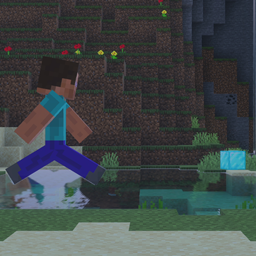
Panorama: Item Rush Carte pour Minecraft 1.21, 26.40
Imaginez Minecraft Bingo, mais à points. 10 minutes pour collecter les objets les plus rares afin de gagner des points, celui qui en a le plus gagne.
SCROLL DOWN FOR INSTALL GUIDE - AT THE BOTTOM OF THE PAGE
Find people to play with, and get closely involved with development in our Discord server @ https://discord.gg/yDxEEXyPyE
The concept for this mini game at its very core is incredibly simple. You'll get 10 minutes to collect the rarest items and score the most points, with the winner being whoever earns the most points.
This mini game is endlessly replayable in every sense of the word. 430 quintillion randomly-generated item list variations, and random spawns up to 30,000 blocks away to the centre of the map.
This game may have a set goal of sorts, but features a non-linear way of achieving said goal. It is up to you if you'd like to go underground and explore the caves, traverse the world above in search for biomes. Different randomly-generated item list variations will encourage different ways of play each round.
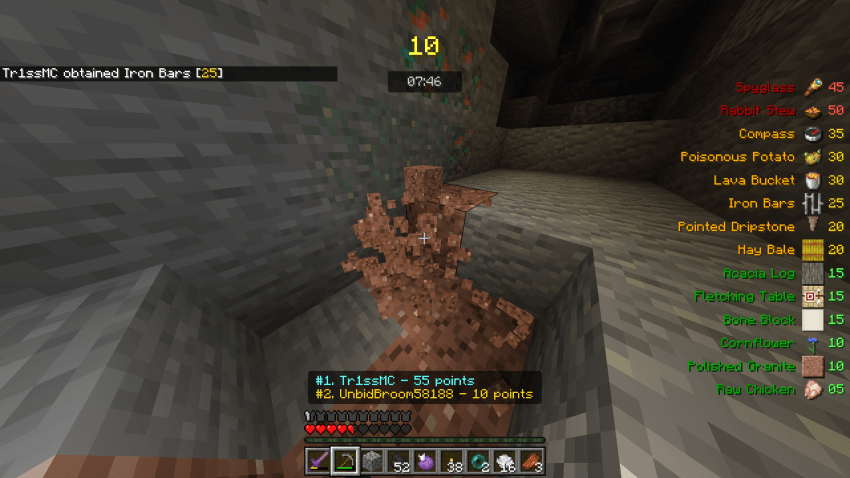
No matter your playstyle, you can definitely enjoy the fun this mini game has to offer. It allows you to customise the loot you start with to closely gear it towards your playstyle. Enter the obsidian rooms in the lobby, and choose between three special items to start the game with.
It can be enjoyed as either a casual, chilled-out solo experience, or as a nail-bitingly fast-paced race to claim the #1 spot between up to 16 players.
HOST - Check out the settings menu:
Choose between a 10-minute mode, 15-minute mode, or 20-minute mode. Depending the amount of time you have on your hands, you can modify the length of the game, with difficulty of item sets scaling as round length is increased.
Inspired by the likes of MCC Bingo, UHC, Chunklock, and a longing for more exciting minecraft multiplayer gameplay
INSTALLATION GUIDE
- Download & import the addon into Minecraft
- Begin the process of creating a world
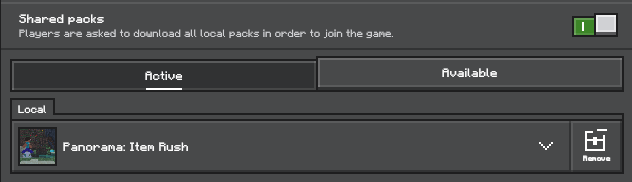
- Enter the "Resource Packs" menu, enable the addon and ensure the "Shared Packs" option is enabled, as shown below
- Just create the world, invite some friends, and have a good time ;D
Comment installer Panorama: Item Rush
With Millida Launcher
Install Millida Launcher
The launcher is free: download it at millida.net/launcher and sign in with any nickname.
Click “Install” on this page
The launcher opens and installs the map for Minecraft 1.20.80–26.40 automatically.
Launch the game
A profile with it appears in the launcher: click “Play”.
Manually
Download the map archive
Pick the file Panorama - Item Rush.mcaddon (1.4 MB).
Unpack it into the saves folder
The world folder (with level.dat inside) must sit directly in .minecraft/saves.
Open the world
“Singleplayer”: the map will be in your world list.
On a server
Replace the world folder
Stop the server and put the map folder in place of world (or set its name in level-name).
Use the “To server” button
On Millida Hosting, the button at the top of the page uploads the file to your server and restarts it for you.
Versions
Avec dépendances
| Minecraft | Loader | Fichier | Date | Actions |
|---|---|---|---|---|
| 1.21.30 | — | Panorama - Item Rush1.4 Mo |
FAQ
Which Minecraft versions does Panorama: Item Rush work on?
There are files for 1.20.80–26.40, 46 versions in total. The newest is 26.40.
Where can I download Panorama: Item Rush safely?
On this page: the file Panorama - Item Rush.mcaddon (1.4 MB) is stored on Millida’s server, with no link shorteners. SHA-1 checksum: 038caac277b72dbc1984314696b1ee42655c056a.
Avis
Soyez le premier à noter Panorama: Item Rush



