

Trinkets Elytra Pack de données pour Minecraft 26.2
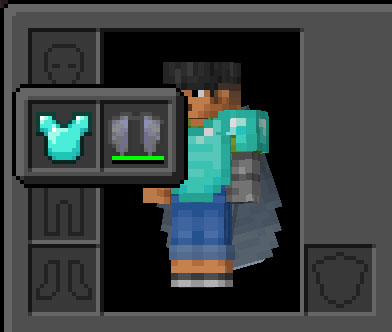
Ce datapack ajoute un emplacement de coffre/cape pour votre Elytra, vous permettant de l'équiper comme un bijou.
- téléchargements
- 1 téléchargements
- vues
- 27 vues
- Mis à jour
- Mis à jour 07.07.2026
- 26.1 — 26.2
 Pack de données
- Client et serveur
Trinkets Elytra
This data pack allows you to open a Trinket slot for your Elytra.
Status: Archived / Discontinued
This project was created temporary while waiting for the official release. Now that the official DataPack is available, I am archiving this mod.
Please switch to the official version here: Trinkets Elytra Support

About
Trinkets is a library mod that provides extra equipment slots. However, out of the box, it provides no visible slots for vanilla items. This datapack enables the functionality for the Elytra by assigning chest/cape slot.
@Patbox: Trinkets by itself is invisible if nothing else uses it. You either need some mods that depend on it or to use a datapack.
Installation
Simply drop the .jar file into your mods folder or .zip into datapacks.
Requirements
Trinkets Updated (or Trinkets) must be installed.
License
I am not the original author of this configuration. This logic is based on the repository for Trinkets Updated, which is a fork of the original Trinkets.
Known Issues
Incompatible with Polymer and Polymer Patch for Trinkets Updated. Polymer patch currently doesn't work due to limitations.
Comment installer Trinkets Elytra
With Millida Launcher
Install Millida Launcher
The launcher is free: download it at millida.net/launcher and sign in with any nickname.
Click “Install” on this page
The launcher opens and installs the data pack for Minecraft 26.1–26.2 automatically, together with its dependencies: Dependency.
Launch the game
A profile with it appears in the launcher: click “Play”.
Manually
Download the archive
Pick the file trinkets_elytra-1.0.0.zip (7 KB) for your game version.
New world: “Data Packs”
When creating a world, click “Data Packs”, drag the archive into the window, then move it to “Selected”.
Existing world: the datapacks folder
Put the archive into saves/<world>/datapacks and type /reload in game.
On a server
Archive goes into the server world’s datapacks
The world/datapacks folder on the server; players do not need to install anything.
Reload the data
Type /reload in the server console or restart the server.
Use the “To server” button
On Millida Hosting, the button at the top of the page uploads the file to your server and restarts it for you.
Versions
Avec dépendances
| Minecraft | Loader | Fichier | Date | Actions |
|---|---|---|---|---|
| 26.2 | Pack de données | 26.26.6 Ko 1 | ||
| 26.1 | Pack de données | 26.16.6 Ko |
Ce qu'il faut pour l'exécuter
- Dependencyobligatoire
Avis
Soyez le premier à noter Trinkets Elytra


