

SkyOreGen Pack de données pour Minecraft 1.20.1, 1.19.2
SkyOreGen est un data pack qui remplacera les pierres et le basalte des générateurs par des minerais et des blocs déterminés par le tier du générateur.
- vues
- 29 vues
- Mis à jour
- Mis à jour 02.12.2023
- 1.17 — 1.20.2
 Pack de données
- Client et serveur
SkyOreGen
This data pack will replace the cobblestone and basalt from generators with ores and blocks determined by the tier of generator.
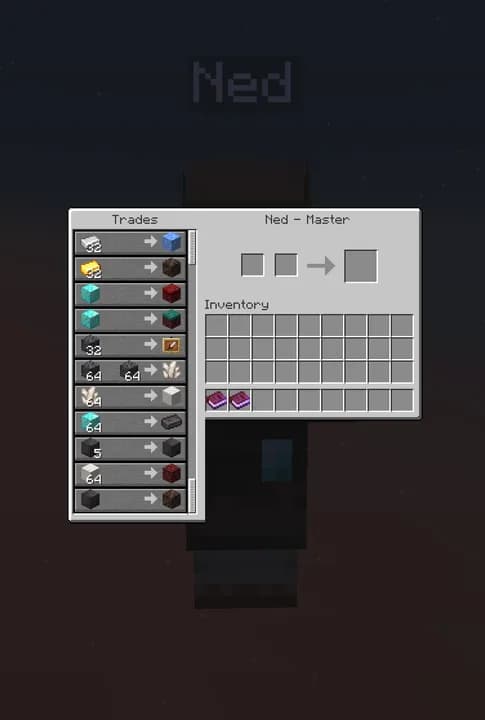
SkyOreGen can be used on any skyblock map as all necessary items for the data pack are given through advancements and two villagers summoned from books.
When first loading into game the welcome text has a trigger command to allow the player to change the difficulty between hard and normal for SOG. Changing to hard will increase cost of items from Greg/Ned and will also lower the rates from the generators. Once the first piece of cobblestone enters the player's inventory the difficulty is locked and can no longer be changed by the trigger.

Compatibility
- v1.10.0: mc1.17-1.20.2
Comment installer SkyOreGen
With Millida Launcher
Install Millida Launcher
The launcher is free: download it at millida.net/launcher and sign in with any nickname.
Click “Install” on this page
The launcher opens and installs the data pack for Minecraft 1.17–1.20.2 automatically.
Launch the game
A profile with it appears in the launcher: click “Play”.
Manually
Download the archive
Pick the file SOG-1.10.0.zip (954 KB) for your game version.
New world: “Data Packs”
When creating a world, click “Data Packs”, drag the archive into the window, then move it to “Selected”.
Existing world: the datapacks folder
Put the archive into saves/<world>/datapacks and type /reload in game.
On a server
Archive goes into the server world’s datapacks
The world/datapacks folder on the server; players do not need to install anything.
Reload the data
Type /reload in the server console or restart the server.
Use the “To server” button
On Millida Hosting, the button at the top of the page uploads the file to your server and restarts it for you.
Versions
Avec dépendances
| Minecraft | Loader | Fichier | Date | Actions |
|---|---|---|---|---|
| 1.17.1 | Pack de données | 1.17.1954 Ko |
Avis
Soyez le premier à noter SkyOreGen


