

CliffTree Pack de données pour Minecraft 1.20.1, 1.21.1
Une refonte de la génération du monde de style vanilla, avec de nouveaux biomes et des retouches aux biomes existants. Abréviation de "Cliff under a Tree"
- vues
- 78 vues
- Mis à jour
- Mis à jour 28.10.2026
- 1.20.1 — 26.2
 Pack de données
- Client et serveur
À propos du pack de données CliffTree
### 🌸 CliffTree now supports Minecraft 26.2 🌸
🩷 In active development, features subject to change. Please report any issues. 🩷

🧡 Join the Penumbra Discord server for development updates! 🧡
## 🌸 About CliffTree 🌸
Cliff under a Tree, or CliffTree for short, is a world generation datapack that freshens up the Overworld with brand new biomes and improvements to existing biomes, all while maintaining the spirit of vanilla!
From searing Shrublands to frigid Glacier Vallies, explore a plethora of biomes, including all-new sights such as the Oasis, the Tundra, or variations of familiar places, like the Snowy Old Growth Taiga!
### Vanilla Biome Improvements
Many biomes from vanilla have been improved! Alongside overall better distribution, CliffTree makes visual changes such as terracotta on the sides of Savanna Plateaus, fallen logs on various forest biomes, more stone on the sides of cliffs, and wide Beaches reminiscent of Minecraft beta.
### Improved Rivers and Oceans
Nearly every biome in CliffTree has new colors for water, seen across the Overworld's rivers and oceans! Dive into even deeper oceans, and swim through new underwater rock and spire formations! River floors have also been altered, improving the distribution of sand, clay, and gravel underwater to provide a nice and cohesive gradient, rather than random disks.
### New and Improved Cave Biomes
Instead of surface biomes extending all the way down to the underground, CliffTree adds distinct cave biomes! You'll still find ordinary-looking caves, but you'll also find icy Frozen Caves, terracotta-filled Warm Caves, and deep down, the scorching magma of the Inferno!
### New Tree Shapes and Foliage Rules
Foliage like grasses and flowers can now be planted on sand snow blocks! Some trees have also received a makeover, such as Birch and small Jungle trees. Saplings also have custom growth rules, with only some saplings growing up on sand and snow, and certain blocks allowing the growth of rare tree types, like Jungle bushes and Swamp Oaks!
## 🌸 Add-ons and Compatibility 🌸
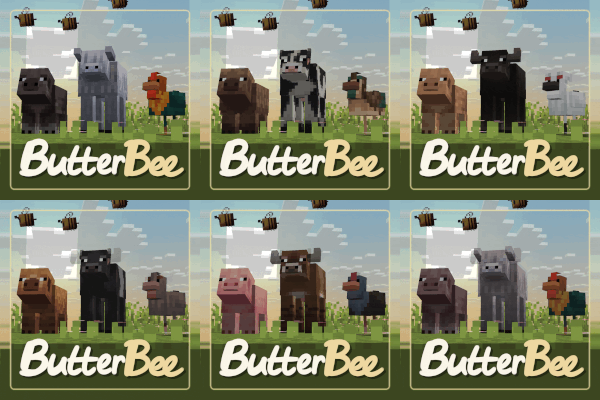
### ButterBee - Mob Variants
ButterBee spices up CliffTree's ecosystems by adding new biome-dependant variants for chickens, cows, pigs, wolves, and even one new frog! This add-on will hopefully make exploration feel fresh, as you might discover new faces along your journey!

### Tectonic
Tectonic is a world generation project that aims to transform how terrain is shaped. Terrain forms to continent-like landmasses, tailored to fit massive mountain ranges and new terrain types. Oceans feature smaller "islands", up to around a thousand blocks across!
Since Tectonic 3.0, the mod versions of CliffTree and Tectonic are natively compatible together! If you're using the datapack version, a compatibility datapack is required.
## 🌸 Originally by Konci and Walls 🌸
This is probably obvious, but CliffTree's name originates from Island Song. I just really like Adventure Time.

### 🛜 Get 25% off at BisectHosting using code "konci" 🛜

Comment installer CliffTree
With Millida Launcher
Install Millida Launcher
The launcher is free: download it at millida.net/launcher and sign in with any nickname.
Click “Install” on this page
The launcher opens and installs the data pack for Minecraft 1.20.1–26.2 automatically, together with its dependencies: Vanilla Backport.
Launch the game
A profile with it appears in the launcher: click “Play”.
Manually
Download the archive
Pick the file clifftree-3.3-datapack-26.2.zip (1.4 MB) for your game version.
New world: “Data Packs”
When creating a world, click “Data Packs”, drag the archive into the window, then move it to “Selected”.
Existing world: the datapacks folder
Put the archive into saves/<world>/datapacks and type /reload in game.
On a server
Archive goes into the server world’s datapacks
The world/datapacks folder on the server; players do not need to install anything.
Reload the data
Type /reload in the server console or restart the server.
Use the “To server” button
On Millida Hosting, the button at the top of the page uploads the file to your server and restarts it for you.
Versions
Avec dépendances
| Minecraft | Loader | Fichier | Date | Actions |
|---|---|---|---|---|
| 1.21.1 | Pack de données | 1.21.11.3 Mo | ||
| 26.2 | Pack de données | 26.21.4 Mo | — | |
| 26.1 | Pack de données | 26.11.3 Mo | — | |
| 1.21.11 | Pack de données | 1.21.111.3 Mo | — | |
| 1.21 | Pack de données | 1.211.1 Mo | — | |
| 1.20.1 | Pack de données | 1.20.1857 Ko | — |
Ce qu'il faut pour l'exécuter
- Vanilla Backportobligatoire
- Lithostitchedfacultatif
Contenu qui en dépend
FAQ
Which Minecraft versions does CliffTree work on?
There are files for 1.20.1–26.2, 14 versions in total. The newest is 26.2.
Does CliffTree work on a server?
Yes: the data pack goes into the datapacks folder of the server world, and players do not need to install anything.
What does CliffTree need to work?
Required: Vanilla Backport. Without it the data pack will not start. Optional: Lithostitched.
How do I download CliffTree?
With Millida Launcher: it installs CliffTree into a modpack by itself, for the right game version and loader. The launcher is free.
Avis
Soyez le premier à noter CliffTree


