

777 Pack de données pour Minecraft 1.21.1, 1.21
Tous vos rêves de jeux d'argent peuvent désormais se réaliser dans Minecraft en survie !
- téléchargements
- 2 téléchargements
- vues
- 59 vues
- Mis à jour
- Mis à jour 26.09.2026
- 1.21 — 26.2
 Pack de données
 Jeu vanilla
- Client et serveur
777
Adds gambling to survival Minecraft!
Throw away all your precious resources for a chance to win BIG at the Slot Machine! Or if you are feeling a little bit classier, try your hand at the Blackjack Table for an opportunity to duplicate your favorite items!
Intended for use in survival, there are several amazing rewards you can get such as:
- Unbreakable tools & armor
- Infinite duration potions
- Stackable totem of undying
- And more!
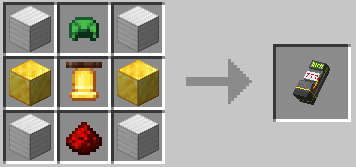
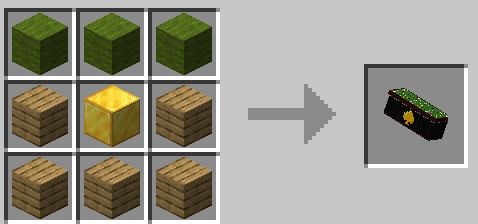
Types of bets and their odds (Slot Machine)
Low Bet (1 in 160)
- Iron block
- Gold Block
- Emerald Block
- Diamond

High Bet (1 in 80)
- Diamond block
- Netherite ingot
- Rabbits foot

Max Bet (1 in 40)
- Netherite block
- Player head
Note: If adding to a pre-existing world, type /reload before trying to use it!
Comment installer 777
With Millida Launcher
Install Millida Launcher
The launcher is free: download it at millida.net/launcher and sign in with any nickname.
Click “Install” on this page
The launcher opens and installs the data pack for Minecraft 1.21–26.2 automatically.
Launch the game
A profile with it appears in the launcher: click “Play”.
Manually
Download the archive
Pick the file 777_dp_2.0.2_26.1.zip (490 KB) for your game version.
New world: “Data Packs”
When creating a world, click “Data Packs”, drag the archive into the window, then move it to “Selected”.
Existing world: the datapacks folder
Put the archive into saves/<world>/datapacks and type /reload in game.
On a server
Archive goes into the server world’s datapacks
The world/datapacks folder on the server; players do not need to install anything.
Reload the data
Type /reload in the server console or restart the server.
Use the “To server” button
On Millida Hosting, the button at the top of the page uploads the file to your server and restarts it for you.
Versions
Avec dépendances
| Minecraft | Loader | Fichier | Date | Actions |
|---|---|---|---|---|
| 26.1.2 | Pack de données | 26.1.2490 Ko | ||
| 1.21.11 | Pack de données | 1.21.11490 Ko 1 | ||
| 1.21 | Pack de données | 1.21577 Ko | ||
| 26.2 | Pack de données | 26.2490 Ko 1 | — | |
| 26.1 | Pack de données | 26.1490 Ko | — |
FAQ
Which Minecraft versions does 777 work on?
There are files for 1.21–26.2, 7 versions in total. The newest is 26.2.
Does 777 work on a server?
Yes: the data pack goes into the datapacks folder of the server world, and players do not need to install anything.
Where can I download 777 safely?
On this page: the file 777_dp_2.0.2_26.1.zip (490 KB) is stored on Millida’s server, with no link shorteners. SHA-1 checksum: f1ef11abf6b84f871c9b95ce61ed745028cb5664.
Avis
Soyez le premier à noter 777


