

Simply 3D Paquete de recursos para Minecraft 1.18.2
Un paquete para hacer ciertos bloques utilitarios en 3D, pero manteniéndolos estilo vanilla
- visualizaciones
- 22 visualizaciones
- Actualizado
- Actualizado 03.09.2026
- 1.18 — 1.18.2
 Juego vanilla
- Cliente
Simply 3D
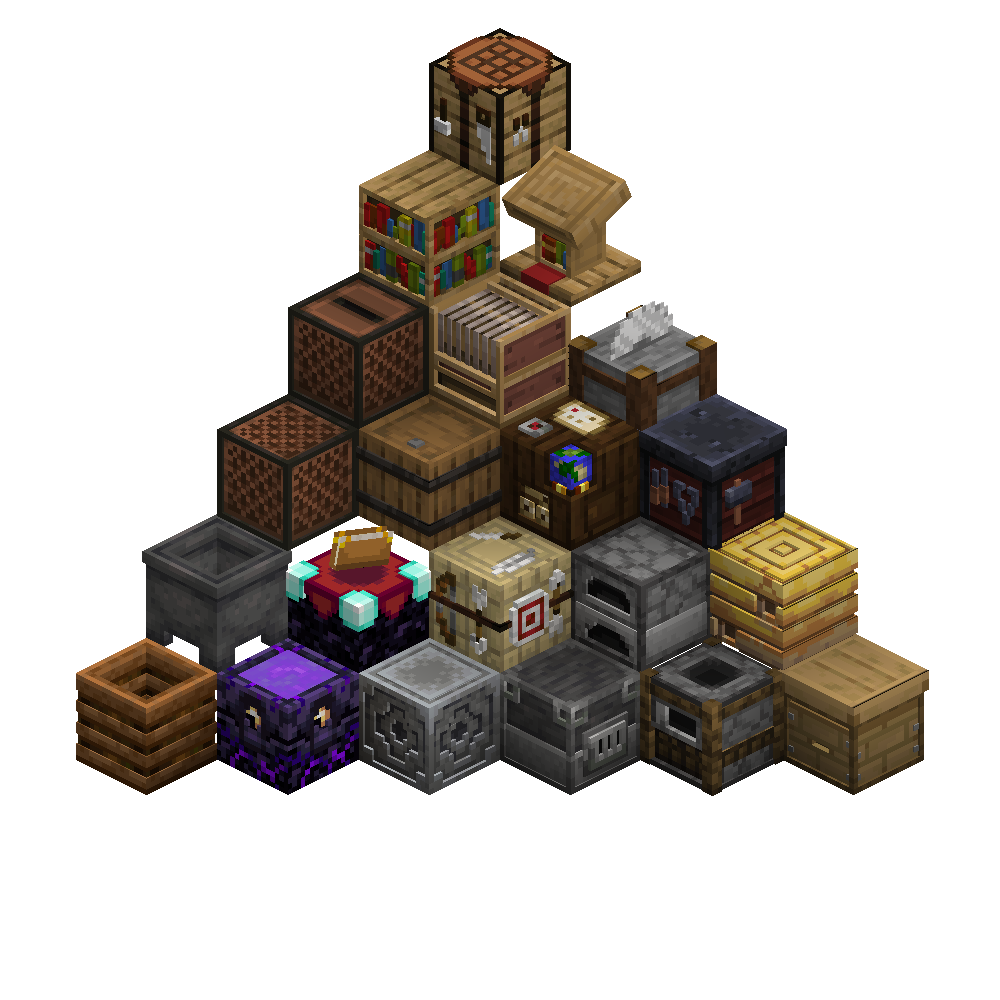
This pack turns the utility blocks into 3D models, but does not over do it. I only use 1/0.75/0.5/0.25 indents or raises to keep inline with the same 3D style as the item frame.
Want more like this check the page out for all the extra additions, like lanterns and other blocks!
Click to go to the page!
Blocks That Have A Model
- Crafting Table
- Cartography Table
- Smithing Table
- Stone Cutter
- Loom
- Bookshelf
- Lectern
- Furnace
- Blast Furnace
- Smoker
- Barrel
- Bee Hive
- Bee Nest
- Composter
- Caldron
- Respawn Anchor
- Lodestone
- Enchanting Table
This pack could work with a lot of other pack's as it still uses the vanilla textures and only modifys the models, as long as a pack doesn't change positions of certain details it would work. Make sure this texture pack is on-top of all the other packs.
Thanks to Isometric renders for their great mod to make these renders
Cómo instalar Simply 3D
With Millida Launcher
Install Millida Launcher
The launcher is free: download it at millida.net/launcher and sign in with any nickname.
Click “Install” on this page
The launcher opens and installs the resource pack for Minecraft 1.18–1.18.2 automatically.
Launch the game
A profile with it appears in the launcher: click “Play”.
Manually
Download the archive
Pick the file Simply 3D.zip (136 KB) for your game version. No need to unpack it.
Put it in the resourcepacks folder
The easiest way: “Options”, then “Resource Packs”, then “Open Pack Folder”, and drag the archive there.
Enable the pack
In the same window, move the pack to the right-hand “Selected” column and click “Done”.
Versiones
Con dependencias
| Minecraft | Cargador | Archivo | Acciones |
|---|---|---|---|
| 1.18.2 | — | 1.18.2136 KB |
Reseñas
Sé el primero en valorar Simply 3D



