
Refined Armor Paquete de recursos para Minecraft 1.19.2, 1.19.3
¡Rediseña el aspecto de los conjuntos de armadura de Minecraft!
Acerca del paquete de recursos Refined Armor
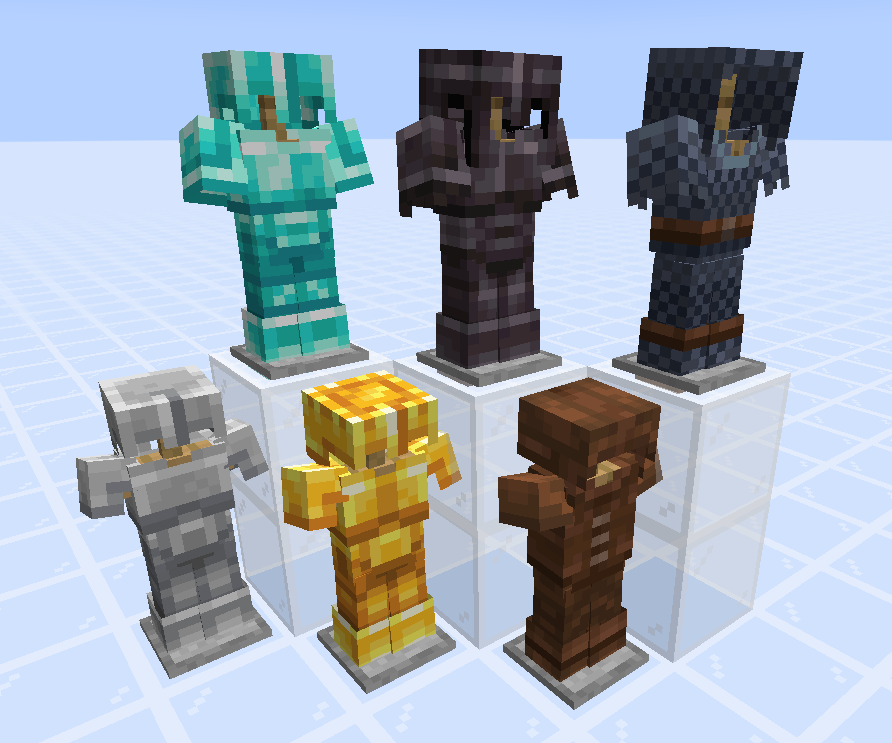
Refined Armor is a resource pack which redesigns the appearance of Minecraft's armor sets.
These redesigns are somewhat based on the Minecraft Dungeons style of shading: blockier and sharper shading, without outlining. The goal here was to make each armor set look good enough to wear proudly, but without exaggerating on detail, to keep with the vanilla style.
Cómo instalar Refined Armor
With Millida Launcher
Install Millida Launcher
The launcher is free: download it at millida.net/launcher and sign in with any nickname.
Click “Install” on this page
The launcher opens and installs the resource pack for Minecraft 1.19–1.19.3 automatically.
Launch the game
A profile with it appears in the launcher: click “Play”.
Manually
Download the archive
Pick the file Refined-Armor-1.0-1.19.zip (30 KB) for your game version. No need to unpack it.
Put it in the resourcepacks folder
The easiest way: “Options”, then “Resource Packs”, then “Open Pack Folder”, and drag the archive there.
Enable the pack
In the same window, move the pack to the right-hand “Selected” column and click “Done”.
Versiones
Con dependencias
| Minecraft | Cargador | Archivo | Fecha | Acciones |
|---|---|---|---|---|
| 1.19.3 | — | Refined Armor 1.0 - 1.1929.8 KB 1 |
FAQ
Which Minecraft versions does Refined Armor work on?
There are files for 1.19.3, 1.19.2, 1.19.1, 1.19. The newest is 1.19.3.
Where can I download Refined Armor safely?
On this page: the file Refined-Armor-1.0-1.19.zip (30 KB) is stored on Millida’s server, with no link shorteners. SHA-1 checksum: 0bc391d8fe50212a032b671443477f14508b339f.
Reseñas
Sé el primero en valorar Refined Armor



