

PvP Utils Paquete de recursos para Minecraft 1.21.1, 1.21
Un paquete de texturas que añade mejoras de calidad de vida para el PvP, manteniendo un estilo vanilla.
- descargas
- 129 descargas
- visualizaciones
- 510 visualizaciones
- Actualizado
- Actualizado 04.09.2026
- 1.21 — 26.2
 Juego vanilla
- Cliente
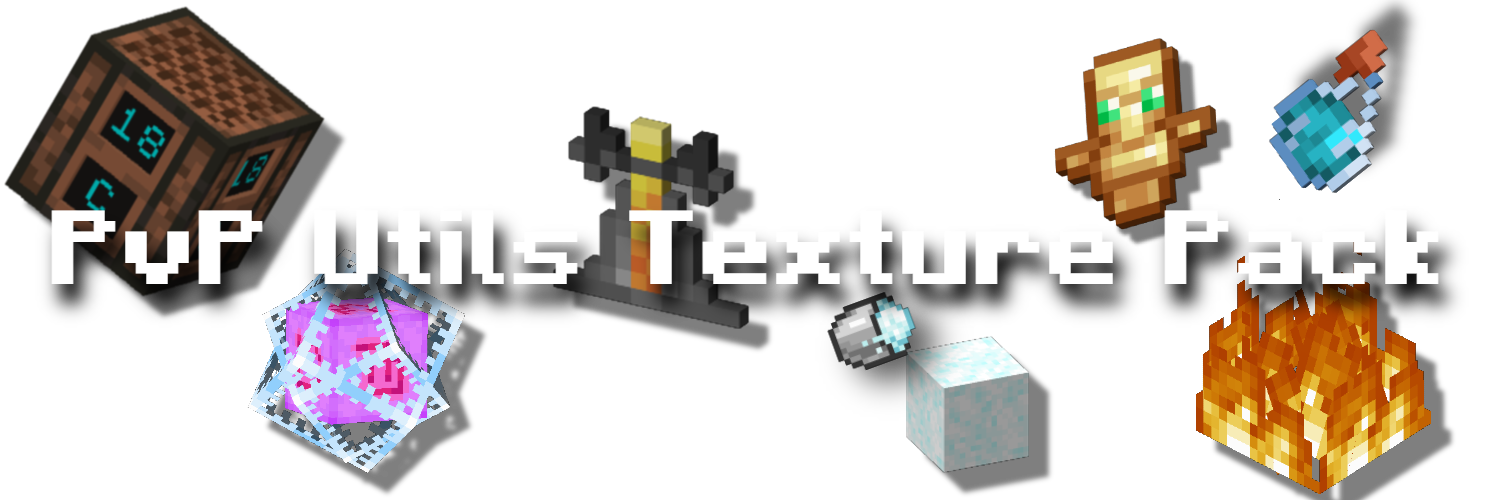
This Ressource Pack adds many Quality of Life Textures, while keeping the game in a vanilla-ish Style.
Features are as followed:
- Side Shield and Smaller Shield Block
- Low Fire Overlay
- No Fishing Bobber
- Better powdered Snow
- Brewing Stand Guide
- No Explosion
- Small Totem Pop
- Visual Note Block Pitch
- Border around Suspicious Gravel & Sand
- Quieter Sound for Explosions, Fire Hurting and Rain
Credits

Fire Overlay and Quieter Sounds by DrDonut: https://discord.com/invite/donut
Brewing Stand Guide by Corrupted Soul (Originally from Vanilla Tweaks): https://www.planetminecraft.com/texture-pack/vanillatweaks-brewing-stand-gui-but-tweaked-and-1-21/ https://vanillatweaks.net/
Lower and Side Shield by Plomek: https://www.planetminecraft.com/texture-pack/lower-shield-5669766/
Badges by Andre601: https://github.com/intergrav/devins-badges?tab=readme-ov-file
Visual Note Block Pitch, Suspicious Sand & Gravel Borders by VanillaTweaks: https://vanillatweaks.net/

Cómo instalar PvP Utils
With Millida Launcher
Install Millida Launcher
The launcher is free: download it at millida.net/launcher and sign in with any nickname.
Click “Install” on this page
The launcher opens and installs the resource pack for Minecraft 1.21–26.2 automatically.
Launch the game
A profile with it appears in the launcher: click “Play”.
Manually
Download the archive
Pick the file PvP Utils 1.2.2.zip (405 KB) for your game version. No need to unpack it.
Put it in the resourcepacks folder
The easiest way: “Options”, then “Resource Packs”, then “Open Pack Folder”, and drag the archive there.
Enable the pack
In the same window, move the pack to the right-hand “Selected” column and click “Done”.
Versiones
Con dependencias
| Minecraft | Cargador | Archivo | Fecha | Acciones |
|---|---|---|---|---|
| 26.1 | — | 26.1405 KB 84 | ||
| 1.21.11 | — | 1.21.11405 KB 15 | ||
| 26.2 | — | 26.2405 KB 22 | — |
FAQ
Which Minecraft versions does PvP Utils work on?
There are files for 1.21–26.2, 16 versions in total. The newest is 26.2.
Does PvP Utils need mods?
No, the resource pack works in the plain game without loaders: put it into the resourcepacks folder and enable it in the options.
Where can I download PvP Utils safely?
On this page: the file PvP Utils 1.2.2.zip (405 KB) is stored on Millida’s server, with no link shorteners. SHA-1 checksum: 166f45a500fe91422b06ac176cf68a9898aff11f.
Reseñas
Sé el primero en valorar PvP Utils



