
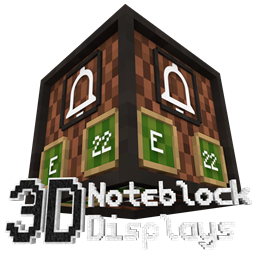
Acerca del paquete de recursos Note Block Displays 3D
Today I have something innovative to show you: Note Block Displays!
This stand-alone Addon for 3D CreatorCraft adds an "Display" to every Note Block. On that Display you can see which instrument and which note the Note Block is using. This is the first resourcepack that allows you to see that. And you do not even need to install any mod to use this resourcepack. The feature to create a Block Model for every note was added in the Minecraft 1.13 snapshots. So this resourcepack is only available for Minecraft 1.13 and higher versions.
Stand-alone Addon means that this Addon is designed to be used with 3D CreatorCraft, but it also works without 3D CreatorCraft...
For more information please visit the official website:
creatorlabs.org/downloads/3d-noteblock-displays
Cómo instalar Note Block Displays 3D
With Millida Launcher
Install Millida Launcher
The launcher is free: download it at millida.net/launcher and sign in with any nickname.
Click “Install” on this page
The launcher opens and installs the resource pack for Minecraft 1.19.3 automatically.
Launch the game
A profile with it appears in the launcher: click “Play”.
Manually
Download the archive
Pick the file 3D-Noteblock-Displays-1.19.3-V2.3.zip (739 KB) for your game version. No need to unpack it.
Put it in the resourcepacks folder
The easiest way: “Options”, then “Resource Packs”, then “Open Pack Folder”, and drag the archive there.
Enable the pack
In the same window, move the pack to the right-hand “Selected” column and click “Done”.
Versiones
Con dependencias
| Minecraft | Cargador | Archivo | Fecha | Acciones |
|---|---|---|---|---|
| 1.19.3 | — | 3D-Noteblock-Displays-1.19.3-V2.3.zip739 KB |
FAQ
Which Minecraft versions does Note Block Displays 3D work on?
Only Minecraft 1.19.3: there are no files for other versions.
Where can I download Note Block Displays 3D safely?
On this page: the file 3D-Noteblock-Displays-1.19.3-V2.3.zip (739 KB) is stored on Millida’s server, with no link shorteners. SHA-1 checksum: 6e5d2e7a9ab6b37012f95b58ff4a32ba614562e4.
Reseñas
Sé el primero en valorar Note Block Displays 3D


