
Create: Smart Compass Paquete de recursos para Minecraft 1.21.1
Cambia las texturas y recetas de Nature's Compass para que encajen con el estilo de Create.
Acerca del paquete de recursos Create: Smart Compass
This pack revamps Nature's Compass and Explorer's Compass to match closer with the Create mod.
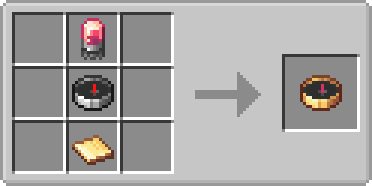
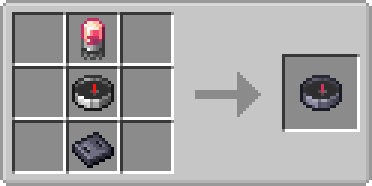
Changes:
- New texture for the nature's compass (Also changes the name to "Smart Compass")
- New texture for the explorer's compass.
- Change the crafting recipes to match with the new textures.
Installation:
The resource pack also works as a datapack, so you need to install it in both your resource packs folder and your world's datapacks folder. (You need to have "Create" with "Nature's Compass" and/or Explorer's Compass Installed)
Notes:
The crafting recipe for the explorer's compass could change in the future.
Cómo instalar Create: Smart Compass
Install Millida Launcher
The launcher is free: download it at millida.net/launcher and sign in with any nickname.
Click “Install” on this page
The launcher opens and installs the resource pack for Minecraft 1.21.1 automatically.
Launch the game
A profile with it appears in the launcher: click “Play”.
Versiones
Con dependencias
| Minecraft | Cargador | Archivo | Fecha | Acciones |
|---|---|---|---|---|
| 1.21.1 | — | SmartCompass_v2.2.zip291 KB |
FAQ
Which Minecraft versions does Create: Smart Compass work on?
Only Minecraft 1.21.1: there are no files for other versions.
How do I download Create: Smart Compass?
With Millida Launcher: it installs Create: Smart Compass into a modpack by itself, for the right game version and loader. The launcher is free.
Reseñas
Sé el primero en valorar Create: Smart Compass



