

Pagoda Shaders para Minecraft 1.20.1, 1.21.1
Pagoda Shaders es un shaderpack de Minecraft con temática japonesa que mejora los visuales del juego con una estética oriental serena y tradicional. Presenta iluminación suave, tonos cálidos y un ambiente estilo sakura.
 Fabric
 OptiFine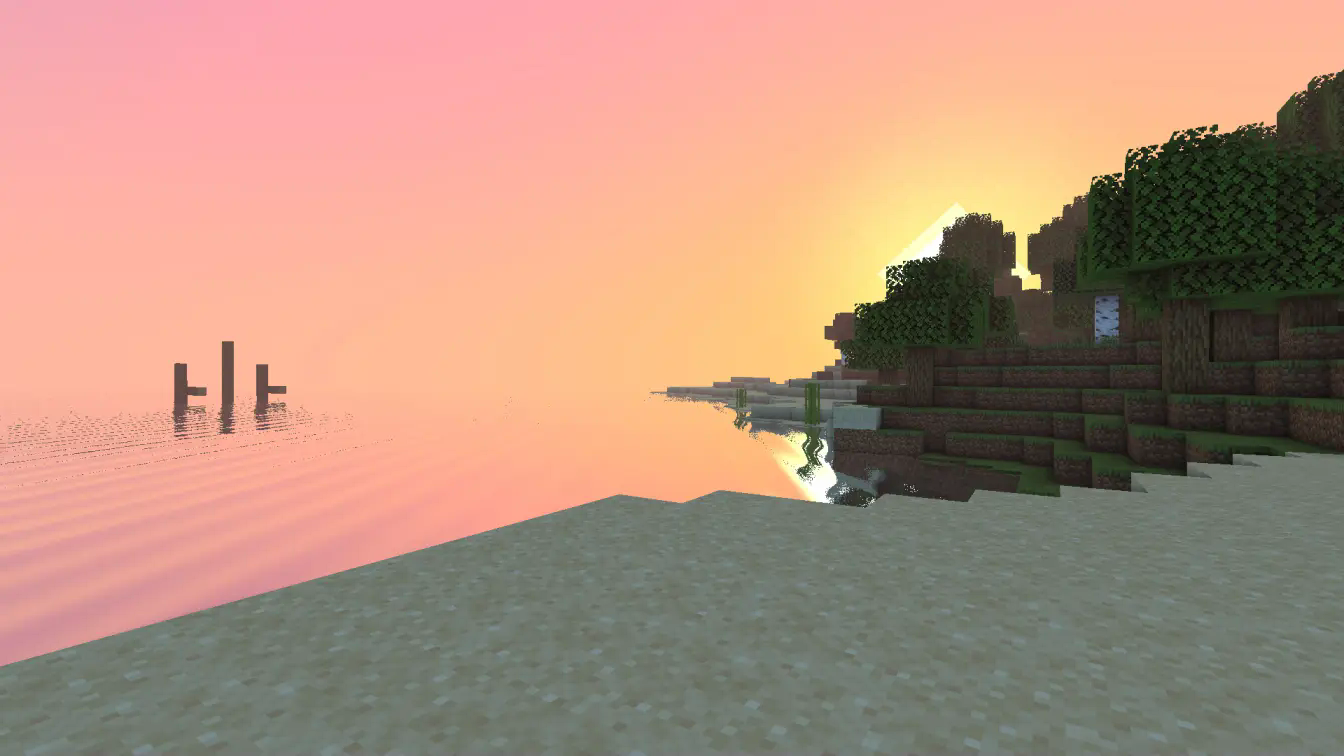
ABOUT
Pagoda Shaders is a Japanese, Chinese, and Korean tradition-inspired shader pack with visuals reminiscent of old-style anime. It brings a soft, cultural aesthetic to Minecraft, offering a peaceful and nostalgic visual experience. Designed for fans of traditional East Asian themes, Pagoda Shaders blends elegance with performance-friendly visuals
Features
Pagoda Shaders includes a beautiful pink-themed sunset, reflective water, and a gentle, serene atmosphere. It does not include waving foliage to ensure better performance on low-end and midrange PCs. However, it features waving water for added realism. Perfect for players who want artistic vibes with smoother FPS.
BUGS
Found a bug? Report it by creating a ticket under the bug category in our Discord server. Your feedback is important and helps us improve Pagoda Shaders for everyone. Every bug report is appreciated and brings us closer to a perfect visual experience.

Cómo instalar Pagoda Shaders
With Millida Launcher
Install Millida Launcher
The launcher is free: download it at millida.net/launcher and sign in with any nickname.
Click “Install” on this page
The launcher opens and installs the shaders for Minecraft 1.20–26.2 automatically.
Launch the game
A profile with it appears in the launcher: click “Play”.
Manually
Install Iris or OptiFine
Without a shader mod the game cannot see shaders. Install it for the same Minecraft version.
Download the shader archive
Pick the file PagodaShaders_v1.1.zip (45 KB) and do not unpack it.
Put it in the shaderpacks folder
“Options”, then “Video Settings”, then “Shader Packs”, then “Open Shader Pack Folder”, and drag the archive there.
Select the shaders
In the same window, click the pack name and “Apply”.
Versiones
Con dependencias
| Minecraft | Cargador | Archivo | Acciones |
|---|---|---|---|
| 26.2 | Iris, OptiFine | 26.244.7 KB | |
| 26.1 | Iris, OptiFine | 26.144.7 KB | |
| 1.21.11 | Iris, OptiFine | 1.21.1144.7 KB | |
| 1.21 | Iris, OptiFine | 1.2144.7 KB | |
| 1.20.1 | Iris, OptiFine | 1.20.144.7 KB |
FAQ
Which Minecraft versions does Pagoda Shaders work on?
There are files for 1.20–26.2, 23 versions in total. The newest is 26.2.
What do I need to run Pagoda Shaders?
Shaders are loaded through Iris or OptiFine: without one of them the game cannot see them.
Where can I download Pagoda Shaders safely?
On this page: the file PagodaShaders_v1.1.zip (45 KB) is stored on Millida’s server, with no link shorteners. SHA-1 checksum: 3cb9d5b720704afbabfab3c095853278a763659e.
Reseñas
Sé el primero en valorar Pagoda Shaders


