
NoMelt Plugin para Minecraft
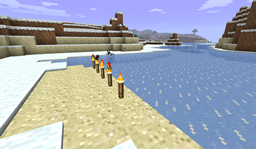
¡Evita que el hielo y la nieve se derritan! Construye esa fortaleza de hielo con la que siempre has soñado.
NoMelt v1.0.0
Hey there! This plugin will globally stop all melting of ice and snow (including snow blocks) from light sources (lava, glowstone, torch etc...) as well as stop ice from freezing in water. This will make ice drop blocks of ice too. To install, drop the NoMelt.jar into your bukkit plugins folder and restart/reload the server. If "[NoMelt] Enabled" comes up in the console, you're good to go! Originally this plugin was developed by Vynlar back on the Bukkit forums. I am a good friend of his, and decided to pick it back up and fix it so it works with the latest CraftBukkit, as well as begin adding new features.
Features:
- Stops snow/ice from melting
- Stops ice from freezing
- Stops snow from gathering on the ground
- Option to make ice not spawn water when broken
- Makes ice drop ice blocks
In the configuration file, which can be found in your plugins folder under "NoMelt/config.yml", there are options in a list. Setting one to true means it will be active, false means it will be inactive.
Configuration Options:
- icedrop: When true, ice will drop when an ice block is broken. (Default: True)
- noMelting: When true, no ice or snow will melt from light sources such as torches or glowstone. (Default: True)
- noFreeze: When true, no water will freeze and no snow will collect in your world. (Default: True)
- iceWater: When false, no water will spawn when ice is broken. (Default: False)
To-Do
- Add no-melt building mode, where nothing that you build with the mode on will melt, but everything else will
- Cuboid melting protection
Credits:
Idea from this thread
Thanks to Bone008 and xsolar66 for feature ideas.
Thanks to Avous for requesting and coming up with the idea.
Thanks to Vynlar for letting me pick this project back up!
Cómo instalar NoMelt
A server on Paper or Spigot
The plugin runs on the server core; players do not need to install anything.
File goes into the plugins folder
Download the file NoMelt.jar (5 KB) and put it into the server’s plugins folder.
Restart the server
On startup the plugin creates its own settings folder in plugins.
Use the “To server” button
On Millida Hosting, the button at the top of the page uploads the file to your server and restarts it for you.
Versiones
Con dependencias
| Minecraft | Cargador | Archivo | Fecha | Acciones |
|---|---|---|---|---|
| — | — | NoMelt v1.0.04.9 KB |
Reseñas
Sé el primero en valorar NoMelt


