

ClientCatcher Plugin para Minecraft 1.20.1, 1.21.1
Detecta el cliente con el que un jugador se ha conectado a tu servidor
- visualizaciones
- 30 visualizaciones
- Actualizado
- Actualizado 05.09.2026
- 1.7.2 — 26.2
 Velocity
- Servidor
Acerca del plugin ClientCatcher
Simple Velocity plugin to get the client with which a player has connected to your server
Commands
Permission: clientcatcher.command
Client /clientcatcher client
Permission: clientcatcher.command.client
Shows you a player's client and mods, if any are installed
Mods /clientcatcher mods
Permission: clientcatcher.command.mods
Shows you the player's mods, in case he has any installed
Reload /clientcatcher reload
Permission: clientcatcher.command.reload
Reloads the plugin
Permissions
Bypass Client Detection
clientcatcher.bypass.brand
Bypass Mod Detection
clientcatcher.bypass.mods
- Download it from Modrinth
- Download MCKotlin
- Put both plugins in your Velocity proxy
- And configure the plugin to block the mods and clients of your choice
The plugin is not fully effective, several malicious clients hide their client branding when entering the server or impersonate vanilla clients. However, the plugin can detect several clients such as Forge, Fabric, LiteLoader, Lunar, Vanilla, and others.
It also detects Forge 1.7.10 - 1.12.2 mods.
If you want to use ClientCatcher in Fabric, you can try https://modrinth.com/mod/clientcatcher-fabric
Placeholders
ClientCatcher provides several placeholders for use in other MiniPlaceholders-compatible plugins
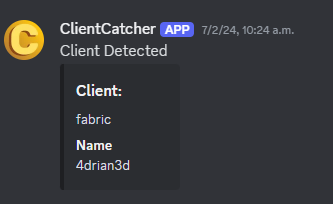
Discord WebHook Configuration
If you have a Discord server on which you want to show alerts of which clients your players are using, you can activate the webhooks module and configure it like this
- Copy the URL of the WebHook.
- Extract the ID and Token from the URL.
- Put those fields in the specific configuration options.
- Restart your proxy
Cómo instalar ClientCatcher
A server on Velocity
The plugin runs on the server core for Minecraft 1.7.2–26.2; players do not need to install anything.
File goes into the plugins folder
Download the file ClientCatcher-3.2.3.jar (196 KB) and put it into the server’s plugins folder.
Restart the server
On startup the plugin creates its own settings folder in plugins.
Or use the “To hosting” button
On Millida Hosting, the button at the top of the page uploads the file to your server and restarts it for you.
Versiones
Con dependencias
| Minecraft | Cargador | Archivo | Fecha | Acciones |
|---|---|---|---|---|
| 1.12.2 | Velocity | 1.12.2196 KB | — |
Qué necesita para funcionar
- MiniPlaceholdersopcional
Reseñas
Sé el primero en valorar ClientCatcher


