
ChestShop Notifier Plugin para Minecraft 1.16
Rastrea las ventas de ChestShop y recibe notificaciones
Acerca del plugin ChestShop Notifier
Note: The latest version of this plugin works with every UUID-compatible CraftBukkit or Spigot version!
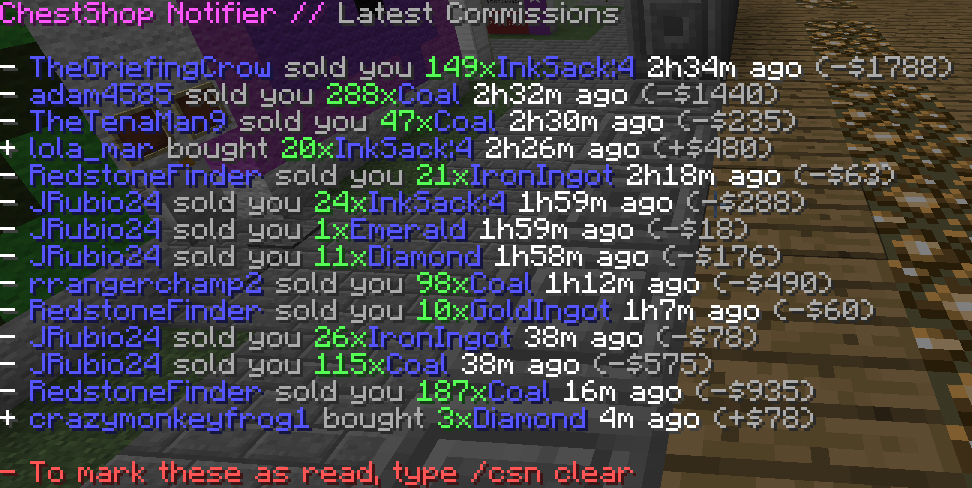
CSN (ChestShop Notifier) is a plugin that records ChestShop transactions to a SQLite or MySQL database. When a shop owner logs onto the server, they will be presented with an option to view sales from when they were offline.
Installation Instructions
Commands
- /csn help → Shows available commands
- /csn history [<page>] → Shows unread sale history from database
- /csn history [<username> [<page>]] → Shows sale history of another player
- /csn clear [<usernamse>] → Marks all sale history as read for your user
- /csn cleandatabase → Remove database entries. Parameters:
--older-than, -o days → Removes entries older than days --user, -user username/uuid → Removes entries from a single user only --read-only, -r → Removes only read entries, default behaviour --all, -a → Removes all entries
- /csn upload → Forces the plugin to upload all data to the database (in v1.1 and higher this should be only used after database connection problems!)
- /csn reload → Reloads configuration and connects to database using new config
- /csn convert → Converts the database table csn to UUIDs. (table csn gets converted in csnUUID and the username table renamed to csnOLD)
Permissions
- csn.user → Allows user to receive notifications when they log in, and access to /csn history.
- csn.admin → Super permission node. Access to all commands. (especially upload, reload and convert)
For all permissions take a look at the plugin.yml
Config
Chest Shop Notifier<br /> logging: admin-shop: true notifications: notify-on-user-join: true delay-seconds: 5 history: max-rows: 10 query-limit: 10000 debugging: verbose: true database: # Possible types: SQLite and MySQL type: sqlite dbname: 'database' # MySQL specific settings host: 'localhost' port: 3306 username: 'dbadmin' password: '123456' ssl: false clean-on-startup: enabled: false parameters: "--older-than 30 --all" messages: sales: "&c You made &f{sales} sales&c since you last checked." history-cmd: "&c To see them, type &f/csn history&c." history-caption: "&dChestShop Notifier // &7Latest Commissions" history-empty: "&cNothing to show." history-bought: "&a+ &9{player} &7bought &a{count}x&9{item} &f{timeago}&7 ago &a(+{money})" history-bought-read: "&a+ &7{player} &8bought &a{count}x&7{item} &7{timeago}&8 ago &a(+{money})" history-sold: "&c- &9{player} &7sold you &c{count}x&9{item} &f{timeago}&7 ago &c(-{money})" history-sold-read: "&c- &7{player} &8sold you &c{count}x&7{item} &7{timeago}&8 ago &c(-{money})" history-footer-page: "&c- Page &f{current}&c/&f{pages}&6 - &7/csn history <page>" history-footer-clear: "&f- &cTo remove all old entries, type /csn clear" history-clear: "&cHistory cleared! New sales will continue to be recorded." history-marked-read: "&cUnread entries marked read!" history-others-not-allowed: "&cYou are not allowed to check the history of {username}" # new translations reload-cmd: "&dChestShop Notifier // &7Reloading, please wait..." reload-success: "&aReloaded!" reload-database-success: "&aDatabase connected!" reload-database-fail: "&cDatabase failed to connect!" user-not-found: "&cThe user '{player}' was not found." page-not-found: "&e{page} &cis not a valid page number input for /csn history <page>!" page-not-found-other: "&e{page} &cis not a valid page number input for /csn history <user> <page>!" database-error: "&cInvalid database connection. Please edit config and /csn reload." database-error-oncommand: "&cDatabase error while executing this command!" database-cleaned: "&cCleaned database from {amount} entries!" database-uploaded: "&cBatch executed!" database-convert: "&cAttempting to convert database..." database-convert-fail: "&cError while trying to convert! Maybe you don't have a 'csn' table?" database-converted: "&cDatabase converted!" unrecognized-command: "&cCommand not recognized. Type /csn help for help." missing-arguments: "&cMissing parameter arguments: {usage}" invalid-number: "&c{typo} is not a valid number input for {usage}!" invalid-username: "&c{typo} is not a valid username/uuid input for {usage}!" missing-permission: "&cYou don't have the permission {permission}!" help: header: "&dChestShop Notifier // &7Commands" help: "&7 /csn &dhelp &f- Plugin usage & commands" history: "&7 /csn &dhistory [<page>]&f- View sales" clear: "&7 /csn &dclear &f- Remove read sales" history-others: "&7 /csn &dhistory <username> [<page>]&f- View sales of another account" clear-others: "&7 /csn &dclear <username>&f- Remove read sales of another account" cleandatabase: "&7 /csn &ccleandatabase &f- Remove database entries. Parameters:" cleandatabase-older-than: "&c --older-than, -o <days> &f- Removes entries older than <days>" cleandatabase-user: "&c --user, -user <username/uuid> &f- Removes entries from a single user only" cleandatabase-read-only: "&c --read-only, -r &f- Removes only read entries, default behaviour" cleandatabase-all: "&c --all, -a &f- Removes all entries" upload: "&7 /csn &cupload &f- Force update databases" convert: "&7 /csn &cconvert &f- Convert database to UUIDs" reload: "&7 /csn &creload &f- Reload configuration"
Requirements
- ChestShop installed and running.
- Optionally: MySQL server if you want to store the information in a real database/share it between servers.
Planned Features
- UUID support done in v1.1.2
- Look up the sales of offline players done in v1.1.2
- Ignore ChestShop's Admin Shop done in v1.1.2
- History pagination done in v1.2
- SQLite support done in v1.3.3
- Auto updater & version checker
- Translation system (partially done in v1.1.2, you can set your own messages in the config)
For more features and suggestion use the GitHub issues page!
Source Code & Dev Builds
- You can view the source code online at:
https://github.com/ChestShop-authors/ChestShopNotifier
- Development builds are available on the Minebench.de Jenkins build server:
http://ci.minebench.de/job/ChestShopNotifier/
Donations
Feel free to comment with your ideas, bugs, or requests, ideally by opening an issue on the github repo. If you really want to monetarily then click here.
Demonstration

Cómo instalar ChestShop Notifier
A server on Paper or Spigot
The plugin runs on the server core for Minecraft 1.13–1.16; players do not need to install anything.
File goes into the plugins folder
Download the file ChestShopNotifier.jar (241 KB) and put it into the server’s plugins folder.
Restart the server
On startup the plugin creates its own settings folder in plugins.
Or use the “To hosting” button
On Millida Hosting, the button at the top of the page uploads the file to your server and restarts it for you.
Minecraft 1.16 runs on Java 8: with a different Java version the game may close right after launch.
Versiones
Con dependencias
| Minecraft | Cargador | Archivo | Fecha | Acciones |
|---|---|---|---|---|
| 1.16 | — | 1.3.3241 KB |
FAQ
Which Minecraft versions does ChestShop Notifier work on?
There are files for 1.16, 1.15, 1.14, 1.13. The newest is 1.16.
Which Java does ChestShop Notifier need?
Minecraft 1.16 runs on Java 8. If the game closes right after launch, the usual cause is the wrong Java version in the profile settings.
Where can I download ChestShop Notifier safely?
On this page: the file ChestShopNotifier.jar (241 KB) is stored on Millida’s server, with no link shorteners. SHA-1 checksum: bf536bcef8d01d3d36a9754a0f6569066495dce1.
Reseñas
Sé el primero en valorar ChestShop Notifier


