
CartDispense Plugin para Minecraft
Dispensa vagonetas en raíles automáticamente
CartDispense - Dispense Carts On Rails Automatically
Version: v0.10
Description
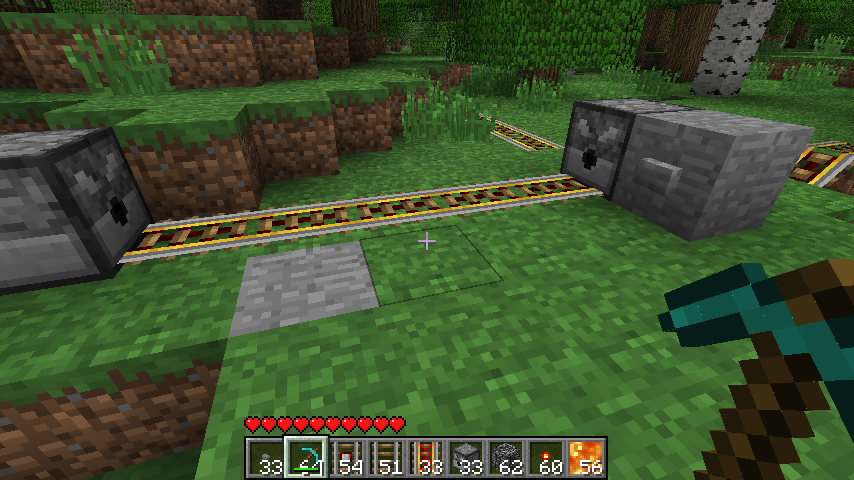
Dont you just hate it when you find a train track that you want to ride and you dont have any minecarts to ride it. You could build one from iron or you could spawn one if you are an admin. Not anymore! With this plugin there is no need for making or spawning minecarts, simply press the button and a minecart will be spawned on the track automatically!
Updated to work with powered-rails and detector-rails!
Video
Features
- Click the stone button beside the dispenser and a minecart is automatically placed on the track.
- Works with standard rails, powered rails, and detector rails.
- Works in any orientation but there must be a track infront of the dispenser and a minecart inside the dispenser.
- Works with rails bellow the dispenser.
- Placing another dispenser on the other end of the track will automatically remove the minecart and place the user out of the cart.
Download
Download CartDispense
Changelog
v0.10 - 26/07/2011
- Updated for 1337, plugin now works with any world.
v0.8 - 26/07/2011
- Added @N4th4 changes for the CB 1000 update. Plugin should be working fine now.
v0.7 - 19/06/2011
- Added support for using powered minecarts and storage minecarts in dispensers.
v0.6 - 03/06/2011
- Fixed bug where minecart would throw errors if the world was not named world. Fixed now, you (should) be able to use any world name now.
v0.5 - 01/06/2011
- Added support for the removal of minecart on collision with another dispenser.
v0.4 - 31/05/2011
- Added support for spawning minecarts on a tracks below the dispenser(can add it for above too if you want)
v0.3 - 31/05/2011
- Fixed error with minecarts spawning even if there was no cart around
v0.2 - 30/05/2011
- Updated to work with detector-rails and powered-rails
- Removed pointless debug message
v0.1 - 29/05/2011
- Initial Release
Cómo instalar CartDispense
A server on Paper or Spigot
The plugin runs on the server core; players do not need to install anything.
File goes into the plugins folder
Download the file CartDispense.jar (4 KB) and put it into the server’s plugins folder.
Restart the server
On startup the plugin creates its own settings folder in plugins.
Or use the “To hosting” button
On Millida Hosting, the button at the top of the page uploads the file to your server and restarts it for you.
Versiones
Con dependencias
| Minecraft | Cargador | Archivo | Fecha | Acciones |
|---|---|---|---|---|
| — | — | CartDispense v0.113.5 KB |
FAQ
Do players need to install CartDispense?
No, the plugin goes only on the server, into the plugins folder: players do not need to download anything.
Reseñas
Sé el primero en valorar CartDispense


