
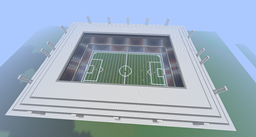
World Cup Stadium Mapa para Minecraft 1.7.9
Estadio de la Copa Mundial
Acerca del mapa World Cup Stadium
World Cup Stadium 2014
How to install:in start meny type %appdata% go to the .minecraft and saves in that folder drag ne downloadet file
Done. Enyoy
Cómo instalar World Cup Stadium
With Millida Launcher
Install Millida Launcher
The launcher is free: download it at millida.net/launcher and sign in with any nickname.
Click “Install” on this page
The launcher opens and installs the map for Minecraft 1.0.0–1.7.9 automatically.
Launch the game
A profile with it appears in the launcher: click “Play”.
Manually
Download the map archive
Pick the file World Cup Stadium.zip (1.6 MB).
Unpack it into the saves folder
The world folder (with level.dat inside) must sit directly in .minecraft/saves.
Open the world
“Singleplayer”: the map will be in your world list.
On a server
Replace the world folder
Stop the server and put the map folder in place of world (or set its name in level-name).
Use the “To server” button
On Millida Hosting, the button at the top of the page uploads the file to your server and restarts it for you.
Versiones
Con dependencias
| Minecraft | Cargador | Archivo | Fecha | Acciones |
|---|---|---|---|---|
| 1.7.6 | — | World Cup Stadium.zip1.6 MB |
FAQ
Which Minecraft versions does World Cup Stadium work on?
There are files for 1.0.0–1.7.9, 24 versions in total. The newest is 1.7.9.
Where can I download World Cup Stadium safely?
On this page: the file World Cup Stadium.zip (1.6 MB) is stored on Millida’s server, with no link shorteners. SHA-1 checksum: e29f32827fc6c73ae85b52b0174fbbba3376f280.
Reseñas
Sé el primero en valorar World Cup Stadium



