
Parkour Course Mapa para Minecraft 1.8
Un circuito de parkour único en Minecraft.
Description
Your main goal is to, well, jump! Pass the level's mini maps the quickest possible! I really hope you enjoy it! It took me a lot of time to build it and I really enjoyed it while making it.
No mod is required to play this map.
Link to respective thread in MinecraftForum.
Features
- The map is made out of small mini courses, each with its own special detail.
- Music for your entertainment, different in each level.
- Shortcuts, checkpoints and mazes.
- Level titling (using the 14w21b features).
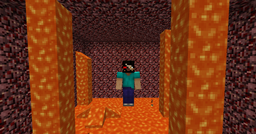
Trailer: soon! Here are some screenshots of the map instead.
Notes
- Play the map with the latest snapshot (14w21b and higher). In lower versions some features might not work and thus you won't have the best experience the map can give you. If you decide to play the map in a lower version, may it be 1.7.9.
- This map is still under development. I've been working on it for a very long time (started about summer 2012) and I decided to make a public release. This doesn't mean it misses any features. It means the map does not have a proper ending.
Courses
- Humble Begginings
- A Peaceful Place
- Zephyr
- The TARDIS
- Hurricos
- The Library
- Wool Party!
- Crystal Glacier
- Volcanic Acids (unfinished)
Rules
- Do not destroy any blocks.
- Set your brightness setting to Bright and Smooth Lighting to Maximum.
- Your Render Distance setting must be 12 at most.
- Turn off the Clouds.
- Particle visibility must be set to either Decreased or All.
- Do not change any gamerules.
- Always follow shortcuts you find, but
- Never fly to get to a point (if you use creative mode or any other hack/mod), unless you are mad :P.
- Choose your gamemode (creative mode preffered).
- Do not use any mods/hacks to achieve anything. You are allowed to use creative mode anytime you want.
- You can use any command you want.
- Enable your music (put the Master Volume to 100% and the Music to 0%) to listen to tracks (by C418). (<- optional)
Videos
You are very welcome to record videos of this map. If you do so, please give credit to me and a link to this thread in the description. Send me a message and I will add your video to the thread!
Feedback
Feedback is appreciated! Leave some when you finish the map to let others, and me as well, know what you think of it! Is it good? Is it bad? Anything really.
Cómo instalar Parkour Course
With Millida Launcher
Install Millida Launcher
The launcher is free: download it at millida.net/launcher and sign in with any nickname.
Click “Install” on this page
The launcher opens and installs the map for Minecraft 1.7.9–1.8 automatically.
Launch the game
A profile with it appears in the launcher: click “Play”.
Manually
Download the map archive
Pick the file Parkour Course.zip (9.1 MB).
Unpack it into the saves folder
The world folder (with level.dat inside) must sit directly in .minecraft/saves.
Open the world
“Singleplayer”: the map will be in your world list.
On a server
Replace the world folder
Stop the server and put the map folder in place of world (or set its name in level-name).
Or use the “To hosting” button
On Millida Hosting, the button at the top of the page uploads the file to your server and restarts it for you.
Versiones
Con dependencias
| Minecraft | Cargador | Archivo | Fecha | Acciones |
|---|---|---|---|---|
| 1.7.9 | — | Parkour Course.zip9.1 MB | ||
| 1.7.9 | — | Parkour Course.zip9.1 MB |
Reseñas
Sé el primero en valorar Parkour Course



