

playtime tracker Paquete de datos para Minecraft 1.16.5, 1.19.2
¡registra tu tiempo de juego en el mundo mostrado en días, horas, minutos y segundos!
- visualizaciones
- 34 visualizaciones
- Actualizado
- Actualizado 02.09.2026
- 1.13 — 1.20
 Paquete de datos
- Cliente y servidor
playtime tracker
track your world playtime displayed in days, hours, minutes, and seconds!
by default, playtime is displayed above your hotbar:
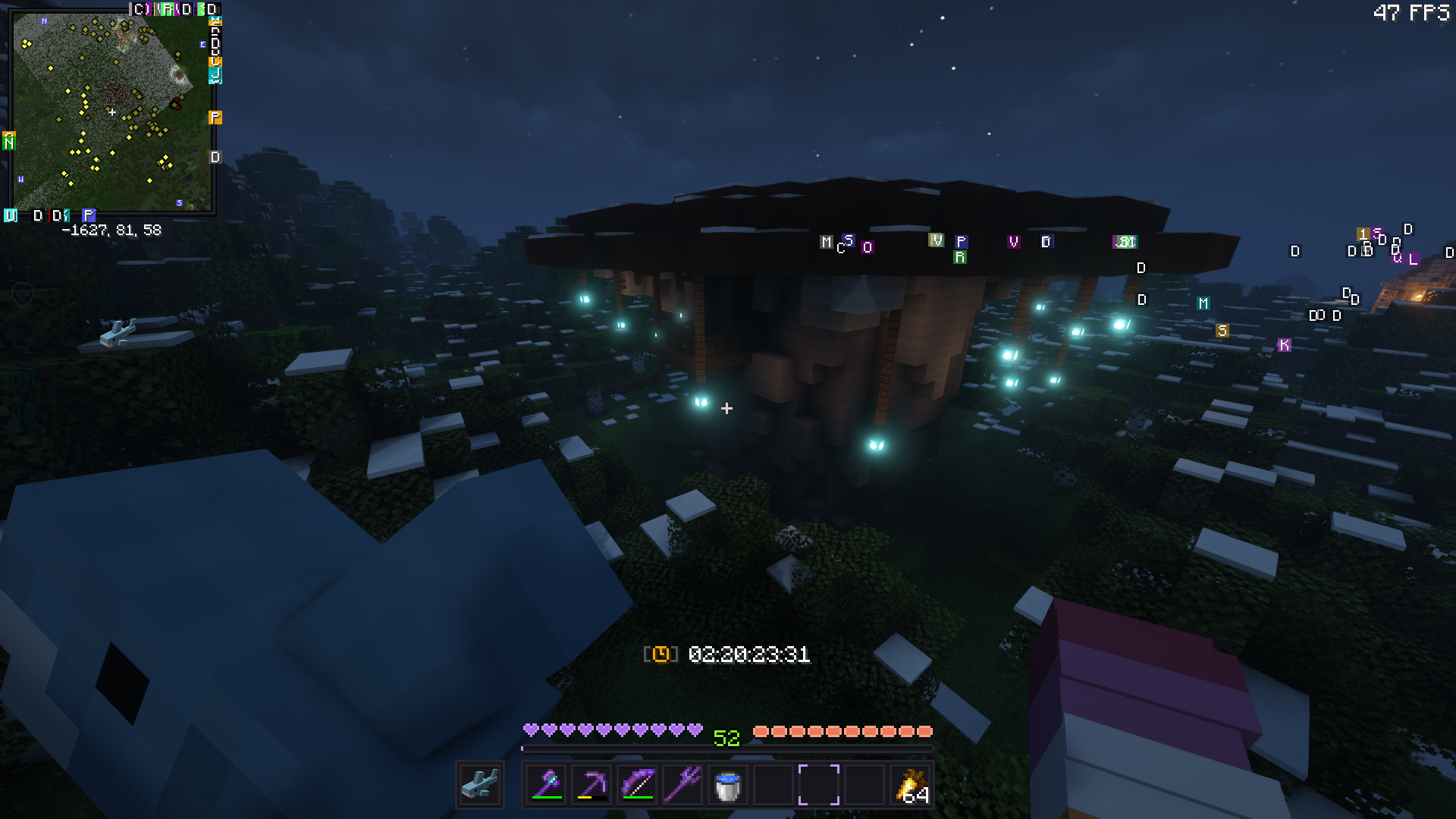
..but this can be toggled via: (playtime will still be tracked in the background)
/trigger playtime_display

alternatively, display global playtime with:
/scoreboard objectives setdisplay sidebar playtime_s/m/h/d
name - scoreboard
seconds - playtime_s minutes - playtime_m hours - playtime_h days - playtime_d

Cómo instalar playtime tracker
With Millida Launcher
Install Millida Launcher
The launcher is free: download it at millida.net/launcher and sign in with any nickname.
Click “Install” on this page
The launcher opens and installs the data pack for Minecraft 1.13–1.20 automatically.
Launch the game
A profile with it appears in the launcher: click “Play”.
Manually
Download the archive
Pick the file Playtime-Tracker.zip (17 KB) for your game version.
New world: “Data Packs”
When creating a world, click “Data Packs”, drag the archive into the window, then move it to “Selected”.
Existing world: the datapacks folder
Put the archive into saves/<world>/datapacks and type /reload in game.
On a server
Archive goes into the server world’s datapacks
The world/datapacks folder on the server; players do not need to install anything.
Reload the data
Type /reload in the server console or restart the server.
Use the “To server” button
On Millida Hosting, the button at the top of the page uploads the file to your server and restarts it for you.
Versiones
Con dependencias
| Minecraft | Cargador | Archivo | Fecha | Acciones |
|---|---|---|---|---|
| 1.18.2 | Paquete de datos | 1.18.217 KB | ||
| 1.17.1 | Paquete de datos | 1.17.117 KB | ||
| 1.15.2 | Paquete de datos | 1.15.217 KB | ||
| 1.14.4 | Paquete de datos | 1.14.417 KB | ||
| 1.16.5 | Paquete de datos | 1.16.517 KB | — |
Reseñas
Sé el primero en valorar playtime tracker


