

Physical Stats Paquete de datos para Minecraft 1.21.1, 1.21
Mejora la velocidad, la fuerza y el tamaño consumiendo objetos personalizados. Cada estadística tiene 5 niveles, afectando a habilidades y atributos.
- descargas
- 1 descargas
- visualizaciones
- 38 visualizaciones
- Actualizado
- Actualizado 23.10.2025
- 1.21 — 26.2
 Paquete de datos
- Cliente y servidor
Physical Stats
This Datapack/mod adds 3 new stats which define your physical condition, you can become a gigantic monster with slower movement, or a hyper fast runner! Or anything in between as well as a strong puncher :)
Each stat has 5 levels, and here are list of pros and cons of each:

Size:
Increases player size by 0.085 per level Decreases movement speed by 0.024 per level Increases block and entity interaction range by 0.67 block per level Increases max health by 4 (2 hearts) per level

Speed:
Increases movement on land by 0.021 per level Increases movement in water by 0.15 per level
Strength:
Increases base knockback by 0.35 per level Increases base damage by 0.33 per level
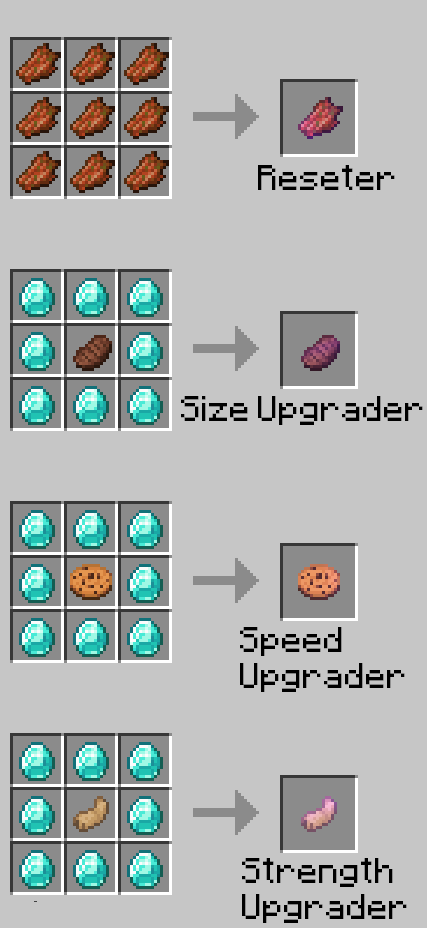
You can also reset all your statistic by eating a Reseter crafted with 9 rotten flesh
Crafting
Cómo instalar Physical Stats
With Millida Launcher
Install Millida Launcher
The launcher is free: download it at millida.net/launcher and sign in with any nickname.
Click “Install” on this page
The launcher opens and installs the data pack for Minecraft 1.21–26.2 automatically.
Launch the game
A profile with it appears in the launcher: click “Play”.
Manually
Download the archive
Pick the file physical_stats_1.2.zip (16 KB) for your game version.
New world: “Data Packs”
When creating a world, click “Data Packs”, drag the archive into the window, then move it to “Selected”.
Existing world: the datapacks folder
Put the archive into saves/<world>/datapacks and type /reload in game.
On a server
Archive goes into the server world’s datapacks
The world/datapacks folder on the server; players do not need to install anything.
Reload the data
Type /reload in the server console or restart the server.
Use the “To server” button
On Millida Hosting, the button at the top of the page uploads the file to your server and restarts it for you.
Versiones
Con dependencias
| Minecraft | Cargador | Archivo | Fecha | Acciones |
|---|---|---|---|---|
| 26.2 | Paquete de datos | 26.216 KB | ||
| 26.1 | Paquete de datos | 26.116 KB |
Reseñas
Sé el primero en valorar Physical Stats


