
OP Cobblestone Paquete de datos para Minecraft 1.21.4
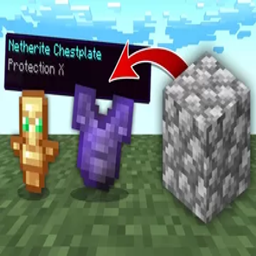
Minecraft, pero... ¡el Cobblestone suelta botín OP! ¡1.21.4!
Acerca del paquete de datos OP Cobblestone
Hi everyone!
Welcome to another of my OP datapacks! In this pack, Cobblestone gives OP Loot! Using Silk Touch, still gives you Cobblestone. While mining Cobblestone with a pickaxe, you'll get OP Loot instead of Cobblestone... If you mine with a Silk Touch pickaxe, you'll get Cobblestone.
Leave the Pack Zipped In Your Datapack Folder! No Need To Type: /reload as this pack will auto load on it's own!
Let me know if you guys run into any problems, or if there is anything you want to see added...
If you are having issues with downloading the or installing the datapack, or any game play questions, you can easily chat with me via discord: https://discord.gg/9eWqwKk
Looking for game testers, Youtubers, etc...
If you use any part of this datapack, ask 1st for permission.
If you want to record this video for YouTube, or Twitch, or anything else, feel free. I'd love to see the gameplay. Also, make sure to add a link to this in the description!
DONATIONS If you would be so kind to show me some love by donating to me on Paypal, we would really appreciate it, as these projects take a lot of time and effort to make, and I always deliver quality over quantity!
Donations can be sent to https://www.paypal.me/siresolo
If you are having issues with downloading the or installing the datapack, or any game play questions, you can easily chat with me via discord: https://discord.gg/9eWqwKk
Cómo instalar OP Cobblestone
With Millida Launcher
Install Millida Launcher
The launcher is free: download it at millida.net/launcher and sign in with any nickname.
Click “Install” on this page
The launcher opens and installs the data pack for Minecraft 1.21.4 automatically.
Launch the game
A profile with it appears in the launcher: click “Play”.
Manually
Download the archive
Pick the file OP Cobblestone 1.21.4.zip (6 KB) for your game version.
New world: “Data Packs”
When creating a world, click “Data Packs”, drag the archive into the window, then move it to “Selected”.
Existing world: the datapacks folder
Put the archive into saves/<world>/datapacks and type /reload in game.
On a server
Archive goes into the server world’s datapacks
The world/datapacks folder on the server; players do not need to install anything.
Reload the data
Type /reload in the server console or restart the server.
Use the “To server” button
On Millida Hosting, the button at the top of the page uploads the file to your server and restarts it for you.
Versiones
Con dependencias
| Minecraft | Cargador | Archivo | Fecha | Acciones |
|---|---|---|---|---|
| 1.21.4 | — | OP Cobblestone 1.21.4.zip5.9 KB |
FAQ
Which Minecraft versions does OP Cobblestone work on?
Only Minecraft 1.21.4: there are no files for other versions.
Does OP Cobblestone work on a server?
Yes: the data pack goes into the datapacks folder of the server world, and players do not need to install anything.
Where can I download OP Cobblestone safely?
On this page: the file OP Cobblestone 1.21.4.zip (6 KB) is stored on Millida’s server, with no link shorteners. SHA-1 checksum: f111fe73b9f439d85fad8722d9e58d163db12be9.
Reseñas
Sé el primero en valorar OP Cobblestone


