

Nostalgic Bed Paquete de datos para Minecraft 1.21.1, 1.21
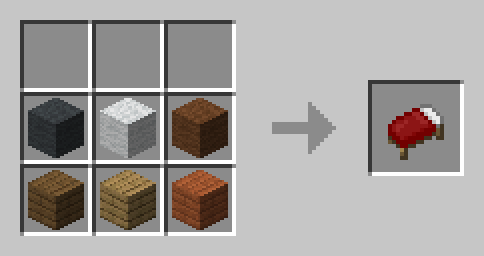
Reemplaza el sistema moderno de fabricación de camas con la nostálgica receta antigua de la cama roja.
- visualizaciones
- 18 visualizaciones
- Actualizado
- Actualizado 26.09.2026
- 1.21 — 1.21.10
 Paquete de datos
- Cliente y servidor
Acerca del paquete de datos Nostalgic Bed

This is a nostalgia Datapack/Mod. You can craft the Red Bed with any wool/wood combination. To get other colors, just dye the Bed. It also makes crafting the Bed on your first day much less of a hassle.
🛠️ Installation
Datapack Installation Guide
Copy the .zip archive into the ".minecraft/saves/yourworldname/datapacks" folder, where yourworldname is the name of your world.

Mod installation Guide
Copy the .jar archive into the folder your Mod Loader of choice provides.

❗Issues & Suggestions
Please report issues immediately on my Discord.
Cómo instalar Nostalgic Bed
With Millida Launcher
Install Millida Launcher
The launcher is free: download it at millida.net/launcher and sign in with any nickname.
Click “Install” on this page
The launcher opens and installs the data pack for Minecraft 1.21–1.21.10 automatically.
Launch the game
A profile with it appears in the launcher: click “Play”.
Manually
Download the archive
Pick the file nostalgicBed1.21.10.zip (2 KB) for your game version.
New world: “Data Packs”
When creating a world, click “Data Packs”, drag the archive into the window, then move it to “Selected”.
Existing world: the datapacks folder
Put the archive into saves/<world>/datapacks and type /reload in game.
On a server
Archive goes into the server world’s datapacks
The world/datapacks folder on the server; players do not need to install anything.
Reload the data
Type /reload in the server console or restart the server.
Use the “To server” button
On Millida Hosting, the button at the top of the page uploads the file to your server and restarts it for you.
Versiones
Con dependencias
| Minecraft | Cargador | Archivo | Fecha | Acciones |
|---|---|---|---|---|
| 1.21.10 | Paquete de datos | 1.21.102.4 KB | ||
| 1.21.4 | Paquete de datos | 1.21.42.4 KB | ||
| 1.21.3 | Paquete de datos | 1.21.32.5 KB | ||
| 1.21 | Paquete de datos | 1.212.5 KB |
FAQ
Which Minecraft versions does Nostalgic Bed work on?
There are files for 1.21–1.21.10, 7 versions in total. The newest is 1.21.10.
Does Nostalgic Bed work on a server?
Yes: the data pack goes into the datapacks folder of the server world, and players do not need to install anything.
Where can I download Nostalgic Bed safely?
On this page: the file nostalgicBed1.21.10.zip (2 KB) is stored on Millida’s server, with no link shorteners. SHA-1 checksum: ddb413bb2f43b55801e1757463180aebe5bb6a36.
Reseñas
Sé el primero en valorar Nostalgic Bed


