

Craftable Bedrock Paquete de datos para Minecraft 1.20.1, 1.21.1
Hace que la bedrock se pueda fabricar, para construcciones permanentes. ¡Ten cuidado dónde la colocas!
- visualizaciones
- 29 visualizaciones
- Actualizado
- Actualizado 26.09.2026
- 1.14 — 26.1.1
 Paquete de datos
- Cliente y servidor
Craftable Bedrock Datapack
Tired of bedrock being an unmovable, uncraftable barrier in your Minecraft world? This datapack changes everything! With this datapack, you can now craft bedrock using a simple yet substantial recipe: 9 blocks of obsidian.
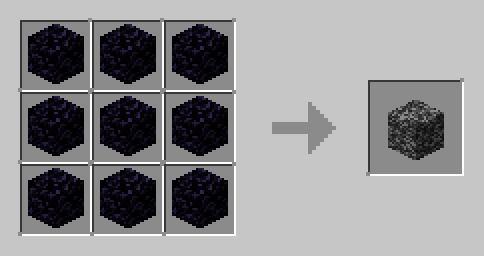
Imagine the possibilities! Build truly indestructible bases, create unbreachable vaults, or design challenges with ultimate barriers. No longer confined by the limitations of vanilla gameplay, your creativity can now reach new, unbreakable heights.
Download the "Unbreakable Creations" datapack today and start building the ultimate, unbreakable structures in your Minecraft world!
Note: Minecraft might say that the datapack is incompartable with the minecraft version. However this is not true. It can be used safely in minecraft 1.13.x to 1.21.x without any problems
Cómo instalar Craftable Bedrock
With Millida Launcher
Install Millida Launcher
The launcher is free: download it at millida.net/launcher and sign in with any nickname.
Click “Install” on this page
The launcher opens and installs the data pack for Minecraft 1.14–26.1.1 automatically.
Launch the game
A profile with it appears in the launcher: click “Play”.
Manually
Download the archive
Pick the file craftable-bedrock-26.1.zip (1 KB) for your game version.
New world: “Data Packs”
When creating a world, click “Data Packs”, drag the archive into the window, then move it to “Selected”.
Existing world: the datapacks folder
Put the archive into saves/<world>/datapacks and type /reload in game.
On a server
Archive goes into the server world’s datapacks
The world/datapacks folder on the server; players do not need to install anything.
Reload the data
Type /reload in the server console or restart the server.
Use the “To server” button
On Millida Hosting, the button at the top of the page uploads the file to your server and restarts it for you.
Versiones
Con dependencias
| Minecraft | Cargador | Archivo | Fecha | Acciones |
|---|---|---|---|---|
| 26.1.1 | Paquete de datos | 26.1.11.1 KB | ||
| 1.21.11 | Paquete de datos | 1.21.11990 B | ||
| 1.20.6 | Paquete de datos | 1.20.6996 B | ||
| 1.19.4 | Paquete de datos | 1.19.4995 B | ||
| 1.18.2 | Paquete de datos | 1.18.2995 B | ||
| 1.17.1 | Paquete de datos | 1.17.1995 B | ||
| 1.16.5 | Paquete de datos | 1.16.5995 B | ||
| 1.15.2 | Paquete de datos | 1.15.2995 B |
Reseñas
Sé el primero en valorar Craftable Bedrock


