

CITATTFP Paquete de datos para Minecraft 1.20.1, 1.21.1
Datapack para cambiar el objeto activador del portal de Twilight Forest
- visualizaciones
- 129 visualizaciones
- Actualizado
- Actualizado 26.09.2026
- 1.16.5 — 1.21.1
 Paquete de datos
- Cliente y servidor
Custom item to activate the Twilight Forest portal (CITATTFP)
[EN] How to use
- Open the archive, navigate to the path: /data/twilightforest/tags/items/portal/ and open the file activator.json.
- Its contents will look something like this:
{ "replace": true, "values": [ { "id": "minecraft:netherite_ingot", "required": false } ] }
In this case, minecraft:netherite_ingot is the item that will replace the diamond for activating the portal.
- Insert the ID of the item you want to use instead of minecraft:netherite_ingot. Don't forget the quotes.
- Save the file, close the archive and move it to the folder /saves/(WorldName)/datapacks/.
How to get an item ID
To get an item ID, press the key combination F3 + H in the game, then hover over the item in your inventory.
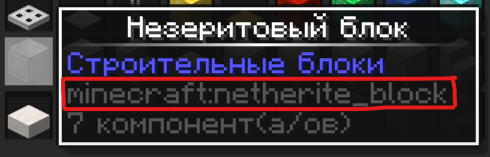
What is highlighted in red in the photo is the item ID you need to use in activator.json.
Examples of activator.json:
Replacement with a sniffer egg
{ "replace": true, "values": [ { "id": "minecraft:sniffer_egg", "required": false } ] }
Replacement with a totem of undying
{ "replace": true, "values": [ { "id": "minecraft:totem_of_undying", "required": false } ] }
Replacement with an egg, netherite ingot and trident
Since the activator.json file is a tag, you can add multiple items (including other tags) that will activate the portal to the Twilight Forest.
{ "replace": true, "values": [ { "id": "minecraft:netherite_ingot", "required": false }, { "id": "minecraft:egg", "required": false }, { "id": "minecraft:trident", "required": false } ] }
Guide for 1.12.2
For 1.12.2 follow this plan:
- Go to the /config/ folder, find the twilightforest.cfg file there and open it.
- Find the line S:portalCreationItems - this line is responsible for changing the portal activator.
Otherwise, do the same as in the instructions above: find out the item ID, write it instead of minecraft:diamond, and reload the game.
{ "replace": true, "values": [ { "id": "minecraft:netherite_ingot", "required": false } ] }
{ "replace": true, "values": [ { "id": "minecraft:sniffer_egg", "required": false } ] }
{ "replace": true, "values": [ { "id": "minecraft:totem_of_undying", "required": false } ] }
{ "replace": true, "values": [ { "id": "minecraft:netherite_ingot", "required": false }, { "id": "minecraft:egg", "required": false }, { "id": "minecraft:trident", "required": false } ] }
Cómo instalar CITATTFP
With Millida Launcher
Install Millida Launcher
The launcher is free: download it at millida.net/launcher and sign in with any nickname.
Click “Install” on this page
The launcher opens and installs the data pack for Minecraft 1.16.5–1.21.1 automatically.
Launch the game
A profile with it appears in the launcher: click “Play”.
Manually
Download the archive
Pick the file citattfp_1-0-1.zip (1 KB) for your game version.
New world: “Data Packs”
When creating a world, click “Data Packs”, drag the archive into the window, then move it to “Selected”.
Existing world: the datapacks folder
Put the archive into saves/<world>/datapacks and type /reload in game.
On a server
Archive goes into the server world’s datapacks
The world/datapacks folder on the server; players do not need to install anything.
Reload the data
Type /reload in the server console or restart the server.
Use the “To server” button
On Millida Hosting, the button at the top of the page uploads the file to your server and restarts it for you.
Versiones
Con dependencias
| Minecraft | Cargador | Archivo | Fecha | Acciones |
|---|---|---|---|---|
| 1.21.1 | Paquete de datos | 1.21.11.3 KB | ||
| 1.18.2 | Paquete de datos | 1.18.21.3 KB | ||
| 1.17.1 | Paquete de datos | 1.17.11.3 KB | ||
| 1.16.5 | Paquete de datos | 1.16.51.3 KB | — |
FAQ
Which Minecraft versions does CITATTFP work on?
There are files for 1.16.5–1.21.1, 12 versions in total. The newest is 1.21.1.
Does CITATTFP work on a server?
Yes: the data pack goes into the datapacks folder of the server world, and players do not need to install anything.
Where can I download CITATTFP safely?
On this page: the file citattfp_1-0-1.zip (1 KB) is stored on Millida’s server, with no link shorteners. SHA-1 checksum: b15619426ca4fa0b8d297dfdc1a3067aecf8dc32.
Reseñas
Sé el primero en valorar CITATTFP


