
Shaders for Minecraft 1.21 — page 24
730 itemsShaders: list


WarmToon
WarmToon: warm, cartoon-style shaders for OptiFine and Iris. Minecraft as it looks in the trailers: soft golden light, gentle shadows and cozy warm colors.Install

ZigCRT
Creates a wavy, pixelated CRT-style distortion effect.Install

Despatra's CRT
A basic CRT shader with some customizabilityInstall

No Hand Shaders
makes the hand invisible in the first-person perspectiveInstall

CREEP SHADER
CREEP Shader A dark, cinematic Minecraft shader with moody lighting, enhanced shadows, atmospheric skies, and clean PvP-friendly visuals. Built for a sharp, mysterious CREEP aesthetic.Install

LVS — Lite Visual Style (Chocapic13' Shaders edit)
A custom Chocapic13' Shaders edit featuring enhanced lighting, atmospheric nights, animated vegetation, water waves, and visual improvements for Minecraft 1.21.8 - 1.20.1 .Install

More & Better Shadows
More & Better Shadows It adds several unique shadows that enhance the world experience.Install

Holo
Lightweight holographic post-processing visual shader.Install
Real Night Vision Shader
Green NVG tint at night with true brighting, fully vanilla by day!Install

NaturalVision Shaders
Recreating real-life vision into MinecraftInstall

Visuality shaders
Visuality shaders follows one simple philosophy: Beautiful visuals, smooth performance, and an immersive Minecraft experience for everyone.Install

Cartoon Dreams Shader
A stylized cartoon shader pack with cel-shading, dynamic shadows, god rays, bloom, water effects, and waving foliage for Minecraft (OptiFine)Install

Marigold Shaders
A warm and cozy Mellow edit made for high FPS gameplay.Install
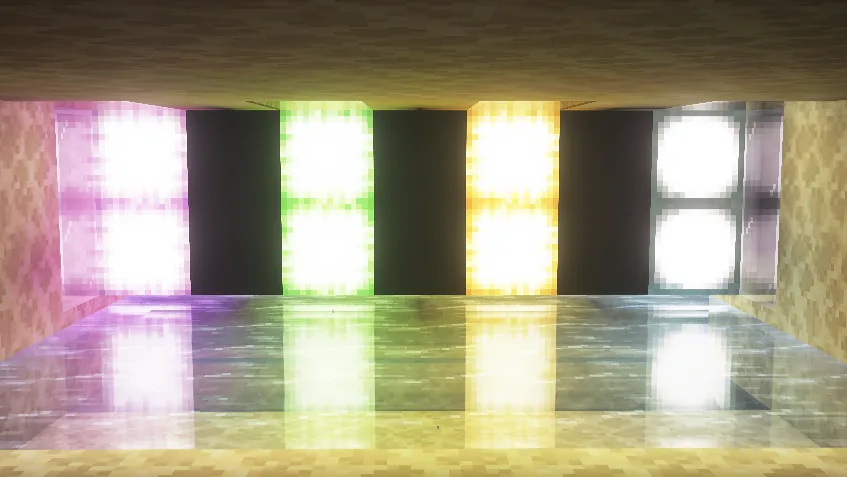
UpaamaShaders
UpaamaShaders is a shader pack that makes Minecraft visually more pleasant while keeping the recognizable vanilla style. It adds cinematic lighting, soft realistic shadows and a dynamic atmosphere. The sky looks deeper thanks to high-quality clouds and beautifulInstall

Velpix Shaders
Transform Minecraft into a living painting with fantasy skies, artistic lighting, stylized shadows, and cinematic atmospheres.Install

Neon Reverie
Neon Reverie is a shader pack based on Complementary Reimagined. It changes the visual style of the game to a softer and more atmospheric one, adding bright accents and a fantasy aesthetic. The pack uses PBR materials to improve surface detail and introduces coloredInstall

Simple Grayscale
Quick shader with an ON/OFF switch to make everything gray.Install

Aalu Shaders
Extremely lightweight shaders with shadows and reflections.Install

ClearVision Shader
Ultra clear and bright shader with enhanced colors, smooth lighting, and built-in night vision for perfect visibility in all dimensions.Install

Renford Tomlinson
Best Shaderpack for Youtube Videos / Thumbnails / Horror ContentInstall

VanillaX Shaders
A shaderpack that brings a clean and modern visual upgrade to Minecraft while preserving the game’s classic atmosphere and vanilla charm.Install

SummerShaders
Summer Shaders – Summer vibes with emissive effects and blue-toned water.Install

Gleam
A beautiful, extremely customizable and performant shader edit of MakeUp-UltraFast focused on fantasy visuals.InstallRequired to run
FAQ
What do I need to get shaders working?
Iris or OptiFine. Iris installs as a Fabric mod and is usually faster; OptiFine is a separate installer. Without one of them the game simply won't see the shader. Millida Launcher installs Iris along with the shader for you.
Which shaders run on a low-end PC?
Light packs without ray tracing and with low shadow resolution. They're marked in the catalog — they give you shadows and water while costing noticeably fewer frames.
How do I install shaders?
Click “Install” and Millida Launcher will put the shader into the shaderpacks folder of the right modpack. Then select the pack in the video settings — no need to unpack the archive.
Iris or OptiFine — which should I choose?
For new versions, Iris: it works with Sodium, usually gives more FPS and supports almost all modern shaders. OptiFine is needed on old versions and for packs that rely on its special features. The two cannot be installed in the same instance.
Are there shaders for Bedrock?
The shaders in this section are for the Java edition; their format does not work in Minecraft PE and Bedrock. Bedrock has a built-in Vibrant Visuals graphics mode and resource packs with deferred rendering support, which are turned on in the game settings.
Shaders for Minecraft 1.21
Shaders for Minecraft 1.21: 730 items in the Shaders section. Compatibility is checked against the files, not the description: only items with a build for exactly these conditions stay in the list.
Beauty costs frames. Heavy ray-traced shaders can cut performance several times over even on a good graphics card, so the catalog separately marks light packs built for weak machines: they give you shadows and decent water while barely touching FPS. In practice: first install Iris or OptiFine, then put the shader archive in the shaderpacks folder and select it in the video settings. It's best to start with a light pack, and the quality profiles inside the shader itself lower the load even further.