
Minecraft server plugins — page 32
3,786 itemsPlugins: list


BuyRegion
Easily sell worldguard regions to players for currency.On a server

ConditionalEvents
Plugin that constantly checks for conditions on certain events and executes custom actions!On a server

EmptyWorldGenerator
This is a basic world generator that creates empty worlds. It's lightweight, easy to use, and very basic.On a server

pv-addon-sculk
With this add-on warder and skulk sensors are triggered by proximity voice chat.On a serverMinequery
MinequeryOn a serverClearChat
[Clearchat] clear the chat with just /c!On a serverControlTPA
ControlTPAOn a server

CommandOverride
CommandOverrideOn a serverFAntiXRay
Modify chunk sending to prevent xray modOn a server
PermissionsRanks
PermissionsRanksOn a server

Shopkeepers Addon
Navigation & Economy » No more searching the shopkeepers marketplace to buy your favorite items.On a server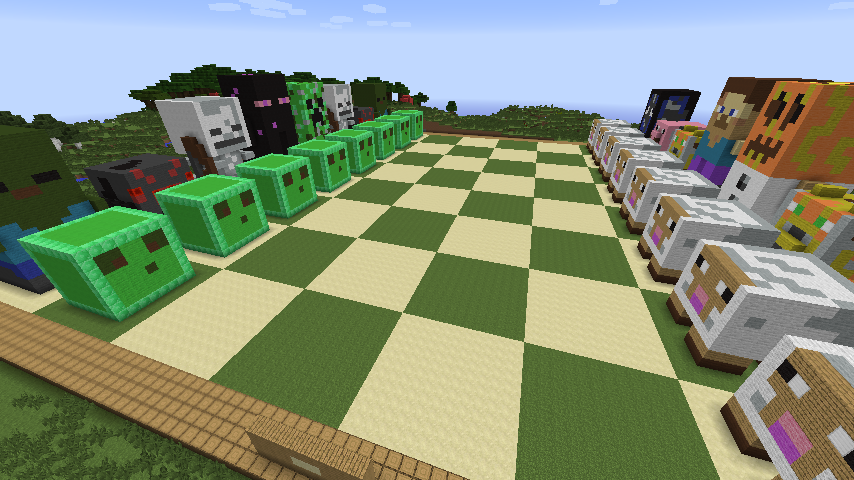
ChessCraft
Play Chess in the world of Minecraft!On a server
Ultimate timber
Help chopping tree easierOn a server

Antixray
A Simple Antyxray plugin for your serverOn a server
Knokko's Custom Items
A plug-in that allows server owners/developers to create custom items with their own texturesOn a server
InfinitePlots
http://dev.bukkit.org/server-mods/infiniteplots/On a server

Limited Creative
Separated inventories for diffrent GameModes. No Diamand ArmorOn a server

TTT (Trouble In Terrorist Town)
Minecraft implementation of the Garry's Mod gamemode Trouble in Terrorist Town.On a serverEasyEssentials
Full of easy commandsOn a server

Colors
A chat plugin that allows you to add colors, prefixes, suffixes, and different chat formats.On a serverMotd+
The number one MOTD manager! Custom variables, custom protocol messages, configuration switching, and more!On a serverWoodCutter
Cutting trees more realistic.On a server

CustomDiscs SVC
CustomDiscs (Simple Voice Chat) is a plugin that lets you play custom music in Minecraft using jukeboxes and discs.On a serverFAQ
How is a plugin different from a mod?
A plugin runs only on the server and requires nothing from players: the client stays vanilla. A mod has to be installed by everyone, and it changes the game itself.
Where do I put a plugin?
Put the .jar file in the plugins folder on the server, then restart the server. The plugin will create its config on first launch.
Will a Spigot plugin work on Paper?
Usually yes: Paper and Purpur are built on Spigot and are compatible with its plugins. The reverse isn't true — a plugin that uses Paper features won't work on plain Spigot.
How do I install a plugin on Aternos?
On Aternos, plugins can only be installed from the built-in list in the “Plugins” section of the panel. You can't upload your own .jar file, so paid and rare plugins can't be installed on Aternos. If the plugin you need isn't on the list, you need hosting with access to the plugins folder: put the file there and restart the server.
Which plugins should I install on a server first?
People usually start with four: EssentialsX (homes, warps, kits, teleport), LuckPerms (groups and permissions), WorldGuard together with WorldEdit (spawn and region protection) and ViaVersion (joining from other game versions). For a server with nickname login, add AuthMe for passwords and SkinsRestorer for skins.
Which plugins should I install on a server for playing with friends?
A small server for friends needs just a few: EssentialsX (home, teleport to a friend, warps), CoreProtect (rolling back griefing and finding who broke a block) and Simple Voice Chat for voice chat, which needs the mod of the same name on players' side. Permissions and region protection are usually unnecessary on such a server.
How do I install a plugin on Paper?
Download the plugin file for your Paper version, put the .jar into the plugins folder and restart the server — the /plugins command will list it. On Millida Hosting the On a server button on the plugin page does the same.
Minecraft server plugins
A plugin is installed on the server, not by the player, and that's the whole difference from a mod: the client stays plain vanilla, and you can join the server without downloading a single file. Plugins run on server cores — Paper, Spigot, Bukkit, Purpur, Folia — while Velocity and BungeeCord are used for proxies between servers. The core matters as much as the version: a Paper plugin will almost always run on Purpur, but a Velocity plugin won't start on a regular server at all.
The useful minimum for a server is almost always the same: EssentialsX for basic commands, LuckPerms for permissions, WorldGuard together with WorldEdit for region protection and CoreProtect to roll back griefing. Servers with nickname login add AuthMe and SkinsRestorer, servers for friends add Simple Voice Chat. On Millida Hosting a free plugin from the catalog goes onto the server with the On a server button on its page, no manual .jar upload.
Plugins handle almost everything behind the scenes on a server: ranks and permissions, land protection, economy and shops, anti-cheat, map rotation, menus and voting. You install them by copying the .jar file into the plugins folder and restarting the server; most create their own config on first launch, which is what you then edit. The card lists supported cores and game versions, the author and license, and all releases are gathered on one page — you can update the plugin right from there.