
Minecraft server plugins — page 107
3,785 itemsPlugins: list
BlockBlocker
BlockBlocker is a very simple plugin which has the potential to radically alter gameplay.On a serverMoreSwords
MoreSwords adds more swords to minecraft!On a server

BeastWithdraw (Multy withdraw)
Withdraw money to CasNote. Withdraw custom limits per permissions Play sounds when player uses withdraw or redeem Formatted amount for values on item. Option to disable using withdraw items in crafting and trading with villager Data stored as NBT tags GratOn a server
NETFire
NETFire - Light netherrack on fire!On a server

StackMobs
Agrupa mobs em um unico corpo / Group mobs in one bodyOn a serverChatFilter
Filter chat to stop messages!On a serverStopLava
Prevent unauthorized players from picking up or placing lava (bucket or blocks)On a serverMCRealistic - Realistic Minecraft!
Makes minecraft more realistic! with a lot of new features.On a server

blXP
blXPOn a server

EnchantExtreme
EnchantExtreme - Extend Your EnchantmentsOn a server
Double Your Experience
Double your exp and change it into cashOn a server

AntiCreativePvp
Lightweight plugin which stops creative mode players from killing peopleOn a server
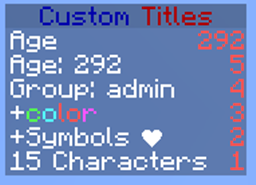
SideBar
Allows you to configure the sidebar/scoreboard.On a serverAutoRespawn
A plugin that will automatically re-spawn players after a certain period of time.On a server

SkyWars2
SkyWars2On a serverSpoutMaterials
SpoutMaterialsOn a serverFriends
Send and recieve friend requests, stopping combat between friends.On a serverBetterSpawners
Allows users to mine, set and use spawners however they like. Has support for admin configuration.On a serverLevel Up
Level UpOn a server

mmoParty
Leadership based parties with damage protection.On a server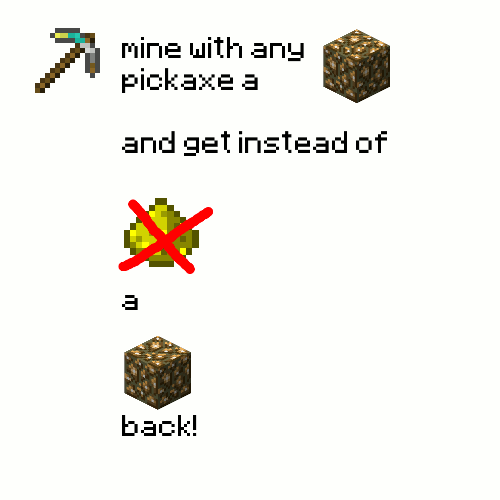
GlowstoneDrop
Destroy a glowstone with a pickaxe and get a block backOn a server
Advanced Custom Enchantments
Many Custom EnchantmentsOn a server
Corruption
An updated version of Likeaboss.On a serverFAQ
How is a plugin different from a mod?
A plugin runs only on the server and requires nothing from players: the client stays vanilla. A mod has to be installed by everyone, and it changes the game itself.
Where do I put a plugin?
Put the .jar file in the plugins folder on the server, then restart the server. The plugin will create its config on first launch.
Will a Spigot plugin work on Paper?
Usually yes: Paper and Purpur are built on Spigot and are compatible with its plugins. The reverse isn't true — a plugin that uses Paper features won't work on plain Spigot.
How do I install a plugin on Aternos?
On Aternos, plugins can only be installed from the built-in list in the “Plugins” section of the panel. You can't upload your own .jar file, so paid and rare plugins can't be installed on Aternos. If the plugin you need isn't on the list, you need hosting with access to the plugins folder: put the file there and restart the server.
Which plugins should I install on a server first?
People usually start with four: EssentialsX (homes, warps, kits, teleport), LuckPerms (groups and permissions), WorldGuard together with WorldEdit (spawn and region protection) and ViaVersion (joining from other game versions). For a server with nickname login, add AuthMe for passwords and SkinsRestorer for skins.
Which plugins should I install on a server for playing with friends?
A small server for friends needs just a few: EssentialsX (home, teleport to a friend, warps), CoreProtect (rolling back griefing and finding who broke a block) and Simple Voice Chat for voice chat, which needs the mod of the same name on players' side. Permissions and region protection are usually unnecessary on such a server.
How do I install a plugin on Paper?
Download the plugin file for your Paper version, put the .jar into the plugins folder and restart the server — the /plugins command will list it. On Millida Hosting the On a server button on the plugin page does the same.
Minecraft server plugins
A plugin is installed on the server, not by the player, and that's the whole difference from a mod: the client stays plain vanilla, and you can join the server without downloading a single file. Plugins run on server cores — Paper, Spigot, Bukkit, Purpur, Folia — while Velocity and BungeeCord are used for proxies between servers. The core matters as much as the version: a Paper plugin will almost always run on Purpur, but a Velocity plugin won't start on a regular server at all.
The useful minimum for a server is almost always the same: EssentialsX for basic commands, LuckPerms for permissions, WorldGuard together with WorldEdit for region protection and CoreProtect to roll back griefing. Servers with nickname login add AuthMe and SkinsRestorer, servers for friends add Simple Voice Chat. On Millida Hosting a free plugin from the catalog goes onto the server with the On a server button on its page, no manual .jar upload.
Plugins handle almost everything behind the scenes on a server: ranks and permissions, land protection, economy and shops, anti-cheat, map rotation, menus and voting. You install them by copying the .jar file into the plugins folder and restarting the server; most create their own config on first launch, which is what you then edit. The card lists supported cores and game versions, the author and license, and all releases are gathered on one page — you can update the plugin right from there.