
Plugins for Minecraft 1.18 — page 10
608 itemsPlugins: list



SpawnJoin Reloaded
Teleports players to spawn when joining, and sets their selected slot.On a server

AFK Rewards Lite
Give Rewards to Players inside a region | 1.8.x - 1.20.xOn a server

AxShulkers
A customizable & secure shulker viewer pluginOn a server

ForcePack
Resource pack handling utilities and enforcement, with Velocity and multiple resource packs support.On a server
CustomCrates
A fully customizable crates pluginOn a server

MobsManager
Powerful mob and entity managementOn a server
FunnyGuilds
FunnyGuilds is a fully customizable RPG plugin that allows you to create guildsOn a server

SimpleClaimSystem
Full claim system for Minecraft servers. Fully configurable and many plugins supported.On a server

S86 Powers
Give unique powers to playersOn a server

Realistic Survival
A unique plugin inspired by RLCraft that aims to enhance pure survival, adventuring and RPG, and immersion of vanilla Minecraft.On a server

Backuper
Simple backup plugin for Paper/Folia with FTP/GOOGLE DRIVE/WebDAV/SFTP supportOn a server

PlayerPoints
A simple and easy to use points-based economy plugin!On a server

zMenu
The best inventory plugin! Online editor available!On a server

AxInventoryRestore
A customizable plugin that backups player inventories and lets server staff to restore or export them as a shulker box.On a server

AxAFKZone
The ULTIMATE plugin to reward AFK players by creating AFK zones / poolsOn a server

NightVision Plugin
Configurable NightVision to fight brightness!On a server

McMMOExtras
A plugin which adds many new features to mcMMO servers!On a server

ProximaTunnel
A plugin that allows you to play with friends on a local server without opening ports.On a server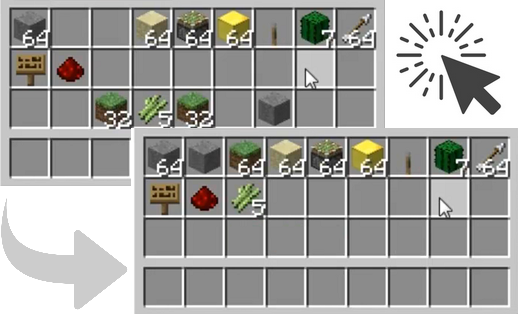
ClickSort
Sort inventories with a simple mouse click.On a server
NDailyRewards
Reward players for playing on your serverOn a server
NoTrashPl
/Support, /Report, /Warn, /ChatClear, /bcast, /gm, /invsee! A small essentials.On a server

MiniPlaceholders
MiniMessage Component-based Placeholders API for Minecraft PlatformsOn a server

PerWorldPlugins
PerWorldPlugins allows plugins to be set to hook onto certain worlds using the config.On a serverFAQ
How is a plugin different from a mod?
A plugin runs only on the server and requires nothing from players: the client stays vanilla. A mod has to be installed by everyone, and it changes the game itself.
Where do I put a plugin?
Put the .jar file in the plugins folder on the server, then restart the server. The plugin will create its config on first launch.
Will a Spigot plugin work on Paper?
Usually yes: Paper and Purpur are built on Spigot and are compatible with its plugins. The reverse isn't true — a plugin that uses Paper features won't work on plain Spigot.
How do I install a plugin on Aternos?
On Aternos, plugins can only be installed from the built-in list in the “Plugins” section of the panel. You can't upload your own .jar file, so paid and rare plugins can't be installed on Aternos. If the plugin you need isn't on the list, you need hosting with access to the plugins folder: put the file there and restart the server.
Which plugins should I install on a server first?
People usually start with four: EssentialsX (homes, warps, kits, teleport), LuckPerms (groups and permissions), WorldGuard together with WorldEdit (spawn and region protection) and ViaVersion (joining from other game versions). For a server with nickname login, add AuthMe for passwords and SkinsRestorer for skins.
Which plugins should I install on a server for playing with friends?
A small server for friends needs just a few: EssentialsX (home, teleport to a friend, warps), CoreProtect (rolling back griefing and finding who broke a block) and Simple Voice Chat for voice chat, which needs the mod of the same name on players' side. Permissions and region protection are usually unnecessary on such a server.
How do I install a plugin on Paper?
Download the plugin file for your Paper version, put the .jar into the plugins folder and restart the server — the /plugins command will list it. On Millida Hosting the On a server button on the plugin page does the same.
Plugins for Minecraft 1.18
Plugins for Minecraft 1.18: 608 items in the Plugins section. Compatibility is checked against the files, not the description: only items with a build for exactly these conditions stay in the list.
Plugins handle almost everything behind the scenes on a server: ranks and permissions, land protection, economy and shops, anti-cheat, map rotation, menus and voting. You install them by copying the .jar file into the plugins folder and restarting the server; most create their own config on first launch, which is what you then edit. The card lists supported cores and game versions, the author and license, and all releases are gathered on one page — you can update the plugin right from there.