
Wall-Jump! [FORGE] Mod für Minecraft 1.16.5, 1.18.2
Springe von Wand zu Wand! Wandspringen, Doppelsprung, Geschwindigkeitssprung, Zaunsprung usw.
- Downloads
- 4 Downloads
- Aufrufe
- 17 Aufrufe
- Aktualisiert
- Aktualisiert 17.10.2026
- 1.16.4 — 1.18.2
 Forge
Forge
Über die Wall-Jump! [FORGE]-Mod
Wall-Jump TXF für Minecraft 1.19-1.21.4
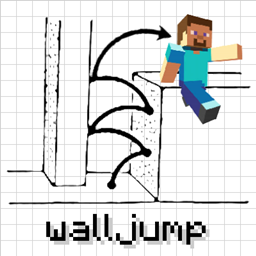
Plattform-Action von Wand zu Wand in Minecraft! Diese Mod fügt dem Spiel Wandspringen und Doppelsprünge hinzu.
Wall Cling: Springe auf eine Wand zu und halte die Wall-Jump-Taste gedrückt (LSHIFT). Dann...
Wall Jump: Während du an der Wand klebst, halte W weiterhin gedrückt und lasse LSHIFT los, um einen Wall Jump auszuführen.
Double Jump: Optionaler Sprung in der Luft, den du zu deinem Vorteil nutzen kannst.
Wenn du eine Map oder ein Video für die Wall-Jump-Mod erstellt hast und sie hier aufgeführt haben möchtest, kannst du mir gerne eine Nachricht schicken!
Einige Konfigurationsoptionen:
- Die Wall-Jump-Taste (standardmäßig LSHIFT, aber SPACE funktioniert auch gut)
- Die Höhe und Entfernung, die bei einem Wall-Jump zurückgelegt wird
- Doppelsprünge (standardmäßig aus, aber eine wirklich lustige Funktion)
- Single-Wall-Jumping (mit nur einer einzigen Wand nach oben klettern)
- Die Mindestdistanz für Fallschaden (kleine Stürze bremsen dich nicht aus)
- Ein Geschwindigkeitsschub beim Sprinten auf dem Boden und beim Gleiten
- Verzauberungen für Wall-Jumping, Double-Jumping und Speed-Boosting
(Server mit installierter Mod zwingen Clients, die Server-Konfiguration zu verwenden) Verwende die Configured-Mod, um die Mod im Spiel zu konfigurieren!
Schau dir diese großartigen bewegungsbasierten Mods an...
Elenai Dodge: Fügt dem Spiel eine multidirektionale Ausweichmechanik hinzu! Elenai Dodge 2: Fügt dem Spiel noch bessere Ausweichmechaniken hinzu! GoProne: Fügt eine Tastenbelegung hinzu, um auf Wunsch in den Kriechmodus zu wechseln! Move Plus: Fügt Kantengreifen, Ausweichen und Kriechen hinzu!
Installation von Wall-Jump! [FORGE]
With Millida Launcher
Install Millida Launcher
The launcher is free: download it at millida.net/launcher and sign in with any nickname.
Click “Install” on this page
The launcher opens and installs the mod for Minecraft 1.16.4–1.18.2 on Forge automatically.
Launch the game
A profile with it appears in the launcher: click “Play”.
Manually
Install Forge
The loader must match the game version of the mod file, for example Minecraft 1.18.2. After installing it, a separate profile appears in your launcher.
Download the file for your version
In the version list above, pick the file walljump-forge-1.18.1-1.3.7.jar (81 KB) for your game version.
Put it in the mods folder
The folder is inside .minecraft (Windows: %appdata%\.minecraft\mods). If it does not exist, create it.
Launch the loader profile
Open “Mods” in the main menu: Wall-Jump! [FORGE] should be in the list.
Minecraft 1.18.2 runs on Java 17: with a different Java version the game may close right after launch.
Versionen
Mit Abhängigkeiten
| Minecraft | Loader | Datei | Datum | Aktionen |
|---|---|---|---|---|
| 1.18.1 | Forge | walljump-forge-1.18.1-1.3.7.jar81.2 KB 2 | ||
| 1.16.5 | — | walljump-forge-1.16.4-1.3.7.jar82.5 KB 2 |
FAQ
Which Minecraft versions does Wall-Jump! [FORGE] work on?
There are files for 1.18.2, 1.18.1, 1.18, 1.16.5, 1.16.4. The newest is 1.18.2.
Is Wall-Jump! [FORGE] for Forge or Fabric?
Only for Forge: 1.18–1.18.2. There are no files for Fabric or NeoForge: a mod for another loader will not start.
Does Wall-Jump! [FORGE] need other mods?
The author lists no required dependencies: the Forge loader is enough.
Which Java does Wall-Jump! [FORGE] need?
Minecraft 1.18.2 runs on Java 17. If the game closes right after launch, the usual cause is the wrong Java version in the profile settings.
Where can I download Wall-Jump! [FORGE] safely?
On this page: the file walljump-forge-1.18.1-1.3.7.jar (81 KB) is stored on Millida’s server, with no link shorteners. SHA-1 checksum: 8d2baf2c28043815b2b1cdb66d6d9b1ef721e2c4.
Bewertungen
Bewerten Sie Wall-Jump! [FORGE] als Erster


