
Transparent Mod für Minecraft 1.20.1, 1.21.5
Erlaubt Ressourcenpaketen, bestimmte Entitäten transparent darzustellen.
 Fabric
 Quilt
Quilt NeoForge
 Forge
ForgeÜber die Transparent-Mod
Transparent ermöglicht es Ressourcenpaketen, bestimmten Entitäten Texturen mit transparenten (oder durchscheinenden) Pixeln zu geben. Zur Verwendung einfach die Mod installieren und ein Ressourcenpaket verwenden oder erstellen, das einer der unterstützten Entitäten eine transparente Textur gibt.
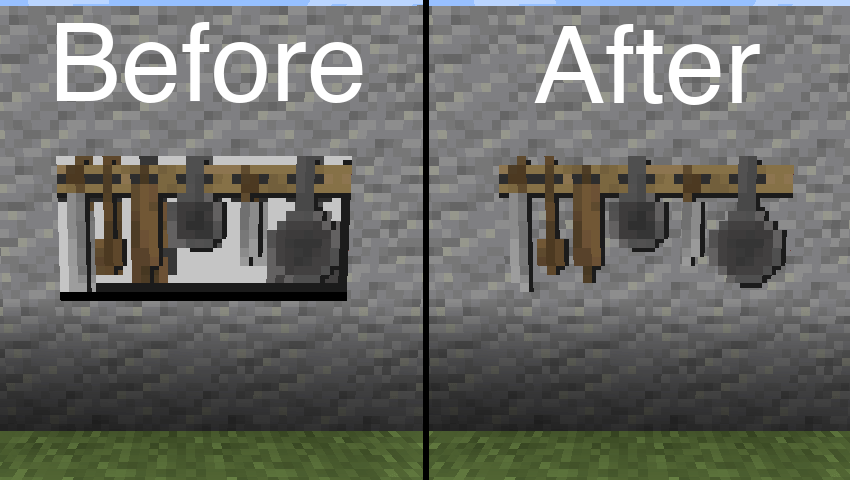
Im obigen Bild verwendetes Ressourcenpaket: BwW Texturepack.
Unterstützt offiziell die Paintings++ Mod!
Unterstützte Entitäten
- Rüstungsständer (1.19.4+)
- Enderkristall
- Enderkristall-Strahl (1.21+)
- Rahmen
- Gemälde
- Spielerumhang (1.21+)
- Spielerrüstung (1.21+)
- Leuchtfeuerstrahl (standardmäßig deaktiviert)
Wenn du möchtest, dass eine weitere Entität von dieser Mod unterstützt wird, lass es mich bitte auf Discord oder in den GitHub Issues wissen.
Konfiguration
Um die Standardkonfiguration zu ändern, füge den folgenden Inhalt der json-Datei in eine Datei in deinem Ressourcenpaket unter /assets/transparent/transparent.json ein.
{ "armorstand": true, "beaconbeam": false, "endcrystal": true, "endcrystalbeam": true, "itemframe": true, "painting": true, "playercape": true, "playerarmor": true }
Melde alle Probleme auf GitHub. Chatte auf Discord im Kanal transparent.
Unterstütze die Entwicklung meiner Mods auf Ko-fi.
Installation von Transparent
With Millida Launcher
Install Millida Launcher
The launcher is free: download it at millida.net/launcher and sign in with any nickname.
Click “Install” on this page
The launcher opens and installs the mod for Minecraft 1.20.1–1.21.5 on Fabric, Forge, NeoForge or Quilt automatically.
Launch the game
A profile with it appears in the launcher: click “Play”.
Manually
Install Fabric, Forge, NeoForge or Quilt
The loader must match the game version of the mod file, for example Minecraft 1.21.5. After installing it, a separate profile appears in your launcher.
Download the file for your version
In the version list above, pick the file transparent-fabric-21.5.0.jar (35 KB) for your game version and loader.
Put it in the mods folder
The folder is inside .minecraft (Windows: %appdata%\.minecraft\mods). If it does not exist, create it.
Launch the loader profile
Open “Mods” in the main menu: Transparent should be in the list.
Minecraft 1.21.5 runs on Java 21: with a different Java version the game may close right after launch.
Versionen
Mit Abhängigkeiten
| Minecraft | Loader | Datei | Datum | Aktionen |
|---|---|---|---|---|
| 1.21.5 | Fabric, Quilt | [Fabric 1.21.5] v21.5.035.3 KB | ||
| 1.21.5 | NeoForge | [NeoForge 1.21.5] v21.5.033.6 KB | ||
| 1.20.6 | Forge | [Forge 1.20.6] v20.6.125.8 KB | ||
| 1.20.1 | Quilt | [Quilt 1.20.1] v8.0.129.4 KB |
FAQ
Which Minecraft versions does Transparent work on?
There are files for 1.21.5, 1.20.6, 1.20.1. The newest is 1.21.5.
Is Transparent for Forge or Fabric?
There are files for Fabric: 1.21.5, for Forge: 1.20.6, for NeoForge: 1.21.5 and for Quilt: 1.20.1–1.21.5.
Does Transparent need other mods?
The author lists no required dependencies: the Fabric, Forge, NeoForge or Quilt loader is enough.
Which Java does Transparent need?
Minecraft 1.21.5 runs on Java 21. If the game closes right after launch, the usual cause is the wrong Java version in the profile settings.
Where can I download Transparent safely?
On this page: the file transparent-fabric-21.5.0.jar (35 KB) is stored on Millida’s server, with no link shorteners. SHA-1 checksum: b1ad3807de859e41029047644e38377a0f023716.
Bewertungen
Bewerten Sie Transparent als Erster


