
Thut's Elevators Mod für Minecraft 1.21.1, 1.19.2
Fügt Aufzüge zu Minecraft hinzu
 NeoForge
 Forge
ForgeÜber die Thut's Elevators-Mod
This mod adds dynamic elevators to minecraft. It currently has support for up to 64 floors, with many controllers per floor, so long as they are directly touching each other.
Versions for MC 1.8.9+ require ThutCore which can be found here: https://minecraft.curseforge.com/projects/thutcore

For oc version, the following methods are available in open computers:
- callFloor(floor:number) -- Calls the Lift to the specified Floor
- callYValue(yValue:number) -- Calls the Lift to the specified Y level
- callXValue(xValue:number) -- Calls the Lift to the specified X location
- callZValue(zValue:number) -- Calls the Lift to the specified Z location
- setFloor(floor:number) -- Sets the floor assosiated to the Controller
- getYValue() -- returns the current Y value of the lift
- getXValue() -- returns the current X value of the lift
- getZValue() -- returns the current Z value of the lift
- getFloor() -- returns the Floor assigned to the Controller
- getFloorYValue(floor:number) -- returns the y value of the specified floor
- isReady() -- returns if the elevator is not currently called to a floor
To set the Controller block face on, right click it with a stick or device linker. to change the page of the controller face, right click with a linker.
to set the floor, shift right click with the linker. Physically touching controller blocks will automatically link together as the same floor, this allows you to make larger control panels.
To remove an elevator, shift right click it with a vanilla stick or a wrench from another mod
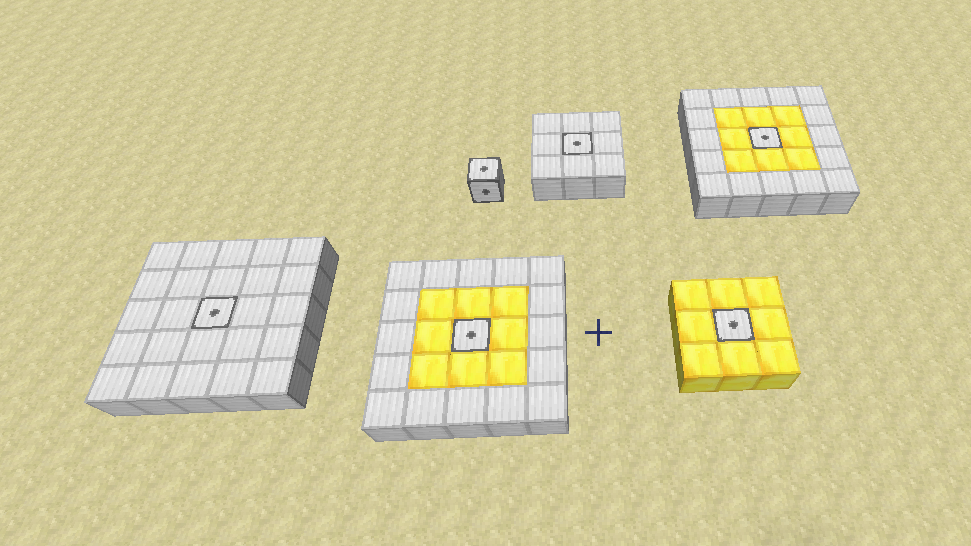
for version 2.0 and later, the lifts have been changed to only require the base to be built. the walls and roof are no longer required.
Old instructions (do not apply to 1.8.9+ builds)
The following instructions are a bit outdated, only the bottom layer is needed now
If you break the rails it will start rotating rapidly, so either re-place the rail, or remove as mentioned.
For build and usage instructions, see Elevator Instructions
For other sizes, see Elevator Instructions 2
You can contact me here on Discord: https://discordapp.com/invite/medHvkA
If you're interested in hosting a server, click the image below!
Thut's Elevators is partnered with BisectHosting!
BisectHosting offers a quick, simple and quality solution. After your purchase, the server is already configured and ready to use. Use the code "Thutmose" to get 25% off your first month as a new client for any of their gaming servers.
Installation von Thut's Elevators
With Millida Launcher
Install Millida Launcher
The launcher is free: download it at millida.net/launcher and sign in with any nickname.
Click “Install” on this page
The launcher opens and installs the mod for Minecraft 1.11–1.21.1 on Forge or NeoForge automatically.
Launch the game
A profile with it appears in the launcher: click “Play”.
Manually
Install Forge or NeoForge
The loader must match the game version of the mod file, for example Minecraft 1.21.1. After installing it, a separate profile appears in your launcher.
Download the file for your version
In the version list above, pick the file thuttech-1.21.1-10.0.1.jar (75 KB) for your game version and loader.
Put it in the mods folder
The folder is inside .minecraft (Windows: %appdata%\.minecraft\mods). If it does not exist, create it.
Launch the loader profile
Open “Mods” in the main menu: Thut's Elevators should be in the list.
Minecraft 1.21.1 runs on Java 21: with a different Java version the game may close right after launch.
Versionen
Mit Abhängigkeiten
| Minecraft | Loader | Datei | Datum | Aktionen |
|---|---|---|---|---|
| 1.21.1 | NeoForge | thuttech-1.21.1-10.0.1.jar74.8 KB 3 | ||
| 1.19.2 | Forge | thuttech-1.19.2-9.3.3.jar81.5 KB 2 | ||
| 1.18.1 | Forge | thuttech-1.18.1-9.1.3.jar82.6 KB | ||
| 1.15.2 | — | thuttech-1.15.2-8.2.3.jar77.7 KB | ||
| 1.15.2 | — | thuttech-1.15.2-8.0.0.b.jar69.2 KB | ||
| 1.11 | — | thuttech-5.0.0a.jar85.4 KB |
FAQ
Which Minecraft versions does Thut's Elevators work on?
There are files for 1.21.1, 1.19.2, 1.18.1, 1.15.2, 1.11. The newest is 1.21.1.
Is Thut's Elevators for Forge or Fabric?
There are files for Forge: 1.18.1–1.19.2 and for NeoForge: 1.21.1. There are no files for Fabric: a mod for another loader will not start.
Does Thut's Elevators need other mods?
The author lists no required dependencies: the Forge or NeoForge loader is enough.
Which Java does Thut's Elevators need?
Minecraft 1.21.1 runs on Java 21. If the game closes right after launch, the usual cause is the wrong Java version in the profile settings.
Where can I download Thut's Elevators safely?
On this page: the file thuttech-1.21.1-10.0.1.jar (75 KB) is stored on Millida’s server, with no link shorteners. SHA-1 checksum: d12b3541e05980042ecadfa5a13d4ecf9a9e9a51.
Bewertungen
Bewerten Sie Thut's Elevators als Erster


