
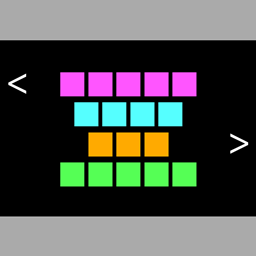
字幕高亮(Subtitle Highlight) Mod für Minecraft 1.20.1
为不同字幕添加样式以区分。Fügt Stile für verschiedene Untertitel hinzu, um sie zu unterscheiden.
 Fabric
 Quilt
QuiltSubtitle Highlight
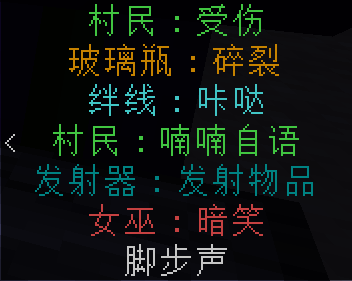
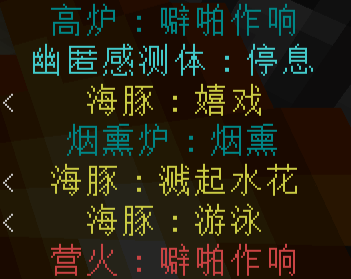
Add styles for different subtitles to distinguish them, and provide customized settings for individual subtitles.
Links
GitHub CurseForge Modrinth MCmod
Dependencies
Cloth Config (GitHub CurseForge Modrinth)
Fabric API (GitHub CurseForge Modrinth)
Fabric Loader (Official website GitHub)
Instruction
This mod contains an Easter Egg that makes some people feel uncomfortable, which can be closed by "iKun (Easter Egg)" in the configure screen.
Default Configuration
Configuration file is saved at "<Game Directory>\config\subtitle_highlight.json".
● Remove Delay: 3 seconds
● Start Ratio: 1
● End Ratio: 0.29411764705882354
● Background Color:#cc000000
● Scale:1
● Bottom Margin:25 (1.18.2 and before) or 30 (1.19 and after)
● Side Margin:1
● Basic Color Settings
● Ambient: Dark Blue
● Block
● Generic: White
● Interactive: Aqua
● Working: Dark Aqua
● Dangerous: Red
● Crop: Dark Green
● Block(other): Dark Gray
● Enchantment: Purple
● Entity
● Mob
● Player
● Attack: Gold
● Hurt: Dark Red
● Player(other): White
● Passive: Green
● Neutral: Yellow
● Hostile: Red
● Boss: Light Purple
● Vehicle: Gray
● Projectile: Gold
● Explosive: Red
● Decoration: Gray
● Entity(other): Dark Gray
● Item
● Weapon: Gold
● Armor: Dark Green
● Tool: Blue
● Item(other): White
● Other: White
● Custom List
字幕高亮
为不同字幕添加样式以区分,同时提供对单个字幕的自定义设置。
链接
GitHub CurseForge Modrinth MC百科
依赖项
Cloth Config(GitHub CurseForge Modrinth)
Fabric API(GitHub CurseForge Modrinth)
Fabric Loader(官网 GitHub)
说明
此模组含有令部分人感到不适的彩蛋,可以通过配置屏幕中的”iKun彩蛋“关闭。
默认配置
配置文件保存在”<游戏目录>\config\subtitle_highlight.json“。
● 最长持续时间:3秒
● 起始比例:1
● 终止比例:0.29411764705882354
● 背景颜色:#cc000000
● 缩放:1
● 底部边距:25(1.18.2及以前)或30(1.19及以后)
● 侧边边距:1
● 基本颜色设置
● 环境:深蓝色
● 方块
● 通用:白色
● 互动:天蓝色
● 运作:湖蓝色
● 危险方块:红色
● 农作物:深绿色
● 方块_其它:深灰色
● 魔咒:紫色
● 实体
● 生物
● 玩家
● 攻击:金色
● 受伤:深红色
● 玩家_其它:白色
● 友好生物:绿色
● 中立生物:黄色
● 敌对生物:红色
● 头目生物:粉红色
● 载具:灰色
● 弹射物:金色
● 爆炸物:红色
● 装饰品:灰色
● 实体_其它:深灰色
● 物品
● 武器:金色
Installation von 字幕高亮(Subtitle Highlight)
With Millida Launcher
Install Millida Launcher
The launcher is free: download it at millida.net/launcher and sign in with any nickname.
Click “Install” on this page
The launcher opens and installs the mod for Minecraft 1.20–1.20.1 on Fabric or Quilt automatically.
Launch the game
A profile with it appears in the launcher: click “Play”.
Manually
Install Fabric or Quilt
The loader must match the game version of the mod file, for example Minecraft 1.20.1. After installing it, a separate profile appears in your launcher.
Download the file for your version
In the version list above, pick the file Subtitle-Highlight-11_1.20-1.20.1.jar (46 KB) for your game version and loader.
Put it in the mods folder
The folder is inside .minecraft (Windows: %appdata%\.minecraft\mods). If it does not exist, create it.
Launch the loader profile
Open “Mods” in the main menu: 字幕高亮(Subtitle Highlight) should be in the list.
Minecraft 1.20.1 runs on Java 17: with a different Java version the game may close right after launch.
Versionen
Mit Abhängigkeiten
| Minecraft | Loader | Datei | Datum | Aktionen |
|---|---|---|---|---|
| 1.20.1 | Fabric, Quilt | Subtitle-Highlight-11_1.20-1.20.1.jar45.7 KB |
Bewertungen
Bewerten Sie 字幕高亮(Subtitle Highlight) als Erster


