
Rubinated Nether Mod für Minecraft 1.20.1, 1.21.1
Rubinated Nether ist eine Vanilla+-Mod, die den Nether Ruby für Nutzen, Dekoration und Redstone ins Spiel bringt.
 NeoForge
 Forge
Forge Fabric
 Quilt
QuiltÜber die Rubinated Nether-Mod
Rubinated Nether is a Vanilla+ mod adding Minecraft's scrapped Ruby. This mod adds several utility and decoration blocks, with a revamped Nether Progression.
Current Features

Within the Nether you may find Rubies near the Lava Ocean, near the Nether Roof or in Piglin Bastions. Harvest them with a Diamond Pickaxe.

Using the Freezer, you can freeze Molten Rubies into Rubies, Ice into its colder variants, Magma Cream into Slimeballs and Magma Blocks into Obsidian. Freezing Snow yields the (un)obtainable Frosted Ice.

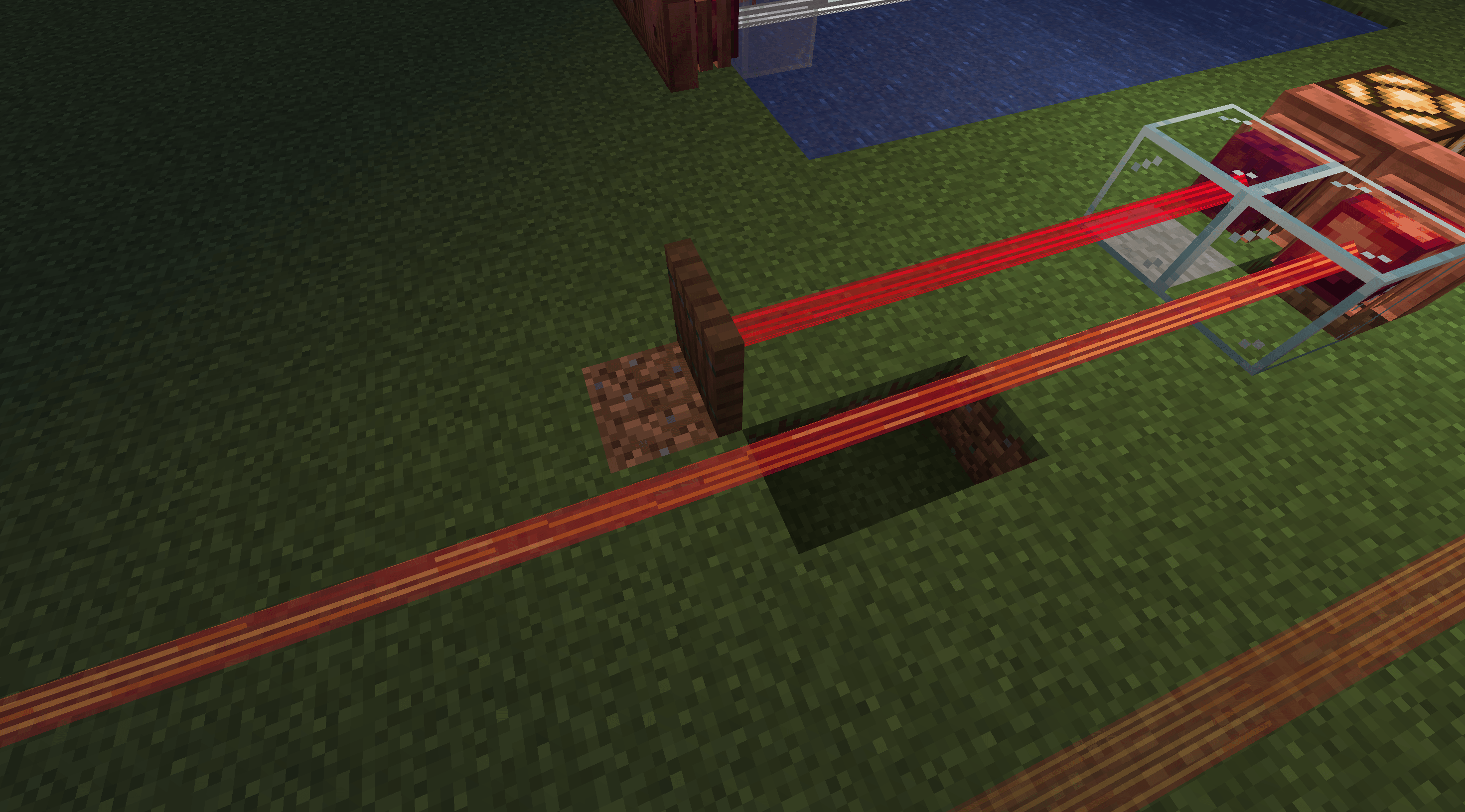
Craft the Ruby Laser to detect entities and blocks in its path. Its beam is invisible unless you wear Ruby Lenses on your head. Alternatively, place Glass directly in front of the Ruby Laser to make its beam visible. Stained Glass tints the laser beam. Its block output is proportional to how close the block or entity is. The laser beam detects block hitboxes. Right-clicking the laser will turn it Tinted, making it only detect blocks and not entities. Placing Tinted Glass in the path of the laser will shorten it's range without redstone output. Currently only works with Tinted mode.

Break Rubies into Ruby Shards for a more economical and efficient way to Barter with Piglins.

Use Soakstones to soak up lava like a sponge, or craft a Ruby Brazier to have Fire Resistance applied to you.

Craft Ruby Glass for a blast-proof window, or Bleeding Obsidian to invite nightmares. You can Rubinate obsidian by right clicking any Crying Obsidian with a Ruby Shard.

Ruby Chandeliers, Ruby Lanterns and Ruby Lava Lamps are all stylish decorations to light up your surroundings! Blocks of Molten Ruby and Molten Ruby Glass also glow! Ruby Chandeliers can be dropped onto enemies and players like Dripstone Spikes.
Vanilla armor also supports Ruby Armor Trims for an orange-hue trim.

Rubinated Nether is compatible with Spelunkery (Rough Ruby variants), Jaden's Nether Expansion, The Aether, and other libraries. The mod also offers a variety of config features to customize the mod.
To disable the Rubinated Netherite Recipe, type the following command:
/datapack disable "rubinated_nether/better_netherite_template"
Upcoming Features
- Overhauled, Unique Piglin Bartering
- Rubination Divination (Better Enchantments with a costly downside!)
- Sacred Shrine (Nether Trial Chambers)
- The Bronze, Sentinel, and other mobs
- Bronze
- The Wrought bullet-hell boss fight
- Nether/Dimensional Reactors
- Mod Compatibility
- ???
Other Information
Can I use this mod within my modpack?
Yes you can! We'd be more than happy for you to do so!
What versions and launchers is Rubinated Nether compatible with?
1.21.1 for Neoforge is the maintained version where updates are released. 1.20.1 for Forge and Fabric is an older version which is no longer updated.
Dependencies?
Rubinated Nether is furthermore compatible with JEI, EMI, Curios, Trinkets, and Jaden's Nether Expansion
Developers?
- Artienia - Lead Developer
- Juniii - Modeller and Co-developer
- Darksonic - Co-developer
- Bon - Artist
Join our Discord Server to receive support and give feedback!
Ruby Armor and Tools Please?
No, this is never going to be added. This is not that type of mod.
Installation von Rubinated Nether
With Millida Launcher
Install Millida Launcher
The launcher is free: download it at millida.net/launcher and sign in with any nickname.
Click “Install” on this page
The launcher opens and installs the mod for Minecraft 1.20.1–1.21.1 on Fabric, Forge, NeoForge or Quilt automatically.
Launch the game
A profile with it appears in the launcher: click “Play”.
Manually
Install Fabric, Forge, NeoForge or Quilt
The loader must match the game version of the mod file, for example Minecraft 1.21.1. After installing it, a separate profile appears in your launcher.
Download the file for your version
In the version list above, pick the file rubinated_nether-2.0.1b.jar (2.7 MB) for your game version and loader.
Put it in the mods folder
The folder is inside .minecraft (Windows: %appdata%\.minecraft\mods). If it does not exist, create it.
Launch the loader profile
Open “Mods” in the main menu: Rubinated Nether should be in the list.
Minecraft 1.21.1 runs on Java 21: with a different Java version the game may close right after launch.
Versionen
Mit Abhängigkeiten
| Minecraft | Loader | Datei | Datum | Aktionen |
|---|---|---|---|---|
| 1.21.1 | NeoForge | Rubinated Nether 2.0.1b2.7 MB | ||
| 1.20.1 | NeoForge, Forge | RubinatedNether-forge-1.3.0.E-1.20.1.jar2.6 MB | ||
| 1.20.1 | Fabric, Quilt | RubinatedNether-fabric-1.3.0.E-1.20.1.jar2.5 MB | ||
| 1.20.1 | NeoForge, Forge | RubinatedNether-forge-1.1.1b-1.20.1.jar505 KB | ||
| 1.20.1 | Fabric, Quilt | RubinatedNether-fabric-1.1.1b-1.20.1.jar346 KB |
FAQ
Which Minecraft versions does Rubinated Nether work on?
There are files for 1.21.1, 1.20.1. The newest is 1.21.1.
Is Rubinated Nether for Forge or Fabric?
There are files for Fabric: 1.20.1, for Forge: 1.20.1, for NeoForge: 1.20.1–1.21.1 and for Quilt: 1.20.1.
Does Rubinated Nether need other mods?
The author lists no required dependencies: the Fabric, Forge, NeoForge or Quilt loader is enough.
Which Java does Rubinated Nether need?
Minecraft 1.21.1 runs on Java 21. If the game closes right after launch, the usual cause is the wrong Java version in the profile settings.
Where can I download Rubinated Nether safely?
On this page: the file rubinated_nether-2.0.1b.jar (2.7 MB) is stored on Millida’s server, with no link shorteners. SHA-1 checksum: 3b5935cd65227d51a3c881646299ab25b091ebdc.
Bewertungen
Bewerten Sie Rubinated Nether als Erster


