

Revelationary Mod für Minecraft 1.21.1, 26.2
Datengetriebenes Block- und Gegenstands-Enthüllungssystem. Entdecke nach und nach!
 Fabric
 NeoForge
Overview
Data Driven Block and Item Revelation system. Discover as you go!
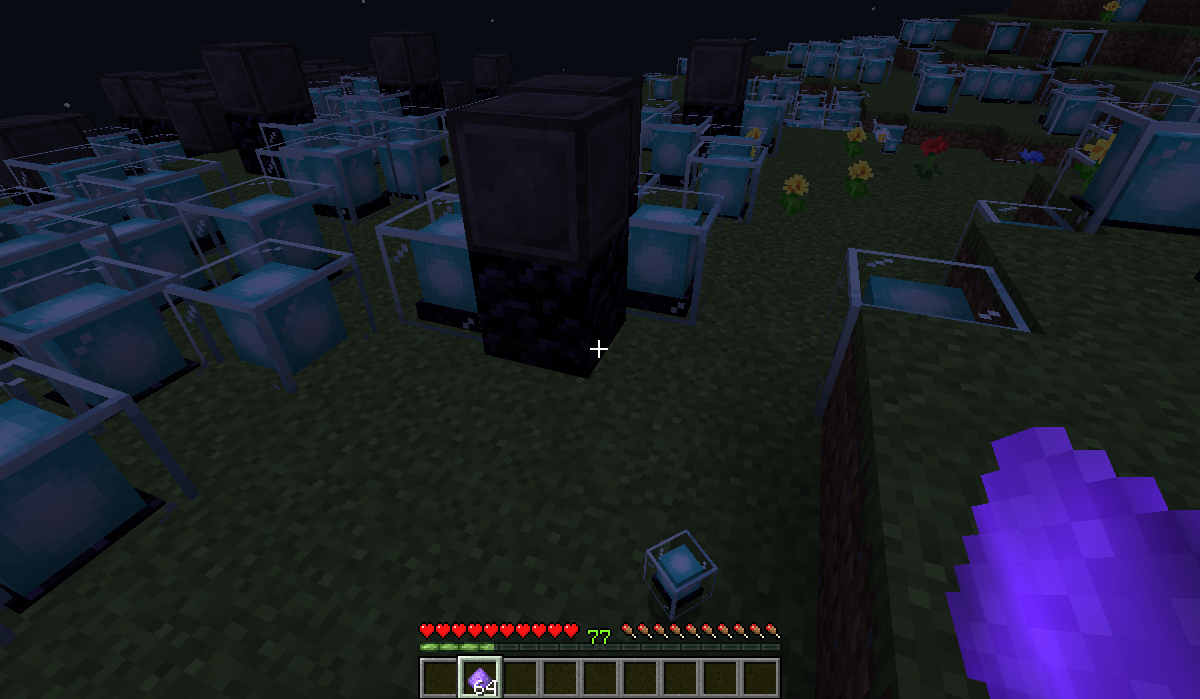
Revelationary adds a way to gate the discovery of new blocks in the world via data pack, or API (for other mods). Using Revelationary, you can design your packs / mods progression in a way the player does not feel overwhelmed when starting a new playthrough. They can only perceive these worldgen blocks when they unlocked a specific advancement, making the block visible for them.
Example: The player sees a specific ore as stone. As they defeat the enderdragon they can now see and mine your ore in the world - it was always there from the start. Individual for each player and very performant.
Revelations
"[a] revelation is the revealing or disclosing of some form of truth or knowledge"
If you are the designer of a progression based mod or modpack you have come to the right place.
With Revelationary, you are able to use Data Packs or the Revelation API to gradually reveal blocks in the world as the player progresses. A plain stone filled cleft might be revealed as bursting with life and ore as the player defeats a boss or reaches an important milestone.
As long as a player does not have the necessary progress the blocks and items you register with Revelationary via API or Data Pack will just have cryptic names and in case of blocks in the world, will drop the same drops as the block it is disguised as, giving the player a seamless experience without getting flooded with unknown resources that they are not able to use at the start. Instead you can introduce resources just as they are needed.
Limitations
Besides visuals and drops, disguised blocks retain all the properties of the original block: Hitbox, if light passes through and everything else. Keep that in mind when searching for fitting candidates. A perfect disguise for your Ore would be stone or deepslate, since these share a lot of similarities. Similarly you could disguise your elusive plant with a poppy: Both have a small hitbox and players can walk through them.
If you are a programmer you can use the Revelation API to dynamically change your blocks properties depending on if they are visible to the player, or not. This way you could even disguise your flower as air: Giving it an empty hitbox when disguised, your players might not even know it is there until they can see them!
Find lots of examples for data packs & the API in Revelationary's wiki: https://github.com/DaFuqs/Revelationary/wiki
Registering Revelations via Data Pack
Have to be placed in the folder resources/data/<<mod_id>>/revelations
{ "advancement": "spectrum:milestones/reveal_quitoxic_reeds", "block_states": { "minecraft:grass": "minecraft:beacon", "minecraft:tall_grass": "minecraft:obsidian", "minecraft:tall_grass[half=upper]": "minecraft:netherite_block" }, "items": { "minecraft:nether_star": "minecraft:gunpowder" } }
Registering a "revelation aware" block or item
public class CloakedItem extends Item implements RevelationAware { Identifier cloakAdvancementIdentifier; Item cloakItem; public CloakedItem(Settings settings, Identifier cloakAdvancementIdentifier, Item cloakItem) { super(settings); this.cloakAdvancementIdentifier = cloakAdvancementIdentifier; this.cloakItem = cloakItem; registerCloak(); } @Override public Identifier getCloakAdvancementIdentifier() { return cloakAdvancementIdentifier; } @Override public Hashtable<BlockState, BlockState> getBlockStateCloaks() { return new Hashtable<>(); } @Override public Pair<Item, Item> getItemCloak() { return new Pair<>(this, cloakItem); } @Override public void onCloak() { } @Override public void onUncloak() { } }
Registering a Callback when Revelations happen
RevelationHolder.registerRevelationCallback(new RevelationHolder.UncloakCallback() { @Override public void trigger(List<Identifier> advancements, List<Block> blocks, List<Item> items) { for(Block block : blocks) { if(Registry.BLOCK.getId(block).getNamespace().equals(MOD_ID)) { ... <I dunno. Like show a popup or something. You tell me> ... break } } } });
Discord
You will find a lot of helpful people on Spectrum's Discord. There always are friendly and helpful people around. Swing around too, if you like!
https://discord.com/invite/EXU9XFXT8a
Installation von Revelationary
With Millida Launcher
Install Millida Launcher
The launcher is free: download it at millida.net/launcher and sign in with any nickname.
Click “Install” on this page
The launcher opens and installs the mod for Minecraft 1.21.1–26.2 on Fabric or NeoForge automatically.
Launch the game
A profile with it appears in the launcher: click “Play”.
Manually
Install Fabric or NeoForge
The loader must match the game version of the mod file, for example Minecraft 26.2. After installing it, a separate profile appears in your launcher.
Download the file for your version
In the version list above, pick the file revelationary-1.5.1+26.2.jar (152 KB) for your game version and loader.
Put it in the mods folder
The folder is inside .minecraft (Windows: %appdata%\.minecraft\mods). If it does not exist, create it.
Launch the loader profile
Open “Mods” in the main menu: Revelationary should be in the list.
Versionen
Mit Abhängigkeiten
| Minecraft | Loader | Datei | Datum | Aktionen |
|---|---|---|---|---|
| 1.21.1 | NeoForge | 1.5.2+1.21.1-neoforge149 KB | ||
| 26.2 | Fabric | 1.5.1+26.2152 KB |
Bewertungen
Bewerten Sie Revelationary als Erster


