
Realistic Fire Spread Mod für Minecraft 1.12.2, 1.21.4
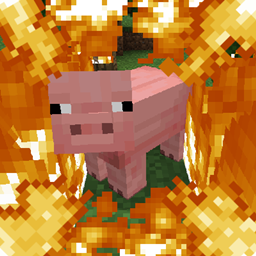
Entities, die brennen, setzen brennbare Blöcke um sie herum in Brand
 Fabric
 Forge
ForgeRealistic Fire Spread
Attention! This mod has been discontinued, but every feature in it has been migrated over to Inferno. Be sure to check it out if you want to play this mod in newer versions!
Entities on fire will set fire to flammable blocks around them. This includes arrows and such.
Installation von Realistic Fire Spread
With Millida Launcher
Install Millida Launcher
The launcher is free: download it at millida.net/launcher and sign in with any nickname.
Click “Install” on this page
The launcher opens and installs the mod for Minecraft 1.12.2–1.21.4 on Fabric or Forge automatically.
Launch the game
A profile with it appears in the launcher: click “Play”.
Manually
Install Fabric or Forge
The loader must match the game version of the mod file, for example Minecraft 1.21.4. After installing it, a separate profile appears in your launcher.
Download the file for your version
In the version list above, pick the file realisticfirespread-1.21.4-r1.jar (225 KB) for your game version and loader.
Put it in the mods folder
The folder is inside .minecraft (Windows: %appdata%\.minecraft\mods). If it does not exist, create it.
Launch the loader profile
Open “Mods” in the main menu: Realistic Fire Spread should be in the list.
Minecraft 1.21.4 runs on Java 21: with a different Java version the game may close right after launch.
Versionen
Mit Abhängigkeiten
| Minecraft | Loader | Datei | Datum | Aktionen |
|---|---|---|---|---|
| 1.21.4 | Fabric | realistic-fire-spread-1.21.4-r1.jar225 KB 3 | ||
| 1.15.2 | Forge | realisticfirespread-1.0.1.jar60.2 KB 1 | ||
| 1.12.2 | — | realisticfirespread-1.0.jar3.7 KB |
Bewertungen
Bewerten Sie Realistic Fire Spread als Erster


