

 NeoForge
 Forge
Über die PokeLucky-Mod
Pokelucky Mod - Randomize! Hack! Chaos! Endless Fun!
Get ready for a brand-new Pixelmon experience with Pokelucky Mod, adding excitement, challenges, and surprises to your world!
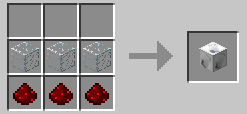
🔹 Exciting Pokémon Randomization! Open a Pokelucky Block and receive a variety of Pokémon and rare items from special chests! But be careful-you might also encounter Team Rocket or terrifying monsters! 😈🔥
🎲 Special Pokelucky Blocks!
- Legendaries Lucky Block - Unlock only Legendary Pokémon! 🌟
- Ultrabeasts Lucky Block - A must-have for Ultra Beast fans seeking supernatural power! 🚀
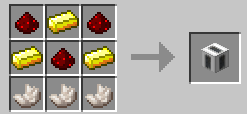
📱 PokePhone - The Ultimate Trainer's Smartphone!
- Store Pokémon anywhere without needing a PC!
- Instant access to Ender Chest-no more running around!
- Secure banking system to safely store your money!
- Beware, hackers! Use the Hack App to attempt stealing money or items from other players! 💀 (But be warned-failure is likely, and your PokePhone may break!)
- Remotely trade Pokémon without using a trade machine!
- Heal Pokémon anytime, anywhere! No need to find a Healing Station!
⚙ Smart Config System! Customize your gameplay directly within your world-no messy config files needed!
🚨 Team Rocket is Back! They mean business!
- Musashi (Jessie) - Sneaks into your inventory to steal your items! 🎭
- Kojiro (James) - Snatches your Pokémon when you least expect it! 🏴‍☠️
💥 Are you ready? Dive into the chaos, randomize Pokémon, and conquer challenges with Pokelucky Mod! 🎮✨
Installation von PokeLucky
With Millida Launcher
Install Millida Launcher
The launcher is free: download it at millida.net/launcher and sign in with any nickname.
Click “Install” on this page
The launcher opens and installs the mod for Minecraft 1.20.2–1.21.1 on Forge or NeoForge automatically.
Launch the game
A profile with it appears in the launcher: click “Play”.
Manually
Install Forge or NeoForge
The loader must match the game version of the mod file, for example Minecraft 1.21.1. After installing it, a separate profile appears in your launcher.
Download the file for your version
In the version list above, pick the file pokelucky-12.15.12-reforged-9.3.16(1.21.1).jar (312 KB) for your game version and loader.
Put it in the mods folder
The folder is inside .minecraft (Windows: %appdata%\.minecraft\mods). If it does not exist, create it.
Launch the loader profile
Open “Mods” in the main menu: PokeLucky should be in the list.
Minecraft 1.21.1 runs on Java 21: with a different Java version the game may close right after launch.
Versionen
Mit Abhängigkeiten
| Minecraft | Loader | Datei | Datum | Aktionen |
|---|---|---|---|---|
| 1.21.1 | NeoForge | pokelucky-12.15.12-reforged-9.3.16(1.21.1)312 KB 1 | ||
| 1.20.2 | Forge | pokelucky-11.15.12-reforged-9.2.10(1.20.2)301 KB | ||
| — | — | pokelucky-generations-6.13.4(1.12.2)251 KB 1 |
FAQ
Which Minecraft versions does PokeLucky work on?
There are files for 1.21.1, 1.20.2. The newest is 1.21.1.
Is PokeLucky for Forge or Fabric?
There are files for Forge: 1.20.2 and for NeoForge: 1.21.1. There are no files for Fabric: a mod for another loader will not start.
Does PokeLucky need other mods?
The author lists no required dependencies: the Forge or NeoForge loader is enough.
Which Java does PokeLucky need?
Minecraft 1.21.1 runs on Java 21. If the game closes right after launch, the usual cause is the wrong Java version in the profile settings.
Where can I download PokeLucky safely?
On this page: the file pokelucky-12.15.12-reforged-9.3.16(1.21.1).jar (312 KB) is stored on Millida’s server, with no link shorteners. SHA-1 checksum: 42931c59301fd7493acaea5d16e2d8bdf4d25397.
Bewertungen
Bewerten Sie PokeLucky als Erster


