

Packed Up (Backpacks) Mod für Minecraft 1.12.2, 26.3
Mit Packed Up kannst du all deine Sachen in neue großartige Rucksäcke packen!
 NeoForge
 Fabric
 Quilt
Quilt Forge
ForgeÜber die Packed Up (Backpacks)-Mod
Packed Up allows you to solve your inventory problems, by giving you the ability to craft new amazing Backpacks! This will allow you to carry your things with you instead of having all those nasty chests around everywhere! It is also ideal for travelling and exploring dungeons! Backpacks can also be used with Baubles, Curios and Trinkets, and can be opened with a keybind!

Backpacks:
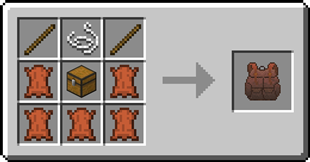
#### Standard Backpack
- good for 3 rows of storage.
Recipe
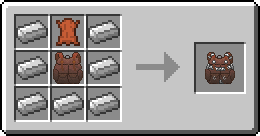
#### Iron Backpack
- upgrade from the Standard Backpack
- 4 rows of storage
Recipe
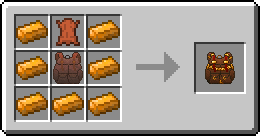
#### Copper Backpack
- upgrade from the Standard Backpack
- 4 rows of storage
Recipe
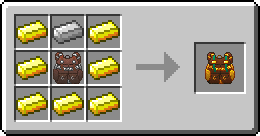
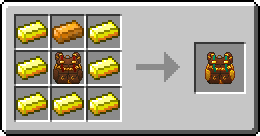
#### Golden Backpack
- upgrade from the Iron Backpack or Copper Backpack
- 5 rows of storage
Recipe
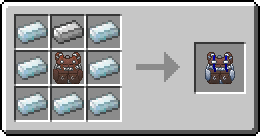
#### Silver Backpack
- upgrade from the Iron Backpack or Copper Backpack
- 5 rows of storage
Recipe
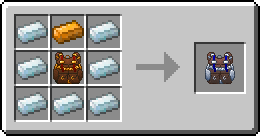
#### Diamond Backpack
- upgrade from the Golden Backpack or Silver Backpack
- 7 rows of storage
Recipe
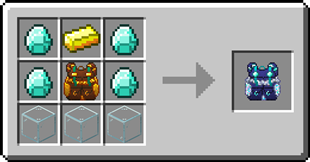
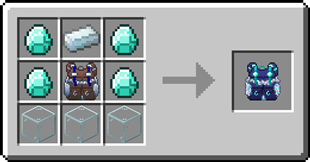
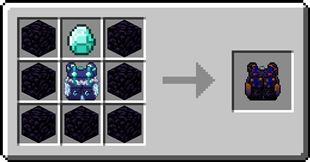
#### Obsidian Backpack
- upgrade from the Diamond Backpack
- 8 rows of storage
Recipe
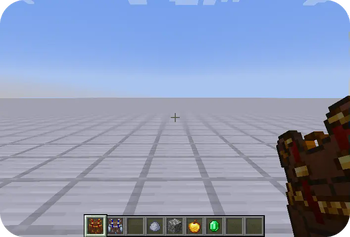
Backpack Customization
Backpacks can have a custom name and custom icon. To customize a backpack, simply shift-right-click whilst holding it.
Opening a Backpack from inside a Backpack
- Open a backpack by right-clicking it
- Right-click on another backpack in the inventory
Does this mod add copper and silver ingots? No, in order to craft the copper and silver backpacks you need a mod that adds copper and silver ingots. Can I change the storage capacity each backpack has? Yes, this can be changed in the config file Can I use your mod in my modpack? Yes, feel free to use my mod in your modpack

Discord
For future content, upcoming mods, and discussion, feel free to join the SuperMartijn642 discord server! [ ](https://discord.gg/QEbGyUYB2e)

Installation von Packed Up (Backpacks)
With Millida Launcher
Install Millida Launcher
The launcher is free: download it at millida.net/launcher and sign in with any nickname.
Click “Install” on this page
The launcher opens and installs the mod for Minecraft 1.12–26.3 on Fabric, Forge, NeoForge or Quilt automatically, together with its dependencies: SuperMartijn642's Config Lib, Fabric API, SuperMartijn642's Core Lib.
Launch the game
A profile with it appears in the launcher: click “Play”.
Manually
Install Fabric, Forge, NeoForge or Quilt
The loader must match the game version of the mod file, for example Minecraft 26.3. After installing it, a separate profile appears in your launcher.
Download the file for your version
In the version list above, pick the file packedup-1.1.1-neoforge-mc26.3.jar (314 KB) for your game version and loader.
Put it in the mods folder
The folder is inside .minecraft (Windows: %appdata%\.minecraft\mods). If it does not exist, create it. Required dependencies go there too: SuperMartijn642's Config Lib, Fabric API, SuperMartijn642's Core Lib.
Launch the loader profile
Open “Mods” in the main menu: Packed Up (Backpacks) should be in the list.
On a server
A server on Fabric, Forge, NeoForge or Quilt
The mod only works on a server with the same loader and game version, for example 26.3.
File goes into the server’s mods folder
Stop the server, put the mod file into the mods folder and start the server again.
Use the “To server” button
On Millida Hosting, the button at the top of the page uploads the file to your server and restarts it for you.
Versionen
Mit Abhängigkeiten
| Minecraft | Loader | Datei | Datum | Aktionen |
|---|---|---|---|---|
| 1.12.2 | Forge | 1.12.21.1 MB 1 | ||
| 26.3 | NeoForge | 26.3314 KB 2 | ||
| 26.3 | Fabric, Quilt | 26.3252 KB 13 | ||
| 26.2 | NeoForge | 26.2314 KB | ||
| 1.12.2 | Forge | 1.12.21.1 MB | — |
Was zum Ausführen nötig ist
- Trinketsoptional
- SuperMartijn642's Config Liberforderlich
- Fabric APIerforderlich
- SuperMartijn642's Core Liberforderlich
- Curios APIoptional
Bewertungen
Bewerten Sie Packed Up (Backpacks) als Erster


