
Oreberries Replanted Mod für Minecraft 1.20.1, 26.1.2
Erze, die auf Beerensträuchern wachsen
 NeoForge
 Forge
ForgeÜber die Oreberries Replanted-Mod
Are you tired of your ores generating in rock? Do you want to grow your ore? Well, you no longer have to hope! Now you can grow ores in the form of berries.
Some of the features:
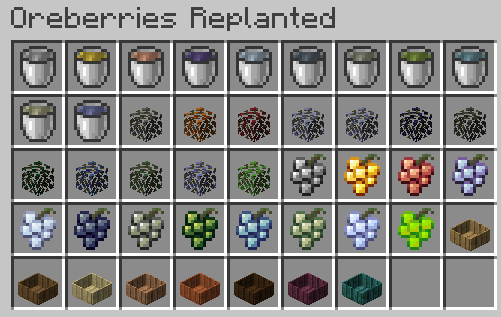
- Most common ores have Ore Berry forms, Think vanilla iron and gold, but also modded ores like: Aluminum, Copper, Lead, Nickel, Osmium, Silver, Tin, Uranium and Zinc
- Essence berries (basically solid experience)
- Ore Berries can be put in a Vat and crushed by jumping on it, which will produce 150 to 200mB of Oreberry Juice which will evaporate into a nugget per 100mB
- Ore Berries can be put into flowerpot (decorative)
- Built in Botany Pots support
By default only Iron and Gold OreBerries are crush-able, the others will require a mod that registers a nugget to the proper tags!
By default Ore Berry bushes can only be planted in dark places only, but that can be switched per Ore Berry Bush in the config.
You can also configure the density, rarity, minY and MaxY per bush and enable/disable the Ore Berry bushes you don't want generating.
Disclaimer: This mod is inspired by the Slimeknights mod berries (Tcon / natura)
Need a server? Get 20% off your first month by using promo code "mrbysco"
For questions feel free to join my Discord.
Want to support us?
-Mrbysco
Installation von Oreberries Replanted
With Millida Launcher
Install Millida Launcher
The launcher is free: download it at millida.net/launcher and sign in with any nickname.
Click “Install” on this page
The launcher opens and installs the mod for Minecraft 1.20–26.1.2 on Forge or NeoForge automatically.
Launch the game
A profile with it appears in the launcher: click “Play”.
Manually
Install Forge or NeoForge
The loader must match the game version of the mod file, for example Minecraft 26.1.2. After installing it, a separate profile appears in your launcher.
Download the file for your version
In the version list above, pick the file OreBerries-Replanted-26.1.2-0.12.1.jar (355 KB) for your game version and loader.
Put it in the mods folder
The folder is inside .minecraft (Windows: %appdata%\.minecraft\mods). If it does not exist, create it.
Launch the loader profile
Open “Mods” in the main menu: Oreberries Replanted should be in the list.
Versionen
Mit Abhängigkeiten
| Minecraft | Loader | Datei | Datum | Aktionen |
|---|---|---|---|---|
| 26.1.2 | NeoForge | OreBerries-Replanted-26.1.2-0.12.1.jar355 KB | ||
| 1.21.8 | NeoForge | OreBerries-Replanted-1.21.8-0.10.2.jar364 KB | ||
| 1.20.1 | NeoForge, Forge | OreBerries-Replanted-1.20.1-0.5.2.jar338 KB | ||
| 1.20.4 | NeoForge | OreBerries-Replanted-1.20.4-0.7.0.jar347 KB | ||
| 1.20.1 | Forge | OreBerries-Replanted-1.20.1-0.5.0.jar322 KB |
FAQ
Which Minecraft versions does Oreberries Replanted work on?
There are files for 26.1.2, 1.21.8, 1.20.4, 1.20.1, 1.20. The newest is 26.1.2.
Is Oreberries Replanted for Forge or Fabric?
There are files for Forge: 1.20–1.20.1 and for NeoForge: 1.20–26.1.2. There are no files for Fabric: a mod for another loader will not start.
Does Oreberries Replanted need other mods?
The author lists no required dependencies: the Forge or NeoForge loader is enough.
Where can I download Oreberries Replanted safely?
On this page: the file OreBerries-Replanted-26.1.2-0.12.1.jar (355 KB) is stored on Millida’s server, with no link shorteners. SHA-1 checksum: 5e9eec17217018c6d031a90c195291977f5a976c.
Bewertungen
Bewerten Sie Oreberries Replanted als Erster


