

Multiworld (Fabric & Forge) Mod für Minecraft 1.20.1, 1.21.1
Multiverse-Alternative für Fabric & Forge!
 Fabric
 Quilt
Quilt NeoForge
 Forge
ForgeÜber die Multiworld (Fabric & Forge)-Mod


Adds support for teleporting & creating multiple worlds. A multiverse alternative for Fabric.


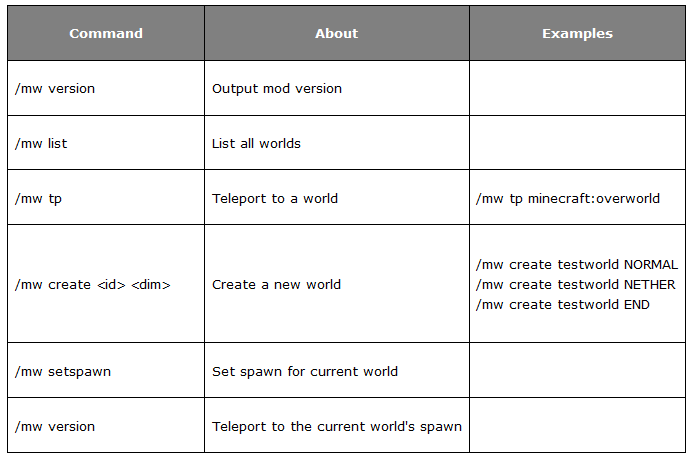
Command Usage:
Command About Examples
/mw version Output mod version
/mw list List all worlds
/mw tp Teleport to a world /mw tp minecraft:overworld
/mw create
Create a new world
<small> (Optional seed & generator)</small>
/mw create testwork NORMAL /mw create testwork NETHER /mw create testwork END
/mw create world NORMAL -g=FLAT -s=1234
/mw setspawn Set spawn for current world
/mw spawn Teleport to world's spawn

Permissions
(Multiworld supports either LuckPerms or CyberPerms)
The permission multiworld.admin or being /op-ed grants access to every command.
- /mw multiworld.cmd
- /mw tp multiworld.tp
- /mw spawn multiworld.spawn
- /mw setspawn multiworld.setspawn
- /mw create multiworld.create
- /mw delete console only
Coming Soon!- Custom Portal support
Note: Multiworld makes use of the Fantasy library by NucleoidMC for creation of runtime worlds.
Installation von Multiworld (Fabric & Forge)
With Millida Launcher
Install Millida Launcher
The launcher is free: download it at millida.net/launcher and sign in with any nickname.
Click “Install” on this page
The launcher opens and installs the mod for Minecraft 1.20.1–1.21.9 on Fabric, Forge, NeoForge or Quilt automatically.
Launch the game
A profile with it appears in the launcher: click “Play”.
Manually
Install Fabric, Forge, NeoForge or Quilt
The loader must match the game version of the mod file, for example Minecraft 1.21.9. After installing it, a separate profile appears in your launcher.
Download the file for your version
In the version list above, pick the file Multiworld-Fabric-bundle.jar (717 KB) for your game version and loader.
Put it in the mods folder
The folder is inside .minecraft (Windows: %appdata%\.minecraft\mods). If it does not exist, create it.
Launch the loader profile
Open “Mods” in the main menu: Multiworld (Fabric & Forge) should be in the list.
Minecraft 1.21.9 runs on Java 21: with a different Java version the game may close right after launch.
Versionen
Mit Abhängigkeiten
| Minecraft | Loader | Datei | Datum | Aktionen |
|---|---|---|---|---|
| 1.21.5 | Fabric, Quilt | 1.10 (Fabric)717 KB | ||
| 1.21.5 | NeoForge | 1.10 (NeoForge 1.21.5)113 KB | ||
| 1.20.1 | Forge | 1.10 (Forge 1.20.1)121 KB | ||
| 1.20.1 | Forge | 1.9 (Forge 1.20.1)103 KB |
FAQ
Which Minecraft versions does Multiworld (Fabric & Forge) work on?
There are files for 1.20.1–1.21.9, 11 versions in total. The newest is 1.21.9.
Is Multiworld (Fabric & Forge) for Forge or Fabric?
There are files for Fabric: 1.20.1–1.21.9, for Forge: 1.20.1, for NeoForge: 1.21.2–1.21.5 and for Quilt: 1.20.1–1.21.9.
Does Multiworld (Fabric & Forge) need other mods?
The author lists no required dependencies: the Fabric, Forge, NeoForge or Quilt loader is enough.
Which Java does Multiworld (Fabric & Forge) need?
Minecraft 1.21.9 runs on Java 21. If the game closes right after launch, the usual cause is the wrong Java version in the profile settings.
Where can I download Multiworld (Fabric & Forge) safely?
On this page: the file Multiworld-Fabric-bundle.jar (717 KB) is stored on Millida’s server, with no link shorteners. SHA-1 checksum: 58d3bec9b9f94c191ced6d6a3c66ad70d6651259.
Bewertungen
Bewerten Sie Multiworld (Fabric & Forge) als Erster


