

Motion Capture Mod für Minecraft 26.2
Ermöglicht es dir, Spielerbewegungen aufzuzeichnen und wiederzugeben
 Fabric
 NeoForge
About
Motion Capture is a mod that allows you to record and replay player movements. It is created mainly for people who want to create complex scenes in Minecraft without using real players.
It records:
- movements
- sprinting, jumping, swimming, sneaking
- swinging hands
- using items
- items in hands and armor
- states like being on fire, being invisible, or glowing
- placing, breaking and interacting with blocks
- nearby entities and riding them
After you save recording, you can create a scene to which you can add multiple recordings or other scenes with parameters like player name, position offset, or start delay.

How to use
- First, you need to start recording using /mocap recording start. It will record all your movements or movements of a player given as an argument.
- Then, you can stop recording using /mocap recording stop and save it with /mocap recording save [name].
- Use /mocap playing start [name] (player_name) (mineskin_url) to play recording.
- You can also create scenes to which you can add multiple recordings or other scenes, with parameters like player name, position offset, or start delay.
- To create scene use /mocap scenes add (scene_name). Then, add your recording using /mocap scenes addTo [scene_name] [recording_name] (delay) (x_offset) (y_offset) (z_offset) (player_name) (skin_source_type) (skin_source) (you can skip arguments in round brackets if you want).
- To play scene use /mocap playing start .[scene_name] - you need to put a dot before the scene name.
- By putting a dot before name, when using /mocap scenes addTo [...], you can also add scenes to other scenes.
Commands
Example
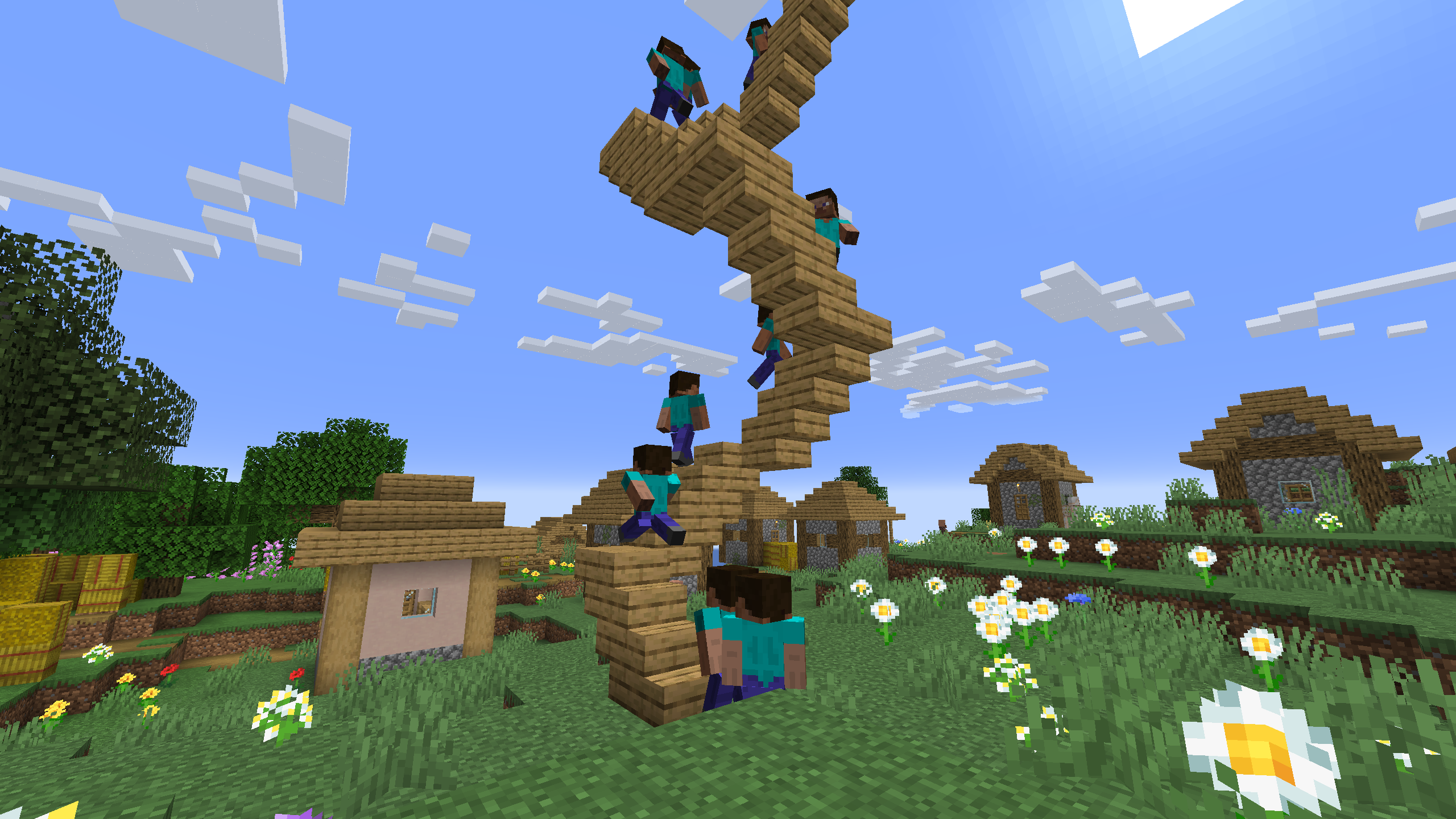
Simple example of one recording used 4 times in a scene with time and position offset

One recording of climbing stairs used multiple times in a scene with start delay
Installation von Motion Capture
With Millida Launcher
Install Millida Launcher
The launcher is free: download it at millida.net/launcher and sign in with any nickname.
Click “Install” on this page
The launcher opens and installs the mod for Minecraft 1.21.5–26.2 on Fabric or NeoForge automatically, together with its dependencies: Fabric API.
Launch the game
A profile with it appears in the launcher: click “Play”.
Manually
Install Fabric or NeoForge
The loader must match the game version of the mod file, for example Minecraft 26.2. After installing it, a separate profile appears in your launcher.
Download the file for your version
In the version list above, pick the file Mocap-FABRIC-26.2-1.3.10.jar (265 KB) for your game version and loader.
Put it in the mods folder
The folder is inside .minecraft (Windows: %appdata%\.minecraft\mods). If it does not exist, create it. Required dependencies go there too: Fabric API.
Launch the loader profile
Open “Mods” in the main menu: Motion Capture should be in the list.
On a server
A server on Fabric or NeoForge
The mod only works on a server with the same loader and game version, for example 26.2.
File goes into the server’s mods folder
Stop the server, put the mod file into the mods folder and start the server again.
Use the “To server” button
On Millida Hosting, the button at the top of the page uploads the file to your server and restarts it for you.
Versionen
Mit Abhängigkeiten
| Minecraft | Loader | Datei | Datum | Aktionen |
|---|---|---|---|---|
| 26.2 | Fabric | 26.2265 KB | ||
| 26.2 | NeoForge | 26.2256 KB | ||
| 26.1.2 | Fabric | 26.1.2264 KB | ||
| 26.1.2 | NeoForge | 26.1.2256 KB | ||
| 1.21.5 | Fabric | 1.21.5561 KB | ||
| 1.21.5 | NeoForge | 1.21.5549 KB | ||
| 1.21.11 | Fabric | 1.21.11562 KB 3 | ||
| 1.21.11 | NeoForge | 1.21.11550 KB |
Was zum Ausführen nötig ist
- Fabric APIerforderlich
FAQ
Which Minecraft versions does Motion Capture work on?
There are files for 26.2, 26.1.2, 26.1.1, 26.1, 1.21.11, 1.21.5. The newest is 26.2.
Is Motion Capture for Forge or Fabric?
There are files for Fabric: 1.21.5–26.2 and for NeoForge: 1.21.5–26.2. There are no files for Forge: a mod for another loader will not start.
What does Motion Capture need to work?
Required: Fabric API. Without it the mod will not start: dependencies go into the same mods folder.
Does Motion Capture work on a server?
Yes. Motion Capture works both in singleplayer and on a server.
Where can I download Motion Capture safely?
On this page: the file Mocap-FABRIC-26.2-1.3.10.jar (265 KB) is stored on Millida’s server, with no link shorteners. SHA-1 checksum: 9e51e42fa3bfa87c83d5626c338863a806ba9193.
Bewertungen
Bewerten Sie Motion Capture als Erster


