
Interaction Wheel Mod für Minecraft 1.20.1, 1.21.1
Rotationsrad im Spiel, um verschiedene Aktionen auszuführen
 NeoForge
 Forge
ForgeÜber die Interaction Wheel-Mod
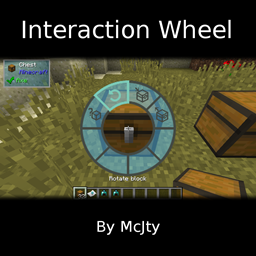
This mod adds an interactive Interaction Wheel that you can access by pressing 'h' (default key). It supports various actions that you can easily access directly from that wheel. Currently supported are:
- Search item in nearby inventories
- Rotate block
- Dump all in inventory
- Fetch all from inventory
- Dump all similar items to inventory
- Automatically select the right tool to harvest the block you are looking at
- And more... (also mod specific interactions)
This wiki contains more information: Interaction Wheel Wiki
There is an API for other mods so that they can add their own wheel actions. RFTools and Immersive Craft do this for example.
You are free to use this mod in any modpack without restrictions
Installation von Interaction Wheel
With Millida Launcher
Install Millida Launcher
The launcher is free: download it at millida.net/launcher and sign in with any nickname.
Click “Install” on this page
The launcher opens and installs the mod for Minecraft 1.10.2–1.21.1 on Forge or NeoForge automatically.
Launch the game
A profile with it appears in the launcher: click “Play”.
Manually
Install Forge or NeoForge
The loader must match the game version of the mod file, for example Minecraft 1.21.1. After installing it, a separate profile appears in your launcher.
Download the file for your version
In the version list above, pick the file interactionwheel-1.20-4.0.0.jar (92 KB) for your game version and loader.
Put it in the mods folder
The folder is inside .minecraft (Windows: %appdata%\.minecraft\mods). If it does not exist, create it.
Launch the loader profile
Open “Mods” in the main menu: Interaction Wheel should be in the list.
Minecraft 1.21.1 runs on Java 21: with a different Java version the game may close right after launch.
Versionen
Mit Abhängigkeiten
| Minecraft | Loader | Datei | Datum | Aktionen |
|---|---|---|---|---|
| 1.21.1 | NeoForge | InteractionWheel - 1.20-4.0.092.2 KB | ||
| 1.20.1 | Forge | InteractionWheel - 1.20-3.0.099.3 KB 1 | ||
| 1.12.1 | — | intwheel-1.12-1.2.7.jar115 KB 1 | ||
| 1.10.2 | — | intwheel-1.1x-1.0.0beta.jar74.5 KB |
FAQ
Which Minecraft versions does Interaction Wheel work on?
There are files for 1.10.2–1.21.1, 8 versions in total. The newest is 1.21.1.
Is Interaction Wheel for Forge or Fabric?
There are files for Forge: 1.20.1 and for NeoForge: 1.21.1. There are no files for Fabric: a mod for another loader will not start.
Does Interaction Wheel need other mods?
The author lists no required dependencies: the Forge or NeoForge loader is enough.
Which Java does Interaction Wheel need?
Minecraft 1.21.1 runs on Java 21. If the game closes right after launch, the usual cause is the wrong Java version in the profile settings.
Where can I download Interaction Wheel safely?
On this page: the file interactionwheel-1.20-4.0.0.jar (92 KB) is stored on Millida’s server, with no link shorteners. SHA-1 checksum: 764c12bf83e07d54eb8995dda907492a7d41e422.
Bewertungen
Bewerten Sie Interaction Wheel als Erster


